Observations:
- With a B550 or B650 motherboard you need to add SSDT-CPUR.aml or SSDT-PLUG-ALT.aml so your CPU is fully recognised in macOS.
- The SSDT-EC-USBX-DESKTOP.aml you are using in your ACPI folder is predominately set for Intel systems.
- There are a few AMD specific SSDT-EC-USBX.aml tables around the internet, which would be a better option for your system.
- The Drivers, Tools and Resources folder contents are fine.
- The Kexts folder contains a few non-essential/sensor kexts, which add nothing to the installation of macOS. The kexts listed below can be deleted from the installer until after macOS has been installed and you have a compatible App installed that will work with these kexts.
- AMDRyzenCPUPowerManagement.kext
- SMCAMDProcessor.kext
- SMCRadeonSensors.kext
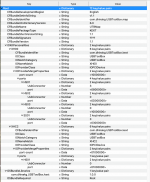
- Your UTBMap.kext is a joke. It should be removed from the EFI and binned. You would be better served using the Kernel > Quirks > XhciPortLimt entry in the config.plist than this overwhelmingly undercooked kext.
- This is a view of the ports being activated in your UTBMap.kext/Contents/Info.plist View attachment 18958 It leaves a lot to be desired in its make up.
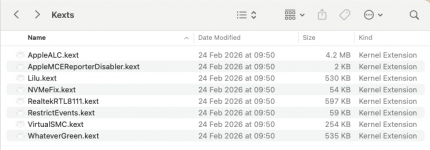
- These are the kexts you need when installing macOS Sequoia.
- View attachment 18959
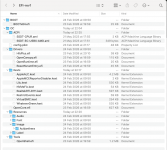
This is how I would configure your EFI folder.
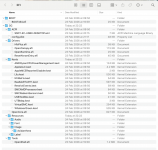
View attachment 18962 compare this to your current EFI folder
View attachment 18961
Not a huge difference but enough to prevent your system booting the macOS installer.
There are a few elements missing from your config.plist
- ACPI Patches for USB fixes on AMD 600-series motherboards.
- MmioWhitelist entries, these will be specific to your motherboard's Bios. without them you don't stand much chance of getting macOS up and running on your system.
- Kernel > Patches > Patch #18 is essential for all AM5 motherboards, it needs to be enabled. You don't have it enabled.
- Misc > Security > SecurebootModel needs to be se to 'Disabled' for an AMD Hack, not 'Default' as stated in the OC Ryzen guide.
- The rest of the config seems to be on a par with the Dortania OC Ryzen guide.
I have attached a revised EFI below, which may get your system booting to the installer. I have added the missing ACPI patches and some 'generic' MmioWhitelist entries, which may or may not work.
All I can say is give this EFI a try. Just rename it to 'EFI' before use.
Also make sure you use the ResetNvram option from the OC boot screen, you may have to press the spacebar to unhide the options. Do this so any old NVRAM entries are removed and only the new ones in the revised EFI are used.
We can look at obtaining custom SSDT's, Patches and MmioWhitelist entries for your system when you have macOs installed or if this EFI doesn't work.



 sign showing is when the USB port used for the macOS installation drive is dropped, once control has been handed to the installation process. Having a UTBMap.kext isn’t the same as having a compatible working USB setup. It is very easy to not include a port or to set a port with the wrong connector type. Both of these can cause the issue you are seeing.