Hackintosh stuck at Blocked sign

blackrcses

New member
AMD OS X Member
Feb 24, 2026
6
0
1
CPU:
AMD Ryzen 7 7700X
This is my first time creating a EFI for hackintosh but Macos gives me a blocked sign, I tried doing what dortainia said in the trouble shooting guide but it didn’t work. I have USBToolBox Mapping but still not working does anyone know how to fix this?

Specs:
Ryzen 7 7700X
Radeon 570
SMbios: MacPro7,1
 
Post a copy of your EFE folder so we can see what you are using.

The commonest reason for the prohibited 🚫 sign showing is when the USB port used for the macOS installation drive is dropped, once control has been handed to the installation process. Having a UTBMap.kext isn’t the same as having a compatible working USB setup. It is very easy to not include a port or to set a port with the wrong connector type. Both of these can cause the issue you are seeing.

Adding the following boot arguments to your configuration.plist might shed some more light on this issue.

-v keepsyms=1 debug=0x100

Have you used the debug version of OpenCore to generate an OC log that contains the Mmio Whitelist entries for your B650 motherboard? See this OC troubleshooting page for details on how to use DevirtualiseMmio and Target quirk to get the information you need.

 
Post a copy of your EFE folder so we can see what you are using.

The commonest reason for the prohibited 🚫 sign showing is when the USB port used for the macOS installation drive is dropped, once control has been handed to the installation process. Having a UTBMap.kext isn’t the same as having a compatible working USB setup. It is very easy to not include a port or to set a port with the wrong connector type. Both of these can cause the issue you are seeing.

Adding the following boot arguments to your configuration.plist might shed some more light on this issue.

-v keepsyms=1 debug=0x100

Have you used the debug version of OpenCore to generate an OC log that contains the Mmio Whitelist entries for your B650 motherboard? See this OC troubleshooting page for details on how to use DevirtualiseMmio and Target quirk to get the information you need.

Here's my EFI and I also included a log that Opencore gave me after boot. Also I'm on the release version of opencore 1.06 should I change to the debug version?
 

Attachments

I will have a look at the EFI folder when I am next at my desk.

The OpenCore log doesn’t show the Mmio devirt entries, so I assume you are not using OpenCore Debug version.
 
Ok thanks! and yes I am on the release ver of opencore
 
I will have a look at the EFI folder when I am next at my desk.

The OpenCore log doesn’t show the Mmio devirt entries, so I assume you are not using OpenCore Debug version.
Hi, It’s been two days do you know the problem with my EFI?
 
Observations:
  1. With a B550 or B650 motherboard you need to add SSDT-CPUR.aml or SSDT-PLUG-ALT.aml so your CPU is fully recognised in macOS.
  2. The SSDT-EC-USBX-DESKTOP.aml you are using in your ACPI folder is predominately set for Intel systems.
    1. There are a few AMD specific SSDT-EC-USBX.aml tables around the internet, which would be a better option for your system.
  3. The Drivers, Tools and Resources folder contents are fine.
  4. The Kexts folder contains a few non-essential/sensor kexts, which add nothing to the installation of macOS. The kexts listed below can be deleted from the installer until after macOS has been installed and you have a compatible App installed that will work with these kexts.
    1. AMDRyzenCPUPowerManagement.kext
    2. SMCAMDProcessor.kext
    3. SMCRadeonSensors.kext
  5. Your UTBMap.kext is a joke. It should be removed from the EFI and binned. You would be better served using the Kernel > Quirks > XhciPortLimt entry in the config.plist than this overwhelmingly undercooked kext.
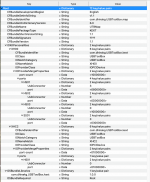
    1. This is a view of the ports being activated in your UTBMap.kext/Contents/Info.plist Screenshot 2026-02-26 at 22.15.35.png It leaves a lot to be desired in its make up.
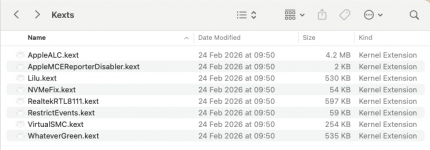
  6. These are the kexts you need when installing macOS Sequoia.
    1. Screenshot 2026-02-26 at 22.18.32.png
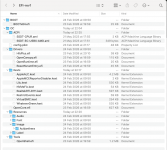
This is how I would configure your EFI folder.

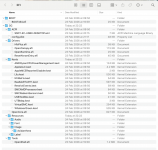
Screenshot 2026-02-26 at 22.25.43.png compare this to your current EFI folder Screenshot 2026-02-26 at 22.23.45.png

Not a huge difference but enough to prevent your system booting the macOS installer.

There are a few elements missing from your config.plist
  1. ACPI Patches for USB fixes on AMD 600-series motherboards.
  2. MmioWhitelist entries, these will be specific to your motherboard's Bios. without them you don't stand much chance of getting macOS up and running on your system.
  3. Kernel > Patches > Patch #18 is essential for all AM5 motherboards, it needs to be enabled. You don't have it enabled.
  4. Misc > Security > SecurebootModel needs to be se to 'Disabled' for an AMD Hack, not 'Default' as stated in the OC Ryzen guide.
  5. The rest of the config seems to be on a par with the Dortania OC Ryzen guide.
I have attached a revised EFI below, which may get your system booting to the installer. I have added the missing ACPI patches and some 'generic' MmioWhitelist entries, which may or may not work.

All I can say is give this EFI a try. Just rename it to 'EFI' before use.

Also make sure you use the ResetNvram option from the OC boot screen, you may have to press the spacebar to unhide the options. Do this so any old NVRAM entries are removed and only the new ones in the revised EFI are used.

We can look at obtaining custom SSDT's, Patches and MmioWhitelist entries for your system when you have macOs installed or if this EFI doesn't work.

 

Attachments

Ok thanks for all your help.
 
Observations:
  1. With a B550 or B650 motherboard you need to add SSDT-CPUR.aml or SSDT-PLUG-ALT.aml so your CPU is fully recognised in macOS.
  2. The SSDT-EC-USBX-DESKTOP.aml you are using in your ACPI folder is predominately set for Intel systems.
    1. There are a few AMD specific SSDT-EC-USBX.aml tables around the internet, which would be a better option for your system.
  3. The Drivers, Tools and Resources folder contents are fine.
  4. The Kexts folder contains a few non-essential/sensor kexts, which add nothing to the installation of macOS. The kexts listed below can be deleted from the installer until after macOS has been installed and you have a compatible App installed that will work with these kexts.
    1. AMDRyzenCPUPowerManagement.kext
    2. SMCAMDProcessor.kext
    3. SMCRadeonSensors.kext
  5. Your UTBMap.kext is a joke. It should be removed from the EFI and binned. You would be better served using the Kernel > Quirks > XhciPortLimt entry in the config.plist than this overwhelmingly undercooked kext.
    1. This is a view of the ports being activated in your UTBMap.kext/Contents/Info.plist View attachment 18958 It leaves a lot to be desired in its make up.
  6. These are the kexts you need when installing macOS Sequoia.
    1. View attachment 18959
This is how I would configure your EFI folder.

View attachment 18962 compare this to your current EFI folder View attachment 18961

Not a huge difference but enough to prevent your system booting the macOS installer.

There are a few elements missing from your config.plist
  1. ACPI Patches for USB fixes on AMD 600-series motherboards.
  2. MmioWhitelist entries, these will be specific to your motherboard's Bios. without them you don't stand much chance of getting macOS up and running on your system.
  3. Kernel > Patches > Patch #18 is essential for all AM5 motherboards, it needs to be enabled. You don't have it enabled.
  4. Misc > Security > SecurebootModel needs to be se to 'Disabled' for an AMD Hack, not 'Default' as stated in the OC Ryzen guide.
  5. The rest of the config seems to be on a par with the Dortania OC Ryzen guide.
I have attached a revised EFI below, which may get your system booting to the installer. I have added the missing ACPI patches and some 'generic' MmioWhitelist entries, which may or may not work.

All I can say is give this EFI a try. Just rename it to 'EFI' before use.

Also make sure you use the ResetNvram option from the OC boot screen, you may have to press the spacebar to unhide the options. Do this so any old NVRAM entries are removed and only the new ones in the revised EFI are used.

We can look at obtaining custom SSDT's, Patches and MmioWhitelist entries for your system when you have macOs installed or if this EFI doesn't work.
Wait but for Dortainia’s guide since I have a B650 MB should I follow any specific instruction for AMD B550 in the guide?
 
Yes.

had to use the B550 guidance with my Asus B650E-F Gaming motherboard. Plus the ACPI Patches and MmioWhitelist entries to get it to work running Sequoia, I am still having issues with my Tahoe installation, such that I keep erasing it and starting over.
 
  AdBlock Detected
Sure, ad-blocking software does a great job at blocking ads, but it also blocks some useful and important features of our website. For the best possible site experience please take a moment to disable your AdBlocker.