

System specs:
Symptom:
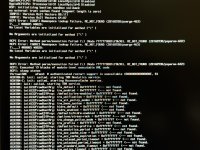
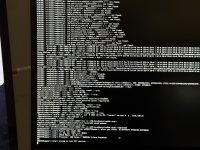
Boots perfectly fine on BIOS 1087. After updating to BIOS 1686, macOS verbose boot always hangs at the exact same line:
AMDCPUSupport::start trying to init PCI service...
System is completely frozen at this point - confirmed via slow-motion video
that no further output is printed after this line (not a scrolling/skip issue,
it's a genuine hang).
What I've already ruled out:
1. BIOS settings - re-verified after the update: Above4G Decoding = Enabled,
Resize BAR = Disabled, TSME/Memory Guard = Disabled. None of these changes
the outcome.
2. npci boot-args - tried both npci=0x2000 and npci=0x3000 with NVRAM reset
between each test. Neither fixes the hang (npci=0x2000 was pre-validated
as safe on 1087 first, then tested on 1686 - no effect either way).
3. OpenCore's own ACPI/SSDT handling - confirmed via opencore-log (Target=67
debug build) that ALL kext injections, ACPI patches (AppleACPIPlatform),
and SMBIOS patches complete successfully with zero errors, right up to
ExitBootServices. So the problem is not in OpenCore's own processing.
4. My custom SSDTs (SSDT-EC, SSDT-USB-Reset, SSDT-USBX, SSDT-PLUG-ALT) were
re-dumped/verified against the 1686 DSDT - every device path they reference
(SBRG, GP17, GP19, GPP7, XHC0/1/2, XH00, etc.) resolves correctly at the
correct hierarchy level in the new DSDT. So it's not a stale-SSDT/renamed-
ACPI-device issue.
What I did find:
Two ACPI errors appear earlier in the verbose log:
ACPI Error: [G02F] Namespace lookup failure, AE_NOT_FOUND (20160930/psargs-463)
ACPI Error: [G002] Namespace lookup failure, AE_NOT_FOUND (20160930/psargs-463)
However, boot continues successfully for a long sequence of steps AFTER these
errors (TRM service init, ACM AccessoryCache, AppleCredentialManager,
AppleKeyStore, CoreAnalyticsHub, RadeonSensor init, correct CPU detection as
"AMD Ryzen 7 9800X3D 8-Core Processor") before finally hanging at
AMDCPUSupport's PCI service init. Given how much succeeds after these ACPI
errors, I don't think G02F/G002 are the actual cause - they look like the
usual harmless AMI-firmware GPIO namespace warnings.
Current working theory:
Everything points to this being inside AMDCPUSupport.kext itself - the SMU/PCI
communication code doesn't like whatever changed under the hood with AGESA
ComboAM5 PI 1.3.0.1b (this is a very recent AGESA branch, released end of
June 2026, mainly for EXPO ULL memory support). This feels like it's past what
BIOS settings or ACPI patching can fix, and more likely needs an
AMDCPUSupport.kext update to handle whatever changed in the SMU/PCI interface
on this AGESA branch.
Questions for the community:
1. Has anyone else hit this specifically on AGESA 1.3.0.1b (June 2026+)?
2. Is there a newer AMDCPUSupport.kext build that's known to handle this AGESA
branch, or is this still unresolved upstream?
3. Any other diagnostic step I should try before giving up and waiting for a
kext update? (Happy to pull full verbose photos/video of any specific
region of the boot log if it'd help someone debug this.)
Since BIOS 1686 cannot be rolled back, I'm stuck on this branch until this is
resolved. Any pointers appreciated.

- Motherboard: ASUS TUF GAMING B850M-PLUS WIFI7
- CPU: AMD Ryzen 7 9800X3D
- BIOS: working fine on 1087, broke after updating to 1686 (AGESA ComboAM5 PI 1.3.0.1b)
- OpenCore, boot-args: -v alcid=11 agdpmod=pikera -lilubetaall -amfipassbeta
Symptom:
Boots perfectly fine on BIOS 1087. After updating to BIOS 1686, macOS verbose boot always hangs at the exact same line:
AMDCPUSupport::start trying to init PCI service...
System is completely frozen at this point - confirmed via slow-motion video
that no further output is printed after this line (not a scrolling/skip issue,
it's a genuine hang).
What I've already ruled out:
1. BIOS settings - re-verified after the update: Above4G Decoding = Enabled,
Resize BAR = Disabled, TSME/Memory Guard = Disabled. None of these changes
the outcome.
2. npci boot-args - tried both npci=0x2000 and npci=0x3000 with NVRAM reset
between each test. Neither fixes the hang (npci=0x2000 was pre-validated
as safe on 1087 first, then tested on 1686 - no effect either way).
3. OpenCore's own ACPI/SSDT handling - confirmed via opencore-log (Target=67
debug build) that ALL kext injections, ACPI patches (AppleACPIPlatform),
and SMBIOS patches complete successfully with zero errors, right up to
ExitBootServices. So the problem is not in OpenCore's own processing.
4. My custom SSDTs (SSDT-EC, SSDT-USB-Reset, SSDT-USBX, SSDT-PLUG-ALT) were
re-dumped/verified against the 1686 DSDT - every device path they reference
(SBRG, GP17, GP19, GPP7, XHC0/1/2, XH00, etc.) resolves correctly at the
correct hierarchy level in the new DSDT. So it's not a stale-SSDT/renamed-
ACPI-device issue.
What I did find:
Two ACPI errors appear earlier in the verbose log:
ACPI Error: [G02F] Namespace lookup failure, AE_NOT_FOUND (20160930/psargs-463)
ACPI Error: [G002] Namespace lookup failure, AE_NOT_FOUND (20160930/psargs-463)
However, boot continues successfully for a long sequence of steps AFTER these
errors (TRM service init, ACM AccessoryCache, AppleCredentialManager,
AppleKeyStore, CoreAnalyticsHub, RadeonSensor init, correct CPU detection as
"AMD Ryzen 7 9800X3D 8-Core Processor") before finally hanging at
AMDCPUSupport's PCI service init. Given how much succeeds after these ACPI
errors, I don't think G02F/G002 are the actual cause - they look like the
usual harmless AMI-firmware GPIO namespace warnings.
Current working theory:
Everything points to this being inside AMDCPUSupport.kext itself - the SMU/PCI
communication code doesn't like whatever changed under the hood with AGESA
ComboAM5 PI 1.3.0.1b (this is a very recent AGESA branch, released end of
June 2026, mainly for EXPO ULL memory support). This feels like it's past what
BIOS settings or ACPI patching can fix, and more likely needs an
AMDCPUSupport.kext update to handle whatever changed in the SMU/PCI interface
on this AGESA branch.
Questions for the community:
1. Has anyone else hit this specifically on AGESA 1.3.0.1b (June 2026+)?
2. Is there a newer AMDCPUSupport.kext build that's known to handle this AGESA
branch, or is this still unresolved upstream?
3. Any other diagnostic step I should try before giving up and waiting for a
kext update? (Happy to pull full verbose photos/video of any specific
region of the boot log if it'd help someone debug this.)
Since BIOS 1686 cannot be rolled back, I'm stuck on this branch until this is
resolved. Any pointers appreciated.
