For my learning purposes, can you tell me where I can find information on MinKernel MaxKernel in OpenCore? I can't find it in their documentation and in the Dortania manuals. I'm not sure if my values are correct for Sonoma. And can you guide me to the GitHub page you're referring to?
Hi all!
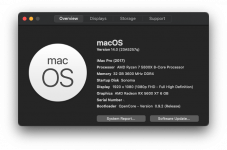
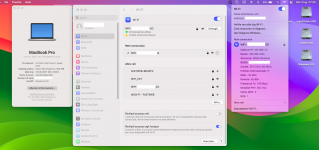
I’ve successfully upgraded from Ventura, but I have issue with WiFi. I have original Apple BCM943602CDP BT/WiFi card, but only BT is working. What should I do to fix WiFi?
In that case, I think I already have the correct values (based on @CaseySJ 's EFI and credits to him). It does work; I've installed Sonoma on a separate SSD with success (without WiFi (fenvi), but I think that is being worked on with the itlwm solution).
Hello everyone, could someone take a look at the config I can't install Sonoma.
I copied the patches again. Lilubetaall is entered and the Max Kernel on 23.0.0 could one of you professionals take a look and give me a tip on what's missing or what I've done wrong
You have a couple of issues in your setup as I see things.
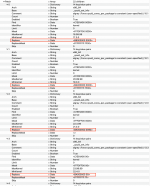
Most important is the failure to add the CPU core Replace entries for your CPU. You don't have any entry for your 16-core CPU in the replace fields in the first four kernel patches.
No details for the CPU core count!
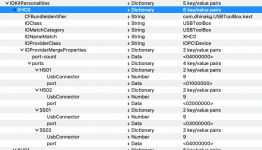
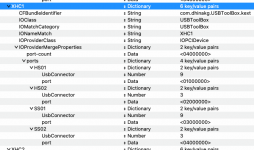
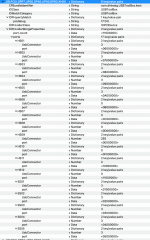
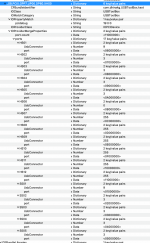
Your UTBMap is attempting to activate 17 x USB ports under two different USB controllers. This is wrong.
There is a maximum of 15 ports per controller, which you are exceeding with the _SB.PCI0.GPP7.UP00.DP40.UP00.DP60.XH00 and _SB.PCI0.GPP7.UP00.DP60.XH00 USB controllers.
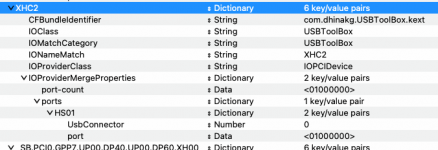
The XHC0, XHC1 and XHC2 USB controllers are fine, as they only look to activate a maximum of 4 ports at most.
Does your motherboard support 43 USB ports?
As that is what you are showing and looking to activate in your UTBMap.kext/Contents/Info.plist.
XHC0 USB controller - 4 x USB ports
XHC1 USB controller - 4 x USB ports
XHC2 USB controller - 1 x USB ports
_SB.PCI0.GPP7.UP00.DP40.UP00.DP60.XH00 controller - 17 x USB ports
_SB.PCI0.GPP7.UP00.DP60.XH00 controller - 17 x USB ports
@Edhawk
thank you very much for your help that worked enter the core count...I must have overlooked entering it again during all the tests...I didn't know about the USB....I will create a new USBmap.kext and then put it here again upload.
Thanks very much
All my SATA ports are full so I attempted to install to an USB SSD. Could not get it to finish the install so I moved the USB SSD from one controller to the other controller and was able to get this far.
Of course my broadcomm is not working.
Next is OC update and and Beta 2.
Your motherboard supports the following USB ports and headers.
CPU:
1 x USB Type-C® port on the back panel, with USB 3.2 Gen 2 support - 2 or 4 x ports (1 or 2 x Physical Type-C & 1 or 2 x Virtual USB2)
depending on this device being Type-C+switch or Type-C without switch connector
2 x USB 3.2 Gen 2 Type-A ports (red) on the back panel - 4 x ports (2 x Physical USB3 & 2 x Virtual USB2)
CPU + USB 2.0 Hub:
2 x USB 2.0/1.1 ports on the back panel - 2 x ports (the only USB2 physical ports on the motherboard)
Chipset:
2 x USB Type-C® ports, with USB 3.2 Gen 2x2 support (1 port on the back panel, 1 port available through the internal USB header) - 4 or 8 x ports (2 or 4 x Physical Type-C & 2 or 4 x Virtual USB2)
depending on these being Type-C+switch or Type-C without switch connectors
2 x USB 3.2 Gen 2 Type-A ports (red) on the back panel - 4 x ports (2 x Physical USB3 & 2 x Virtual USB2)
4 x USB 3.2 Gen 1 ports available through the internal USB headers - 8 x ports (4 x Physical USB3 & 4 x Virtual USB2)
4 x USB 2.0/1.1 ports available through the internal USB headers - 8 x ports (4 x Physical USB3 & 4 x Virtual USB2)
Chipset+USB 3.2 Gen 1 Hub:
4 x USB 3.2 Gen 1 ports on the back panel - 8 x ports (4 x Physical USB3 & 4 x Virtual USB2)
This means your motherboard supports at least 40 x USB ports, possibly up to 46 x ports.
The higher number of ports would depend on the connector type required for the 2 x Type-C physical ports and 1 x Type-C header, i.e. whether they were Type-c+sw (9) or Type-c without switch (10). As the Type-c without switch connector(s) would have 2 x Type-C and 2 x virtual USB2 ports for each physical port/header.
To discover the correct connector type for each Type-C port/header you need to do the following:
Plug in a Type-C device to a type-c port and a specific port will be highlighted.
Eject the Type-C device, flip it 180° and reinsert the device in the same port.
If the same port is highlighted then the connector is Type-c+switch (9)
If a different port is highlighted then the connector is Type-c without switch (10).
Any virtual USB2 ports served by the Type-C port or header would need to match the physical attribute of the port or header when a Type-C device is used.
You may not activate or use the virtual USB2 ports on the Type-C ports/header, in which case you can ignore them and leave them out of your USB configuration.
Your PC case may not have a front Type-C port, in which case the Type-C header would not be used and can be ignored.
You need to remember the following when undertaking the USB port discovery,
Only Type-A USB2 physical ports (black tang) should be set with connector type USB2 (0).
Any Type-A USB3 physical port (red or Blue tang) should be set with connector type USB3 (3), no matter which Gen.
Any USB2 virtual port served from a Physical USB3 port should be set with the connector type USB3 (3) to match the physical port characteristics.
Any USB3 or USB2 ports served from a USB3 motherboard header should be set with connector type USB3 (3).
Any port or device served from a USB2 motherboard header should be set with connector type 'Internal' (255), never as USB2 (0).
Type-C ports and headers have been explained above.
This site uses cookies to help personalise content, tailor your experience and to keep you logged in if you register.
By continuing to use this site, you are consenting to our use of cookies.
Sure, ad-blocking software does a great job at blocking ads, but it also blocks some useful and important features of our website. For the best possible site experience please take a moment to disable your AdBlocker.