Can I ask if you ever had problems with IOREG like freezing or slowing down?
for me on Ventura I have to wait a lot of minute before I can see it and it's always slow, to take a save I spend like 5 minutes xD and my ioreg is very large, like 150MB
Can I ask if you ever had problems with IOREG like freezing or slowing down?
for me on Ventura I have to wait a lot of minute before I can see it and it's always slow, to take a save I spend like 5 minutes xD and my ioreg is very large, like 150MB
I ran some Thunderbolt hot-plug experiments yesterday, but all of them failed. This does not mean we should give up...if at first you don't succeed, try try again. Here are some notes from those experiments:
I started by injecting some device properties that we believe are necessary for hot plug to work:
Root Port TBTC needs property PCIThunderbolt
Downstream Bridge at Address Zero TBDP needs property PCIHotplugCapable
Native Host Interface TBDC needs property linkDetails for enabling full speed (40 Gbps)
I haven't looked at GPE hot plug events yet
With above properties I saw a glimmer of hope, but only a glimmer:
I booted the system with my Belkin Thunderbolt 3 Dock connected
Dock appears in IOReg and works fine
Hot-unplugged the dock -> all IOReg devices turn red as expected
Hot-plugged the dock -> IOThunderboltPort under TBDC flashed green -> this means a GPE event was triggered when dock was plugged in, and the event was seen by macOS
But the dock did not reconnect
There are some unfortunate side effects from adding the above 3 properties:
On reboot, the monitor cannot re-sync to the video signal; I just have to power off and power on the monitor
Worse, however, is that BIOS seems to get reset on reboot
Sleep will work when Thunderbolt device is connected, but wake will not work
Have you checked in your debug log if it is fine?
try to disable not mandatory kext to boot and check the original post for my updated EFI
Also check your USB port mapping
with latest patch discovered by Casey all OS works perfectly and rock solid
if you have problems it could be also related to DDR5 and I would suggest to use AMD specific for them
// MMIO
I actually have similar concerns with MMIO — I've used the EFI provided by @CaseySJfrom here as my starting point (I have Asus X670E Extreme) and modified last entry as I was getting different address on my motherboard. I also left only the second entry enabled and I was able to boot.
But, how do I know those MMIO entries are correct? I can see the MMIO in the logs, but AFAIK this is just telling me what's enabled/disabled. Is there anything else I can look at to verify MMIO is correctly set?
Fun fact: with second ssd installed in the GEN-Z.2 slot (the new fancy easy access slot next to RAM slots) I was not able to boot at all. I had to remove it.
I am attaching my current EFI with logs just in case.
Fun fact: with second ssd installed in the GEN-Z.2 slot (the new fancy easy access slot next to RAM slots) I was not able to boot at all. I had to remove it.
here is (probably) a MMIO problem)
try to see the same the log you have
your MMIO above are good
if you see on the second one 0 system does not boot
Every time you change your hardware configuration (about PCIE slot or NVME disks) you have to check if MMIO are good (the schema 0,1,0,0,0 is safer on this platform)
...
Fun fact: with second ssd installed in the GEN-Z.2 slot (the new fancy easy access slot next to RAM slots) I was not able to boot at all. I had to remove it.
here is (probably a MMIO problem)
try to see the same the log you have
your MMIO above are good
if you see on the second one 0 system does not boot
Every time you change your hardware configuration (about PCIE slot or NVME disks) you have to check if MMIO are good (the schema 0,1,0,0,0 is safer on this platform)
I've noticed that the MMIO in the logs always looks like I've specified it in my config.plist. So this MMIO in the logs is just telling us what are the addresses — not what the correct setting should be — is that correct?
My question is how do I know this is correct or does it just work by accident? In the open core docs it says to randomly disabling/enabling them and checking if system boots up? With 5 record we have quite a lot of possibilities to check
Can I for example add just a single MMIO and try to boot with just a single MMIO set? Once I know what the value for the first one should be check I can add the second to check for enabled/disabled..and so on and on until I have all 5.
I am still experiencing some instability issues and I am looking for potencial EFI errors.
That's very interesting. I was unable to find the correct MMIO values to boot with the GEN-Z.2 slot installed.
How did you come up with your MMIO list? Is there any log-driven method for it or do I have to check every single combination available? 5 x MMIO entires with 2 possible value for each give us quite a lot of possible combinations
I've noticed that the MMIO in the logs always looks like I've specified it in my config.plist. So this MMIO in the logs is just telling us what are the addresses — not what the correct setting should be — is that correct?
the correct settings are due to the experience you get on the platform in this case AM5
The first people who had these systems did the testing for us and found the correct pattern to start
on AM5 as I wrote to you having SKIP 1 on the second MMIO area is currently the best solution
You can also activate the first, the second, the third and the fourth and your system would still start
Since I have this platform I have experienced that the best combination is the one you have in your debug (numbers can change from manufacturer to manufacturer and from bios to bios as well as from installed hardware)
But 0,1,0,0,0 schema for MMIO works for everyone correctly
@pbs888 maybe you are using in a wrong way all patches sets did by Casey for Aquantia ethernet
And also you do not use new patch useful in Ventura OS if you have wifi and TB enabled in your bios
@pbs888 maybe you are using in a wrong way all patches sets did by Casey for Aquantia ethernet
And also you do not use new patch useful in Ventura OS if you have wifi and TB enabled in your bios
I am actully running Monterey — I've tried Ventura but I preffer more stable Monterey (if it is actually more stable)
My BIOS settings are:
onboard USB controller enabled
onboard WIFI/BT disabled
onboard Intel i255-V 2.5Gbe enabled
onboard Aquantia AWC113CS 10Gbe enabled
onboard USB4/Thunderbolt enabled
I've added all patches (except the Thunderbolt one as I have not tried it yet) and everything works as expected.
My first though was that there must be an issue with MMIO entires, but if those are fined maybe I've messup something in the USB configuration?
I've done my USB Mapping with Hackintool with the onboard USB4/Thunderbolt enabled and I made sure to change Fenvi to 255 and I've delited the ports I was not planning on using. I kept all USB C but only kept 3 of the USB2/3.
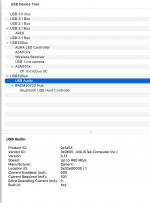
Please see image below. Do I have too many USB controllers?
Hey guys, sorry if this is a bit unrelated to the current discussion, but about a week ago there was a brief discussion on this thread about USB DVD/CD-players not working. I stumbled across this article and thought that it might clear up a little of the confusion that arose here.
Cheers!
The latest version of macOS Ventura breaks compatibility with Pioneer's lineup of USB-connected CD/DVD/Blu-ray drives for the Mac. Apple released macOS 13.2 in late January with support for a new Security Keys for Apple ID feature and various bug fixes.
Hey guys, sorry if this is a bit unrelated to the current discussion, but about a week ago there was a brief discussion on this thread about USB DVD/CD-players not working. I stumbled across this article and thought that it might clear up a little of the confusion that arose here.
Cheers!
The latest version of macOS Ventura breaks compatibility with Pioneer's lineup of USB-connected CD/DVD/Blu-ray drives for the Mac. Apple released macOS 13.2 in late January with support for a new Security Keys for Apple ID feature and various bug fixes.
I saw this a few moments ago. It even affects Pioneer USB CD/DVD drives. There’s also a problem with SMB file sharing.
Both of these problems are in Ventura. I haven’t personally encountered them, but I would expect Apple to fix them in a 13.2.1 or similar minor update.
It is Realtek ALC4082. I was unable to map it - it just would not show up at all in the Hackintool USB section. Did you have to do anything specific for the USB to show up?
I can also see you have AURA LED here - does it mean you can control RGB? I have a Fractal Torrent Compact with RGB but I never though RGB will work via MacOS How did you get it to work?
I can also see you have AURA LED here - does it mean you can control RGB? I have a Fractal Torrent Compact with RGB but I never though RGB will work via MacOS How did you get it to work?
** Automating Liquidctl at Start Up ** Purpose: To install a script that will run automatically at startup to configure Aura LED color channels. Procedure: There are two parts to the procedure: Creating a script to configure color channels Creating and registering a LaunchAgent Part 1...
Aura LED controller via liquidctl: % liquidctl list Device #0: AsusTek Aura LED Controller (experimental) % liquidctl status AsusTek Aura LED Controller (experimental) ├── ARGB channels: 2 └── RGB channels: 1 # set all channels to green % liquidctl -m Aura set sync color static...
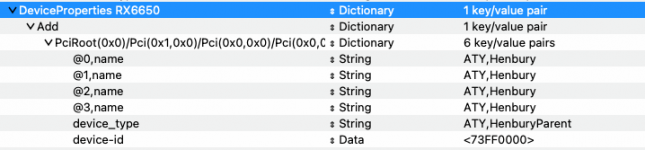
Are you using the RX 6600 XT device-id for your RX 6650 XT, with this being injected via the DeviceProperties section of your config.plist. As you aren't using an SSDT for the dGPU.
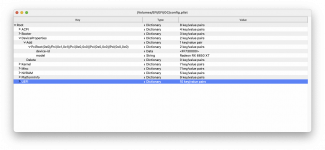
Your DeviceProperties for the RX 6650 XT should look something like this.
I added -radcodec to my boot args, it did not make a difference, unfortunately
here's my GFX util output, if you could help me make an SSDT, I would be most grateful.
its not the end of the world that GFX Bench Metal does't work
Heaven, Geekbench 5, Blender and SotTR benchmark all work and I know Hardware Acceleration (Metal) is working. but if we could fix this, it would be great.
if you need my GFX0 IORegExplore screenshot, I would be happy to provide it.
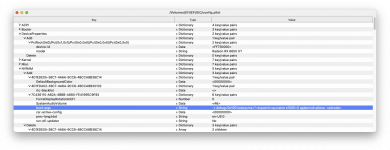
Just add the other five DeviceProperties, as shown in the screenshot below. You might not need an SSDT if the framebuffer patches work with your AMD system.
I don't think you need the -radcodec boot argument either, but that is another matter.
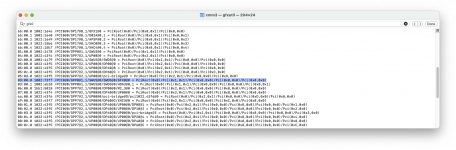
The device path for your discrete GPU is (_SB.PCI0.GPP0.SWUS.SWDS.GFX0) according to the gfxutil screenshot.
Just add the other five DeviceProperties, as shown in the screenshot below. You might not need an SSDT if the framebuffer patches work with your AMD system.
Why the device_type property? That doesn't do anything, and you also need only @0 name, and the other 3 will take it from the first one. Your device-id is wrong, it's 32 bit little endian, so the correct value for spoofing to 6600XT is FF730000.
-radcodec is needed on any spoofed GPU (along with WEG) to fix hardware decoding/encoding support and DRM.
WhateverGreen automatically renames the GPU to GFX0, the actual name is usually VGA_ on Navi.
its not the end of the world that GFX Bench Metal does't work
Heaven, Geekbench 5, Blender and SotTR benchmark all work and I know Hardware Acceleration (Metal) is working. but if we could fix this, it would be great.
if you need my GFX0 IORegExplore screenshot, I would be happy to provide it.
You only need an SSDT if you need to define PCI Bridges, in your case devprops are enough. You should have: device-id | Data | FF730000 model | String | AMD Radeon RX 6650 XT @0,name | String | ATY,Henbury
This site uses cookies to help personalise content, tailor your experience and to keep you logged in if you register.
By continuing to use this site, you are consenting to our use of cookies.
Sure, ad-blocking software does a great job at blocking ads, but it also blocks some useful and important features of our website. For the best possible site experience please take a moment to disable your AdBlocker.



 I can see the MMIO in the logs, but AFAIK this is just telling me what's enabled/disabled. Is there anything else I can look at to verify MMIO is correctly set?