Trying (without success) to rebuilt my hack

philby2530

New member
AMD OS X Member
Nov 30, 2024
10
1
3
CPU:
Ryzen 9 3900X
Hi there,
First of all, Hi to all here.
4 years ago, I was able to make my computer (MSI X570, 64 Gb, Ryzen 9 3000X, Sapphire RX 5700 XT) to run fine on Catalina following the Dortania guide.
And for three day I am trying to make this damned computer to even boot on Catalina. No matter what I do, MacOs screen is not popping up.

I was able 3 days ago to refresh an Old Haswell (I7 4770K), hd4600 to run on Sequoia (With both OpenCore and OCLP) and I wanted to reiterate with my main computer.
Hopefully, I am retired (from IT) and I've got plenty of time.
Let's get on it.
 
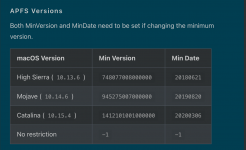
Check you have the correct entries for booting Catalina for the UEFI > APFS > MinDate & MinVersion in your config.plist.

Ryzen and Threadripper(17h and 19h)  OpenCore Install Guide.png MinDate & MinVersion entries for older APFS use.
 
Thanks @Edhawk! Finally Catalina is booting. I was kind of expecting that with a booting EFI, I would be able to install a higher version of Mac OS. With BigSur, I was able to get the install screen but the machine rebooted when trying to format the disk. The system reboot with any higher version of OSX (OS is loading and after a few seconds and hundreds of verbose lines, the system just reboot Not a KP.). I will rebuilt my EFI with the 1,03 version of OC and use the Debug version in order to be able to get more infos on where the system is crashing.
 
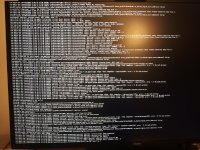
If the system reboots rather than completing the Verbose text, and then showing the second stage Apple Logo, then it is most likely caused by a kernel panic. As you don't have keepsyms=1 and debug=0x100 boot arguments in your config.plist the kernel panic is causing an instant reboot.

Add these two boot arguments and see what is shown in the verbose text. Take a photo and post it here.
 
Thanks again for your reply. Did the changes in the config.plist. The last screen of lines displayed doesn't shown any KP (or at least I can't find one!).
I am going to leave for a week, starting tomorrow so I am not gonna be to test any further your advices during that time.
I'll follow up on Saturday the 14th of December.
Many thanks for your help so far.
 

Attachments

  • 1733347154981.jpg
    1733347154981.jpg
    6.3 MB · Views: 11
Which AMD 9 3000 series CPU are you using, as AMD don't sell a CPU named Ryzen 9 3000X?

They have a Ryzen 9 3900, 9 3900X, 9 3900XT and a 9 3950X. Which are you using with your X570 system?

Post a copy of your WHOLE EFI folder and I will have a look at it while you are away.
 
1st) My processor is an AMD Ryzen 9 3900X
2nd) Find hereunder my EFI

Good evening. I'm back from vacation. I tried today to reconfigure from scratch my EFI. And I went a little bit further.

Where am i right now:
The Cataline partition is still working with the same EFI.
I was obliged to disabled the \Misc\Security\SecureBootModel is order to be able complete th installation.
I did manage to install Sonoma first. But the system was hanging during the system setup after the complete installation was done.
Then I decided to test Sequoia. Installation was successful but the system is failing after an mount of time (under 2 minutes) while trying to finalize the setup. The screen is flashing and the a message saying that the system setup has quit unexpectedly. clicking continue is rebooting.

Latest edit:
I switched back the \Misc\Security\SecureBootModel to Default. System is not hanging any more but I cannot create the local account (I declined connecting my Apple ID). After 2 or 3 minutes, I have an error message saying that This user cannot be created please try again.
 

Attachments

Last edited:
Maybe I should move my thread to the Sequoia instllation one?
 
  1. XhciPortlimit Quirk is enabled, when you have UTBMap.kext present in your OC setup. You don't need the Quirk enabled if you have a working custom USB configuration.
  2. You have Booter > Quirks > EnableWriteProtector = Enabled/True, it should be set as Disabled/False for your Ryzen system.
  3. You have alcid=1 in the boot arguments and DeviceProperties entry for the default Intel Audio layout-id. Delete the DeviceProperties, as the boot argument will take precedence.
  4. You have added RestrictEvents.kext to your setup. but have not used any Nvram or Boot arguments for your MacPro7,1 setup. I have added a few to the NVRAM > Add & > Delete sections of the config below for your CPU and to help with Memory and PCI errors.
I have cleaned up the config.plist attached below and included the changes listed above.

See if this helps, when you use it in place of your current config.
 

Attachments

Many thanks for your reply. I used the updated config plist. The system is freezing a few seconds later than the login. It does not reboot. Just stay frozen. Is there a log file in Sequoia that I can check? Thanks again.
 
Thanks a lot for your help. Working on it for more than an hour. Keep my fingers crossed.

Edit:
Until I tried to Shut it down. The background image stayed on. The system is not shutting off :-(
 

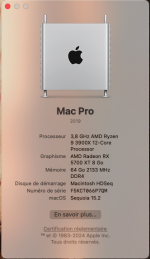
Attachments

  • Capture d’écran 2024-12-18 à 02.19.56.png
    Capture d’écran 2024-12-18 à 02.19.56.png
    128.4 KB · Views: 9
Last edited:
  AdBlock Detected
Sure, ad-blocking software does a great job at blocking ads, but it also blocks some useful and important features of our website. For the best possible site experience please take a moment to disable your AdBlocker.