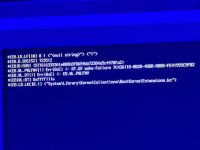
Stuck on the prohibited sign

Ryu

Member
AMD OS X Member
Feb 24, 2024
32
5
8
Foshan, Guangdong, China
CPU:
R5 7500f
This is my first time of trying to install macos. It will be stuck on the prohibited sign and apple.com/starup/mac When I use the efi to install. Can you check my config.plist and tell me what to do.
This is my pc configuration.
CPU: Razen R5 7500F
Motherboard: Asus ROG B650E-F
GPU: Sapphire 57000XT Nitro OC
SSD: intel optane 900p 280g (system disk)
samsung pm9a1 1t *2
wifi and bluetooth: intel ax210
 
There are a number of SSDT's and your DSDT listed as not being found. Probably related to the AM5 Fix table you are using in EFI-2.

Screenshot 2024-05-02 at 17.00.43.png contents of ACPI folder from EFI-2

Screenshot 2024-05-02 at 17.02.16.png contents of ACPI folder from EFI folder, AM5-BIOS-Fix.aml table not present.

So in all likelihood the AM5-Bios-Fix table is causing some ACPI errors, with the SSDT's and your system DSDT.aml tables.
 
There are a number of SSDT's and your DSDT listed as not being found. Probably related to the AM5 Fix table you are using in EFI-2.

View attachment 14039 contents of ACPI folder from EFI-2

View attachment 14040 contents of ACPI folder from EFI folder, AM5-BIOS-Fix.aml table not present.

So in all likelihood the AM5-Bios-Fix table is causing some ACPI errors, with the SSDT's and your system DSDT.aml
The first picture is when I didn’t add the am5-bios-fix.aml, the video file is the result when I added the am5-bios-fix.aml. So I think it may not be related to the am5-bios-fix.aml.
 
So what happened after the screen went black in the video? System Reboot?

How long did you leave the black screen, if the system didn't automatically reboot?
 
Try waiting longer, say 1 hour minimum.
It may be doing things in the background.
Do you see any HDD light activity or hear any noise like the fan speeding up during this black screen period?
The system may reboot automatically if you leave it long enough, and move to the next phase of the installation process.
 
Try waiting longer, say 1 hour minimum.
It may be doing things in the background.
Do you see any HDD light activity or hear any noise like the fan speeding up during this black screen period?
The system may reboot automatically if you leave it long enough, and move to the next phase of the installation process.
The HDD light and the fan speeding up haven’t changed during this black screen period. I will try again and give it more time. Thank you.
 
  • Like
Reactions: Edhawk
Try waiting longer, say 1 hour minimum.
It may be doing things in the background.
Do you see any HDD light activity or hear any noise like the fan speeding up during this black screen period?
The system may reboot automatically if you leave it long enough, and move to the next phase of the installation process.
Today I have tried again to boot and waited for it for 1 hour when it went black screen. Nothing happened, no automactally reboot or fan speeding up. It looks like a difficult problem.
 
Ok, I need to think about this some more.
 
Tell us which AMD CPU, motherboard and GPU you are using.

Which drive you are installing macOS on to.

How have you created your macOS installation drive?

Post a copy of your OpenCore EFI folder so we can see what you are using, as currently we have no way of helping you with the information you have provided.
 
AMD Ryzen 9970x-3D, Asus Rog Strix X870-A, AMD Radeon RX 6800 XT, Im Installing it on a Samsung 500gb SSD, I have used Open Core Simplify.
 

Attachments

Well there is your first issue, you used OpenCore Simplify to create an EFI for an AMD system. That is probably the worst way to create an EFI for an AM5 system, as it doesn't understand or take in to account the requirements for a modern AMD Hack.

Which Samsung 500GB SSD? NVME or SATA drive, make and model of the drive?

Is there anything currently on the Samsung drive, such as Windows or linux?

Your config.plist doesn't validate with no errors when tested against ocvalidate for OC 1.0.7 or 1.0.8. The screenshot below shows the errors present in your config.plist from the OC 1.0.7 ocvalidate script.
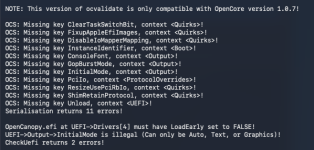
Screenshot 2026-10-24 at 17.30.45.png

These are the errors when your config.plist is tested against OC 1.0.8.

Screenshot 2026-10-24 at 17.31.41.png

The NVRAM section in your config.plist is a bit of a mess. You seem to have combined two of the Add sections, so the 'DefaultBackgroundColour' entry is in with the 'etc-blacklist' and RestrictEvents entries. Same goes for the Delete section. This isn't how any OpenCore config.plist is created.

Screenshot 2026-10-24 at 17.34.43.png Your current NVRAM > Add & Delete sections.
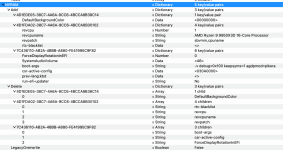
Screenshot 2026-10-24 at 17.37.55.png The correct order for the NVRAM > Add & Delete sections.

I have edited your config.plist to take the issues listed above in to account.

Your UTBMap.kext is a mess, it doesn't conform to the expected USB port configuration for a motherboard with 5 x USB controllers and the following USB ports available.
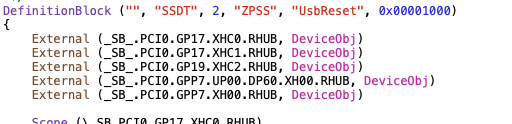
Screenshot 2026-10-24 at 17.41.12.png USB controllers listed in your SSDT-USB-Reset.aml table.

USB ports available from your Asus ROG STRIX X870-A Gaming motherboard:

Rear USB (Total 12 physical ports (plus 12 x Virtual USB ports))
2 x USB4® (40Gbps) ports(2 x USB Type-C® with DP Alt mode)
6 x USB 10Gbps ports (5 x Type-A + 1 x USB Type-C
4 x USB 5Gbps ports (4 x Type-A)

Front USB (Total 9 ports from motherboard headers)
1 x USB 20Gbps connector/Header (supports USB Type-C®)
2 x USB 5Gbps headers support 4 additional USB 5Gbps ports
2 x USB 2.0 headers support 4 additional USB 2.0 ports

You do not have any USB2.0 physical ports on the rear I/O plate, so you shouldn't have any ports set with connector type USB2 (0) in your UTBMap.kext. Any USB2 virtual ports, i.e. USB2 ports served from a USB3 or Type-C port should be set to match the physical port, USB3 (3) or Type-c (9) or (10). They should never be set as USB2 physical ports (0)..

You have 4 x USB2 Internal header ports, plus the ASUS LED and builtin Bluetooth connector (maximum of 6 x ports) that should be set with connector type 'Internal' (255). That is if all of the internal USB 2 ports are active and in use in macOS.

I would recommend that you generate a new UTBMap.kext in Windows using the USBToolBox Tool. Use the following to decide how each port should be configured.
  • USB2 (0) - Physical USB2 ports on rear I/O plate, these ports always have a Black coloured tang.
  • USB3 (3) - Physical USB3 ports on rear I/O plate, these ports can have a Red, Blue, Yellow or Cyan coloured tang.
    • Virtual USB2 ports - served from physical USB3 ports should be set the same as the physical port
  • USB3 (3) - Motherboard Header, usually serving the case front USB3 ports.
    • Virtual USB2 ports - served from physical USB3 ports should be set the same as the physical port
  • Internal (255) - Motherboard USB2 header, this will be any device served from a USB2 header port, such as Bluetooth module, case front USB2 ports, case front card reader etc.
  • Internal (255) - Built-in M.2 WiFi/BT connector, motherboard LEDs and CPU Cooler USB connection.
  • Type-c+sw (9) - will only show two ports being available, 1 x Physical Type-C and 1 x virtual USB2 port.
  • Type-c (10) - will show 4 x ports being available. This occurs when the Type-C device initially inserted, then removed, the device is flipped 180° and reinserted in the same port, 2 x Type-C and 2 x virtual USB2 ports.
The 2 x USB4 ports may not work, if you have included them in the configuration. You would be advised to look through the Bios menu and disable these USB4 ports while installing macOS. They can be re-enabled once macOS is up and running.

The Prohibition sign may be a result of your messed up USB configuration. As it is not uncommon for a misconfigured USB port to be dropped when control is handed from OpenCore to the macOS Installer.

 

Attachments

  1. What model Toshiba NVME?
  2. What if anything is currently on the drive?
  3. Do you plan to use the drive for Windows and macOS or will it be erased and just have macOS installed?
 
Toshiba KXG60ZNV512G, i have windows on 1 drive, the samsung ssd 910pro 2tb, i am trying to dual boot like i had a few months ago
 
Your motherboard's builtin Audio is also served by an Internal USB port. So that would need to be included when configuring the USB kext.
 
ok, this popped up on the screen after u revamped the EFI
 

Attachments

  • IMG_0033.jpeg
    IMG_0033.jpeg
    727 KB · Views: 0
✖
  AdBlock Detected
Sure, ad-blocking software does a great job at blocking ads, but it also blocks some useful and important features of our website. For the best possible site experience please take a moment to disable your AdBlocker.