
Ryzen 7000 Testing
- Thread starter PoMpIs
- Start date
You are using an out of date browser. It may not display this or other websites correctly.
You should upgrade or use an alternative browser.
You should upgrade or use an alternative browser.
Sure...could you try before how OSX sees TSC stuff?
sysctl -a | grep tsc
Code:
kern.hv.clock.tsc_base: 234576230310
kern.hv.clock.tsc_clock_last: 0
net.pktsched.verbose: 0
machdep.cpu.tsc_ccc.denominator: 0
machdep.cpu.tsc_ccc.numerator: 0
machdep.tsc.nanotime.generation: 2
machdep.tsc.nanotime.ns_base: 0
machdep.tsc.nanotime.scale: 954440591
machdep.tsc.nanotime.shift: 0
machdep.tsc.nanotime.tsc_base: 193588815195
machdep.tsc.at_boot: 0
machdep.tsc.deep_idle_rebase: 1
machdep.tsc.frequency: 4499983900
machdep.tsc.rebase_abs_time: 43019890535
Have a long day at the office today, so computer will be turned off in 5 minutes. Can resume tomorrow. Alas, it's a manic Monday. 

How does Aourus Master work you? I have one in the garage@ ExtremeXT, can you fill the signature, for us to know your config please ?
 because it did not work well on macos .. any restarts, sleep problem .....
Really !? Everything works for me, i don't need continiuty and airdrop. My only issue is with the firewire 800, and i am on the way to solve it.How does Aourus Master work you? I have one in the garage
My ACPI come from Audiogod and i have the TB3 aml too.
I have forgotten to update my signature.

Have you tried totally disabling PBO in bios for the audio issues?
I already did that, perfect audio is not achieved.
I tried with the BCLK at 100 to 100.1 and so on up to 105Mhz... no more changes in the bios solved the problem 100%
Done! Nothing too out of the ordinary but gets every job done!@ ExtremeXT, can you fill the signature, for us to know your config please ?
You're not supposed to change it, you're supposed to find the value and set it as FSBFrequency in OpenCore.I already did that, perfect audio is not achieved.
I tried with the BCLK at 100 to 100.1 and so on up to 105Mhz... no more changes in the bios solved the problem 100%
Done! Nothing too out of the ordinary but gets every job done!
You're not supposed to change it, you're supposed to find the value and set it as FSBFrequency in OpenCore.
Yes, I did it in every possible way ... nothing gives perfect audio on the x670e board

Adjusting the BCLK does not fix the problem

Sure, will do this evening.@CaseySJ
No idea how it's named in ASUS BIOSes, but can you get the Host Clock Value/BCLK/FSB Frequency from your BIOS when you get home?
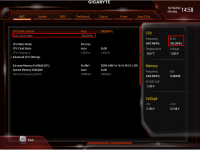
Here is how it looks on my Gigabyte AM4 motherboard.
Here is the output:Thank you and when you have time:
sysctl -a | grep freq
we should also compare the results with a system where you do not have these audio quirks!
Code:
hw.busfrequency: 408000000
hw.busfrequency_max: 408000000
hw.busfrequency_min: 408000000
hw.cpufrequency: 4500000000
hw.cpufrequency_max: 4500000000
hw.cpufrequency_min: 4500000000
hw.tbfrequency: 1000000000
machdep.tsc.frequency: 4499995964Alas I looked for more frequency information in BIOS, but this is all I found (on right side). If anyone has specific pointers on where to look, I'll give them a try.@CaseySJ
No idea how it's named in ASUS BIOSes, but can you get the Host Clock Value/BCLK/FSB Frequency from your BIOS when you get home?
Here is how it looks on my Gigabyte AM4 motherboard.
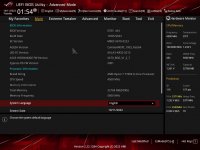
Sadly this seems fineHere is the output:
Code:hw.busfrequency: 408000000 hw.busfrequency_max: 408000000 hw.busfrequency_min: 408000000 hw.cpufrequency: 4500000000 hw.cpufrequency_max: 4500000000 hw.cpufrequency_min: 4500000000 hw.tbfrequency: 1000000000 machdep.tsc.frequency: 4499995964
I've seen it suggested here but have you tried Speedkeeper yet? https://forum.amd-osx.com/resources/speedkeeper.3/
SpeedKeeper makes a huge improvement!!
Details:
- YouTube playback from Safari near perfect thru HDMI/DP
- YouTube playback from Safari 'virtually' perfect through external USB DAC
- YouTube playback from Firefox was previously horrible regardless of output port, but is very very good now (I think I heard a brief stutter)
- Playback from Music App is also 'virtually' perfect through HDMI/DP and very very few stutters through external USB DAC
According to the author's description on GitHub:
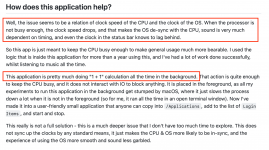
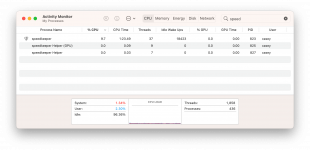
Speedkeeper maintains an 8 to 10 percent load on CPU. Just something to be aware of.
Can you guys recommend a good USB-Audio solution that works with the x670?
my x670 will be setup near my home theater and will be connected by HDMI, but this is most likely a temporary solution. I bought a big fractal torrent case for this build bc I wanted it to be easier to build in than the Torrent Compact I built my x570 system, but I suspect it is going to be an eyesore protruding from the cabinet. and I honestly want the x670 system on my desk. so regular audio out is the way to go.
my x670 will be setup near my home theater and will be connected by HDMI, but this is most likely a temporary solution. I bought a big fractal torrent case for this build bc I wanted it to be easier to build in than the Torrent Compact I built my x570 system, but I suspect it is going to be an eyesore protruding from the cabinet. and I honestly want the x670 system on my desk. so regular audio out is the way to go.
Last edited:
Including the slight discrepancy betweenSadly this seems fine
hw.cpufrequency: 4500000000 andmachdep.tsc.frequency: 4499995964 ?