Problems with Install Boot
- Thread starter Caldir
- Start date
-
Hello Guest. Before you post check the Troubleshooting guide here, Dortania Troubleshooting
You are using an out of date browser. It may not display this or other websites correctly.
You should upgrade or use an alternative browser.
You should upgrade or use an alternative browser.
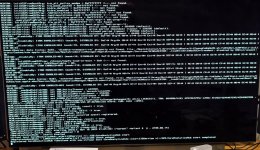
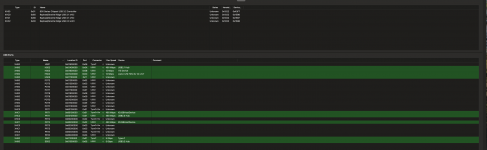
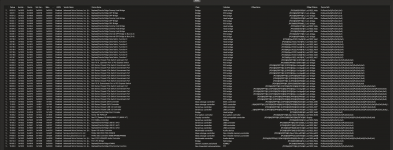

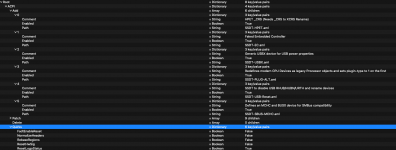
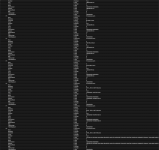
the PCI Devices are correct ? Or have to Delete the 1st with acpi-path ?
maybe i need remap my USB again or something is wrong.
your APCI settings also replace with my settings.
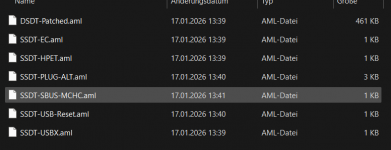
patches_OC.plist into my info info.plist
By the way i still need the USBTool Kext + Mapping ?
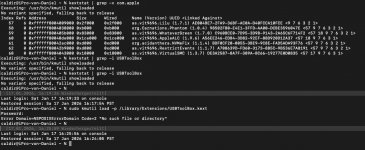
Found out some kexts not loading anymore USBTool and UTB dont know whats happen right know.
Your config put into my config.plist and replace after snapshot.
the PCI
im on sequoia but it doesnt matter so much i guess
Last edited:
there is my USB Mapping in windows seems good
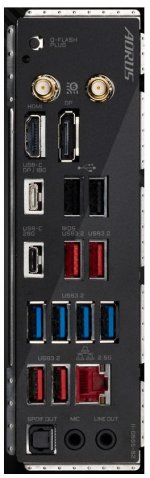
the 2 red beside the ethernet also dont work.
but the blue ports with usb work ... they are all on the same controller
This USB Mapping is so painful ^^
the 2 red beside the ethernet also dont work.
but the blue ports with usb work ... they are all on the same controller
This USB Mapping is so painful ^^
Attachments
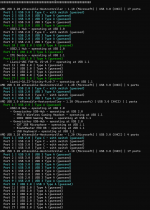
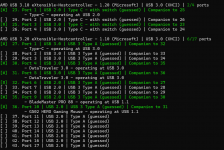

I would make the following points:
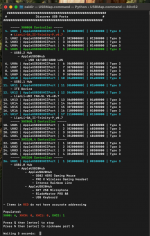
Ports 11, 12 & 17 under the first USB Controller appear to be ‘Internal’ devices, either directly connected to the motherboard or via a USB header. So these ports should be set as ‘Internal’ with connector type (255). I am not positive about the two LianLi fans but the ITE device is definitely an internal device.
You don’t have a Bluetooth device showing, is that correct for your system?
Pay attention to the screen showing the Companion ports, as these are helpful when looking to correct and/or matching port types.
The two Red ports you can’t see may be attached to a USB 3.2 & 2.0 hub, which would mean they don’t show as individual ports. But the same port, such as port #5 & 10 under the first USB controller might keep being highlighted when a USB drive is inserted.
Ports 11, 12 & 17 under the first USB Controller appear to be ‘Internal’ devices, either directly connected to the motherboard or via a USB header. So these ports should be set as ‘Internal’ with connector type (255). I am not positive about the two LianLi fans but the ITE device is definitely an internal device.
You don’t have a Bluetooth device showing, is that correct for your system?
Pay attention to the screen showing the Companion ports, as these are helpful when looking to correct and/or matching port types.
The two Red ports you can’t see may be attached to a USB 3.2 & 2.0 hub, which would mean they don’t show as individual ports. But the same port, such as port #5 & 10 under the first USB controller might keep being highlighted when a USB drive is inserted.

i disabled LAN / WIFI / Bluetooth
USB front header also Internal ?
By the way i saw XH00 XHC1 so all rename to XSTA is that ok ?
USBTmap -> is all about XH00, XHC0, XHC1, XHC2 <- thats are my 4 controller...
should i change in UTBmap.kext ?
"Ports 11, 12 & 17 under the first USB Controller appear to be ‘Internal’ devices, either directly connected to the motherboard or via a USB header. So these ports should be set as ‘Internal’ with connector type (255). I am not positive about the two LianLi fans but the ITE device is definitely an internal device."
That i have fixed.
"The two Red ports you can’t see may be attached to a USB 3.2 & 2.0 hub, which would mean they don’t show as individual ports. But the same port, such as port #5 & 10 under the first USB controller might keep being highlighted when a USB drive is inserted."
I try, no reaction. Just 1 short light from the USB, nothing happens.
Red Ports Behind beside Ethenet, Blue Ports behind
the Blue Ports Behind work. Testet
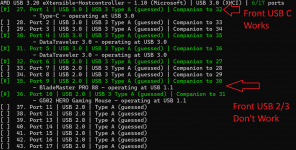
USB front header also Internal ?
By the way i saw XH00 XHC1 so all rename to XSTA is that ok ?
USBTmap -> is all about XH00, XHC0, XHC1, XHC2 <- thats are my 4 controller...
should i change in UTBmap.kext ?
"Ports 11, 12 & 17 under the first USB Controller appear to be ‘Internal’ devices, either directly connected to the motherboard or via a USB header. So these ports should be set as ‘Internal’ with connector type (255). I am not positive about the two LianLi fans but the ITE device is definitely an internal device."
That i have fixed.
"The two Red ports you can’t see may be attached to a USB 3.2 & 2.0 hub, which would mean they don’t show as individual ports. But the same port, such as port #5 & 10 under the first USB controller might keep being highlighted when a USB drive is inserted."
I try, no reaction. Just 1 short light from the USB, nothing happens.
Red Ports Behind beside Ethenet, Blue Ports behind
the Blue Ports Behind work. Testet
Last edited:
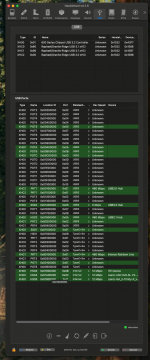
No, if you are talking about the USB3 or Type-C headers. They should be set to match the physical connector type, i.e. USB3 & Type-c with or without switch.USB front header also Internal ?
Just the devices connected to the USB2 header(s) along the bottom of the motherboard should be set as internal, i.e. case front USB2 physical ports with Back Tang, Usb card reader etc. Plus the built-in ITE, Bluetooth if enabled and any LED/Fan or CPU USB devices.
Port #27 and its companion port #32 both should be set as Type-c+switch (9).
Your motherboard only contains 2 x physical USB2 ports (both on the rear I/O plate with Black Tang). These are the only ports that should be set as USB2 (0) in your USB configuration. So you have way too many ports set incorrectly, even if they haven't yet been included in the port discovery.
You need to remember you are NOT limited to 15 ports. As your motherboard has 5 x USB controllers (but only 4 x controllers are active), your motherboard could in theory support and activate up to 60 x USB ports without exceeding the Apple USB port limit.
Sort the Hackintool > USB window by clicking on the top/name of the Location ID column. You may need to click on the name a couple of times so the sorted column matches the listing in the top window showing the 4 x controllers. This will sort the ports in to their respective controller groups, which will make it easier to see which ports are located under each controller.
The controllers with less than 15 ports can enable/activate all their ports, i.e. XHC1, XHC2 & one of the XH00 controllers. The only controller that contains more than 15 ports is the XH00 controller with the Location ID starting 0x01. This controller contains 17 x USB ports, so if all were discovered 2 x ports would need to be manually dropped from this controller, to keep within the 15 port limit.
omg that make so much sense ... like all cable usb is internal ... also my front usb C and front USB 3.0No, if you are talking about the USB3 or Type-C headers. They should be set to match the physical connector type, i.e. USB3 & Type-c with or without switch.
Just the devices connected to the USB2 header(s) along the bottom of the motherboard should be set as internal, i.e. case front USB2 physical ports with Back Tang, Usb card reader etc. Plus the built-in ITE, Bluetooth if enabled and any LED/Fan or CPU USB devices.
Port #27 and its companion port #32 both should be set as Type-c+switch (9).
Your motherboard only contains 2 x physical USB2 ports (both on the rear I/O plate with Black Tang). These are the only ports that should be set as USB2 (0) in your USB configuration. So you have way too many ports set incorrectly, even if they haven't yet been included in the port discovery.
You need to remember you are NOT limited to 15 ports. As your motherboard has 5 x USB controllers (but only 4 x controllers are active), your motherboard could in theory support and activate up to 60 x USB ports without exceeding the Apple USB port limit.
Sort the Hackintool > USB window by clicking on the top/name of the Location ID column. You may need to click on the name a couple of times so the sorted column matches the listing in the top window showing the 4 x controllers. This will sort the ports in to their respective controller groups, which will make it easier to see which ports are located under each controller.
The controllers with less than 15 ports can enable/activate all their ports, i.e. XHC1, XHC2 & one of the XH00 controllers. The only controller that contains more than 15 ports is the XH00 controller with the Location ID starting 0x01. This controller contains 17 x USB ports, so if all were discovered 2 x ports would need to be manually dropped from this controller, to keep within the 15 port limit.
Type C is like always with Switch ?
i will try USBMap Master
Attachments
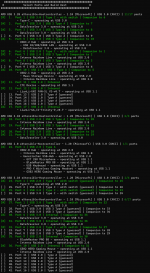
Last edited:
No, Type-C is not always with switch (9).
There is a second Type-C connector type, Type-C without switch that uses (10) to set the type.
The way to tell them apart is by inserting a Type-C device in to an external port, check which port is highlighted in the discovery screen, remove the device and flip it 180° and then reinsert the device in to the same external port.
If the same port is highlighted then it is a Type-c+sw (9) port.
If a different port is highlighted then it is a Type-c port, without switch (10).
Each Type-C with switch physical port will have one virtual USB2 port, there will be two virtual USB2 ports for the without switch. Flipping the device and reinserting it in to the same physical port will show which ports can be activated.
There is a second Type-C connector type, Type-C without switch that uses (10) to set the type.
The way to tell them apart is by inserting a Type-C device in to an external port, check which port is highlighted in the discovery screen, remove the device and flip it 180° and then reinsert the device in to the same external port.
If the same port is highlighted then it is a Type-c+sw (9) port.
If a different port is highlighted then it is a Type-c port, without switch (10).
Each Type-C with switch physical port will have one virtual USB2 port, there will be two virtual USB2 ports for the without switch. Flipping the device and reinserting it in to the same physical port will show which ports can be activated.

I've now tried the black rear USB 2.0 ports + internal and front ports.
Unfortunately, this didn't work either.
The front ports simply won't work.
My idea is to install Catalina and do the port mapping there so I can install the USBInjectAll kext for "simple" port mapping, making it native.
I also have another question. Should I enable native port mapping for the port mapping?
What about Bind USB ports?
The mapping process is very tedious.
Unfortunately, this didn't work either.
The front ports simply won't work.
My idea is to install Catalina and do the port mapping there so I can install the USBInjectAll kext for "simple" port mapping, making it native.
I also have another question. Should I enable native port mapping for the port mapping?
What about Bind USB ports?
The mapping process is very tedious.
USBInjectAll.kext doesn’t work with AMD systems. It is only configured to work with Intel USB controllers, so don’t rely on it when you’re creating your custom USB kext.
As you have macOS installed you should use Corpnewt’s USBMap script, which doesn’t need or rely on any third party kexts etc. when used.
Yes, the USB port discovery phase is tedious and boring, but if you want your Hack to work correctly and consistently it is an essential part of the process.
You don’t need to install Catalina to get a USBMap. You can undertake the discovery and activation process in whichever version of macOS you are currently using. It is exactly the same process no matter which version you are using since Mojave. Mojave and earlier require a different kext for the USB mapping to work. As Apple changed the USB setup in Catalina and have kept it like that till releasing Tahoe, which added another way of looking at/for the port number and type.
As you have macOS installed you should use Corpnewt’s USBMap script, which doesn’t need or rely on any third party kexts etc. when used.
Yes, the USB port discovery phase is tedious and boring, but if you want your Hack to work correctly and consistently it is an essential part of the process.
You don’t need to install Catalina to get a USBMap. You can undertake the discovery and activation process in whichever version of macOS you are currently using. It is exactly the same process no matter which version you are using since Mojave. Mojave and earlier require a different kext for the USB mapping to work. As Apple changed the USB setup in Catalina and have kept it like that till releasing Tahoe, which added another way of looking at/for the port number and type.