
Problems with Install Boot
- Thread starter Caldir
- Start date
-
Hello Guest. Before you post check the Troubleshooting guide here, Dortania Troubleshooting
You are using an out of date browser. It may not display this or other websites correctly.
You should upgrade or use an alternative browser.
You should upgrade or use an alternative browser.

Things have moved on since your last Hack was configured, I hope you are willing to refresh your Hackintosh knowledge.
Don’t use WhateverGreen.kext during the installation process, as it may cause problems that can be circumvented by disabling the kext during the installation process.
No idea if your CPU configuration is correct.
Don’t use WhateverGreen.kext during the installation process, as it may cause problems that can be circumvented by disabling the kext during the installation process.
No idea if your CPU configuration is correct.
- Are you using the latest AMD Kernel patches?
- Have you set the first four patches to reflect the number of cores in your CPU?
i have been used
OpCore-Simplify-main
also did try the bootflag
agdpmod=pikera yes/no ? with NooRX.kext ...
bootflag @ moment: -v debug=0x100 keepsyms=1 agdpmod=pikera
Bios:
Secure Boot DIsabled
4G Decoding Enabled
OpCore-Simplify-main
also did try the bootflag
agdpmod=pikera yes/no ? with NooRX.kext ...
bootflag @ moment: -v debug=0x100 keepsyms=1 agdpmod=pikera
Bios:
Secure Boot DIsabled
4G Decoding Enabled
Last edited:
You don’t need to add the agdpmod=pikera boot argument when using NootRX.kext.
It is only required when using WhateverGreen, and some have found they don’t need to use it in Tahoe. So some trial and error testing on your part may be required to see how your system performs.
The full list of AMD Bios settings are linked below.
It is only required when using WhateverGreen, and some have found they don’t need to use it in Tahoe. So some trial and error testing on your part may be required to see how your system performs.
The full list of AMD Bios settings are linked below.
Perfect thx i found also onther thread here ... was excatly the same Moba
got the hardware ACPI table from Hardware sniffer...
have to adjust the CPU settings then i seems to be fine

which settings were made in Opencore ?
- ManuelB
- Replies: 421
- Forum: 13.0 Ventura
got the hardware ACPI table from Hardware sniffer...
have to adjust the CPU settings then i seems to be fine
Attachments


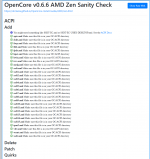
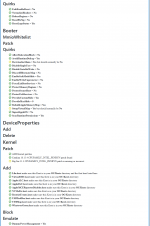
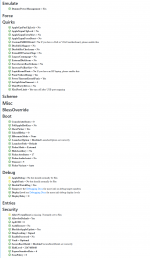
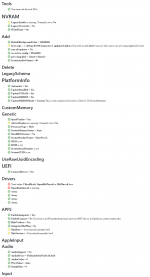
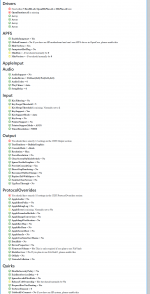
Only problem with the EFI you found is that it is out of date for any recent versions of macOS, such as Sonoma, Sequoia and Tahoe.
The AMD Kernel patches in the config.plist are not up to date either.
SecureBootModel should be set as 'Disabled' not as 'Default'
Intel 2.5G Ethernet controllers can be problematic in macOS. But you seem to have all the necessary fixes in your setup.
I have amended the config.plist in the attached EFI to better reflect the needs for your system. Try it in place of your current folder and see where that gets you.
The AMD Kernel patches in the config.plist are not up to date either.
SecureBootModel should be set as 'Disabled' not as 'Default'
Intel 2.5G Ethernet controllers can be problematic in macOS. But you seem to have all the necessary fixes in your setup.
I have amended the config.plist in the attached EFI to better reflect the needs for your system. Try it in place of your current folder and see where that gets you.
Attachments
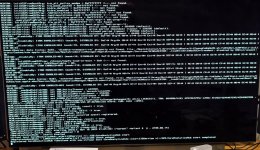
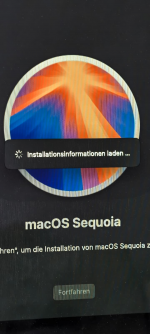
now i get this error must be cpu problem ?
i saw there is wrong CPU inside 7950 instead of 9950 kernel problem ?
Strange with new Bios update get some problems with my network card this stupid i225-v chip
i saw there is wrong CPU inside 7950 instead of 9950 kernel problem ?
Strange with new Bios update get some problems with my network card this stupid i225-v chip
Attachments

Last edited:
The CPU name issue is purely cosmetic. It will have no bearing on the way the CPU works. That will be dictated by the CPU core entries in the AMD Kernel patches.
Why did you update the Bios?
When changing the Bios, this can cause problems with your OC setup, as it may require different MmioWhitelist settings and patches for the system DSDT.aml.
Why did you update the Bios?
When changing the Bios, this can cause problems with your OC setup, as it may require different MmioWhitelist settings and patches for the system DSDT.aml.
everything still works fine just this faulty Network issue with the ethernet Adapter i bought a TP Link USB 3.0 Device for External Network Adapter 
hmm my Front USB A ports not working but USB C front works well
Strange thing is i can boot at the beginning from the USB Front is the Mapping wrong ?
EDIT also some HDMI sound issues. Only Dectect the Sound if i reconnect the Cable after Booting.
on the weekend i will work on it again
hmm my Front USB A ports not working but USB C front works well
Strange thing is i can boot at the beginning from the USB Front is the Mapping wrong ?
EDIT also some HDMI sound issues. Only Dectect the Sound if i reconnect the Cable after Booting.
on the weekend i will work on it again
Last edited:
Sounds working now with some bootargs keepsyms=1 debug=0x100 agdpmod=pikera alcid=1 igfxonln=1 alcdelay=1000
Now just my Front USB Mapping is painfull
Legacy mode USB - should be "off" or it doesn't matter ?
keepsyms=1 debug=0x100 agdpmod=pikera alcid=1 igfxonln=1 alcdelay=1000Now just my Front USB Mapping is painfull
Legacy mode USB - should be "off" or it doesn't matter ?
Attachments
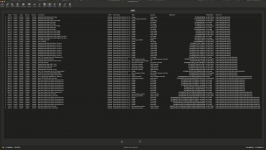
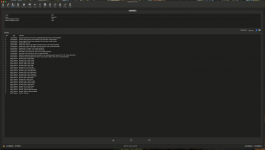
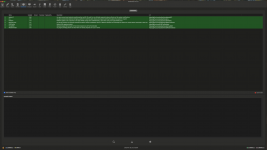
Legacy mode USB should be enabled, well that is what I do when the option is available in the Bios.
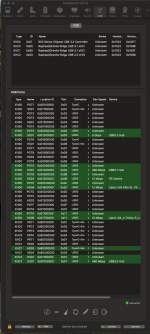
You have 2 x USB Controllers named XH00. Currently the ports from both controllers are mixed together and it is not clear which port belongs to each controller. The easiest way to see which port is associated with each controller is to sort the ports in the Hackintool USB pane by use of the ‘Location ID’ column.
Using Hackintool to configure the USB ports on an AMD system isn’t how I would do things. I think Corpnewt’s USBMap script is a better tool for systems with multiple USB Controllers, such as our AMD Hacks.
Looking at the Hackintool PCIe devices screenshot I can see you have a number of devices that are not using a full IOReg name, I.e. part of the name is missing and has been replaced with ‘pci-bridge’. This is an empty placeholder, which can be fixed using Corpnewt’s SSDTTime script and your systems ACPI tables. The use of the empty placeholder means that the devices are not going to be enabled and active in macOS.
You have 2 x USB Controllers named XH00. Currently the ports from both controllers are mixed together and it is not clear which port belongs to each controller. The easiest way to see which port is associated with each controller is to sort the ports in the Hackintool USB pane by use of the ‘Location ID’ column.
Using Hackintool to configure the USB ports on an AMD system isn’t how I would do things. I think Corpnewt’s USBMap script is a better tool for systems with multiple USB Controllers, such as our AMD Hacks.
Looking at the Hackintool PCIe devices screenshot I can see you have a number of devices that are not using a full IOReg name, I.e. part of the name is missing and has been replaced with ‘pci-bridge’. This is an empty placeholder, which can be fixed using Corpnewt’s SSDTTime script and your systems ACPI tables. The use of the empty placeholder means that the devices are not going to be enabled and active in macOS.
i have try things out by my self... also this im my config.plist failed...Legacy mode USB should be enabled, well that is what I do when the option is available in the Bios.
You have 2 x USB Controllers named XH00. Currently the ports from both controllers are mixed together and it is not clear which port belongs to each controller. The easiest way to see which port is associated with each controller is to sort the ports in the Hackintool USB pane by use of the ‘Location ID’ column.
Using Hackintool to configure the USB ports on an AMD system isn’t how I would do things. I think Corpnewt’s USBMap script is a better tool for systems with multiple USB Controllers, such as our AMD Hacks.
Looking at the Hackintool PCIe devices screenshot I can see you have a number of devices that are not using a full IOReg name, I.e. part of the name is missing and has been replaced with ‘pci-bridge’. This is an empty placeholder, which can be fixed using Corpnewt’s SSDTTime script and your systems ACPI tables. The use of the empty placeholder means that the devices are not going to be enabled and active in macOS.
so i try to make a DSDT Bridge for my Front USB
Attachments
If you post a copy of your systems ACPI tables I will have a look and see which custom SSDT’s your motherboard requires.
The ACPI tables can be obtained from a few different sources.
1. Hackintool’s Utilities tab - Dump ACPI icon.
2. SSDTTime in Windows, specific option to download the tables.
3. OpenCore - https://dortania.github.io/Getting-Started-With-ACPI/Manual/dump.html#from-opencore
The ACPI tables can be obtained from a few different sources.
1. Hackintool’s Utilities tab - Dump ACPI icon.
2. SSDTTime in Windows, specific option to download the tables.
3. OpenCore - https://dortania.github.io/Getting-Started-With-ACPI/Manual/dump.html#from-opencore
Last edited:


OK, I have attached a copy of the Results folder from SSDTTime having used the OEM folder you provided to generate these custom SSDT's and associated ACPI patches.
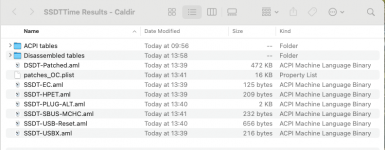 Contents of Results folder
I would recommend you do the following:
Don't replace your current EFI folder with the one from the USB pen drive unless you are sure it works and does what it is meant to do.
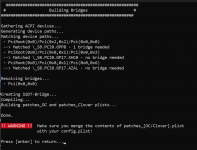
As it turns out your system doesn't require any SSDT-Bridge.aml tables, well not according to SSDTTime. I tested all 7 x entries shown on the Hackintool > PCIe tab from your system to be sure.
Contents of Results folderI would recommend you do the following:
- Create a copy of your current working EFI folder on a spare USB pen drive.
- Remove any existing SSDT's and ACPI patches from your current setup (on the USB pen drive).
- Add the custom SSDT's and patched DSDT table to the ACPI folder.
- Add the ACPI patches contained in the patches_OC.plist to your config.plist
Don't replace your current EFI folder with the one from the USB pen drive unless you are sure it works and does what it is meant to do.
As it turns out your system doesn't require any SSDT-Bridge.aml tables, well not according to SSDTTime. I tested all 7 x entries shown on the Hackintool > PCIe tab from your system to be sure.
