No internet connection with LucyRTL8125 kext in Tahoe Recovery

Astral420

New member
AMD OS X Member
Dec 8, 2025
3
0
1
CPU:
Ryzen 7 7700
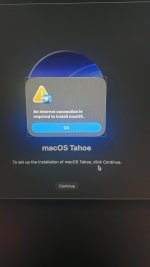
Hi, I do not get internet connection when trying to install Tahoe on my system with this ethernet kext. I used this version of the kext since I am using AM5.

And here are my specs.
Ryzen 7 7700
Asus B650M-AYW WIFI
ASRock Challenger D RX 6600
BiWin DW100 DDR5 32 GB

I do tend to have some kernel panics or sometimes black screens but that isn't really an issue since I tend to reset NVRAM from time to time it happens. Hence I was able to go into MacOS Recovery anyway.

I attached my EFI as well.
 

Attachments

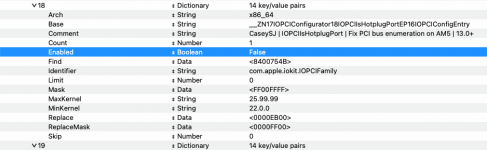
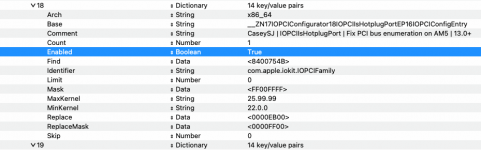
I would recommend you enable AMD Kernel Patch #18, which is aimed at fixing PCI bus issues on AM5 systems, like your B650M board. Enabling this patch might help with the issues you are facing.

Screenshot 2025-12-13 at 16.03.15.png current setting for patch #18

Screenshot 2025-12-13 at 16.03.00.png revised setting for patch #18

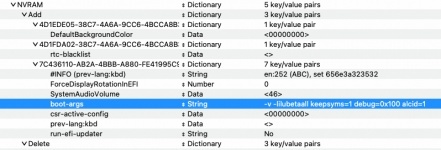
You don't need to use -lilubetaall boot argument in your config.plist, as Tahoe is no longer deemed a Beta release.
Screenshot 2025-12-13 at 16.09.30.png Boot Args, remove those not required


You have alcid=1 in your boot args, plus an entry for an Audio layout in your DeviceProperties. As you don't appear to be using the alternate AppleALC.kext which is required for Tahoe.

Screenshot 2025-12-13 at 16.07.02.png DeviceProperties section, should be empty.

Also when using NootRX.kext you should not be using any DeviceProperties in your config, as they can cause unnecessary issues when booting macOS.

I have attached a revised EFI folder below, this includes the issues mentioned above plus I have cleaned up your config.plist so it is easier to read and navigate.

Try it on a spare USB pen drive and see if it helps.
 

Attachments

  • Like
Reactions: Astral420
Mkay I'll try it, thanks!
I would recommend you enable AMD Kernel Patch #18, which is aimed at fixing PCI bus issues on AM5 systems, like your B650M board. Enabling this patch might help with the issues you are facing.

View attachment 18536 current setting for patch #18

View attachment 18535 revised setting for patch #18

You don't need to use -lilubetaall boot argument in your config.plist, as Tahoe is no longer deemed a Beta release.
View attachment 18538 Boot Args, remove those not required


You have alcid=1 in your boot args, plus an entry for an Audio layout in your DeviceProperties. As you don't appear to be using the alternate AppleALC.kext which is required for Tahoe.

View attachment 18537 DeviceProperties section, should be empty.

Also when using NootRX.kext you should not be using any DeviceProperties in your config, as they can cause unnecessary issues when booting macOS.

I have attached a revised EFI folder below, this includes the issues mentioned above plus I have cleaned up your config.plist so it is easier to read and navigate.

Try it on a spare USB pen drive and see if it helps.
 
Soo it did end up on a kernel panic first try but I ended up resetting NVRAM anyway and that fixed itself booting to recovery. However I still don't get Ethernet in Recovery

EDIT: I'll probably scour around and try a different version of this kext but it's pretty dim.
 

Attachments

  • 230ed6a2-fa13-4c30-83b5-30da1ffb0f60.jpg
    230ed6a2-fa13-4c30-83b5-30da1ffb0f60.jpg
    852.4 KB · Views: 1
  AdBlock Detected
Sure, ad-blocking software does a great job at blocking ads, but it also blocks some useful and important features of our website. For the best possible site experience please take a moment to disable your AdBlocker.