Need assistance adapting EFI for macOS Tahoe (Ryzen 9 7950X3D + RX 6900 XT)

hinkin

Member
AMD OS X Member
Jan 4, 2025
62
8
8
CPU:
AMD Ryzon 9 7950X3D
Hi everyone,

I’ve been trying for several days to get my EFI configuration working for macOS Tahoe on my system, but I haven’t had any success so far.

Hardware Configuration​

  • CPU: AMD Ryzen 9 7950X3D
  • Motherboard: Gigabyte X870 AORUS ELITE WIFI7
  • RAM: 64GB DDR5 5000MHz
  • GPU: AMD Radeon RX 6900 XT 16GB
  • Network: Realtek RTL8125B
  • Wi-Fi/Bluetooth: Fenvi T919 PCIe WLAN Card

I currently have a fully working EFI for macOS Sequoia, but I need assistance in adapting or fixing it so that it can properly install and run macOS Tahoe on this setup.
I’m sharing my current EFI folder for anyone interested in helping improve or create a Tahoe-compatible version.

Any help or suggestions would be greatly appreciated.

Thank you in advance!
 

Attachments

I would love a working efi for this board as I have the same board as well with a 9800x3d and a amd 6800 vid card.. I havent taken the dive yet. Was hoping to see a sucess story in tahoe first. Hopefully @Edhawk is feeling well. I asked corp for help on discord but he said he doesnt really take on these kind of projects. Please keep in the loop if something changes. ill be happy with a working version for 9800x3d and 6800 on sequioa as well. I proably can figure out the usb.kexts but the aml/dst patches stuff is way over my head.
 
  • Like
Reactions: jazzygff
Hi everyone,

I’ve been trying for several days to get my EFI configuration working for macOS Tahoe on my system, but I haven’t had any success so far.

Hardware Configuration​

  • CPU: AMD Ryzen 9 7950X3D
  • Motherboard: Gigabyte X870 AORUS ELITE WIFI7
  • RAM: 64GB DDR5 5000MHz
  • GPU: AMD Radeon RX 6900 XT 16GB
  • Network: Realtek RTL8125B
  • Wi-Fi/Bluetooth: Fenvi T919 PCIe WLAN Card

I currently have a fully working EFI for macOS Sequoia, but I need assistance in adapting or fixing it so that it can properly install and run macOS Tahoe on this setup.
I’m sharing my current EFI folder for anyone interested in helping improve or create a Tahoe-compatible version.

Any help or suggestions would be greatly appreciated.

Thank you in advance!
hinkin
i see It:4 in your config, are you italian?

your Efi posted has different folders (duplicated))
However you have to update many things in sequoia if you are using OCLP to have a working Broadcom wifi

1) update OCLP to OCLP mod by Loabmac (you must disinstall previos oclp version and install the newer ones)
2) update your existing AMD/Kernel/Patches to the newer One you can find on AMD OSX Kernel patches github (Remember to use your core count for them)
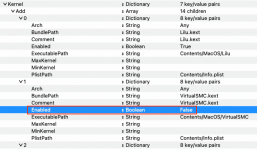
3)Add a new block in Kernel/Block to avoid infinite reboot due your Realtek ethernet and old Skywalk we have to use for broadcom wifi/BT)
4) update your usb mapping for tahoe (there is a script by CorpNewt), it helps to update it in an easy way
5) if it is mandatory Whatevergreen kext to boot your GPU , you have to use a modded one or disable it in the first three installation steps (in tahoe)

Then cross fingers
 
  • Like
Reactions: jazzygff
hinkin
i see It:4 in your config, are you italian?

your Efi posted has different folders (duplicated))
However you have to update many things in sequoia if you are using OCLP to have a working Broadcom wifi

1) update OCLP to OCLP mod by Loabmac (you must disinstall previos oclp version and install the newer ones)
2) update your existing AMD/Kernel/Patches to the newer One you can find on AMD OSX Kernel patches github (Remember to use your core count for them)
3)Add a new block in Kernel/Block to avoid infinite reboot due your Realtek ethernet and old Skywalk we have to use for broadcom wifi/BT)
4) update your usb mapping for tahoe (there is a script by CorpNewt), it helps to update it in an easy way
5) if it is mandatory Whatevergreen kext to boot your GPU , you have to use a modded one or disable it in the first three installation steps (in tahoe)

Then cross fingers
Thanks for the detailed explanation.
This is for a macOS Tahoe Hackintosh setup.
I understand the steps you mentioned, but I don’t currently have the experience to implement them correctly on my own.
Would you be willing to assist me (step-by-step or by pointing me to a working example EFI/config) so I can proceed safely?
I can provide my full hardware specs, current EFI and boot logs if needed.
 
@hinkin this attaced is your usbmap kext adapted for tahoe

you can backup yours and see if your system boots the same...then you have to update your EFI for tahoe (patches and other things i said in previous my message)
 

Attachments

Asus Rog Strix X870-A, Ryzen 9 9950X3D, NVIDIA Geforce RTX 5070 Ti, Intel Arc A380 Graphices, Samsung 990 Pro 2TB. I am having no luck with a functional EFI. This is my first time trying this. I dont know what to do.
 
Neither of the graphics cards in your system are compatible with macOS. So you are wasting your time trying to install a bare metal instance of Tahoe.

You are probably better served using this Virtual Machine guide.

 
Do u know of any decent graphic card that I could get in order to install Tahoe?
 
Have a look at this GPU buyers guide, only AMD RX 6000 series GPU's are really in the decent range, and then only the top few in the Navi 21 series.


The RX 6700 XT or RX 6750 XT car both good for macOS, I use them in most of my Asus AMD Hacks. They are not as good as an RX 6800 XT, RX 6900 XT or RX 6950 XT card. The later can throw a few curve balls depending on the make and model of the card.
 
Asus Rog Strix X870-A, Ryzen 9 9950X3D, Radeon rx 6800xt, the apple symbol shows then changes over to a NOT symbol. I have changed my graphic card, what am I doing wrong?
 
That is usually the sign of a USB port not being activated and carried over to work during the installation process. i.e. the USB pen drive connected to the port can no longer be found by the installer.

If you were using the Verbose boot arguments (-v keepsyms=1 debug=0x100) you would see a set of garbled text along with the Prohibited sign, the last line of text would read as 'Still waiting for root device'.

You need to use a different USB port, preferably a physical USB 2.0 port, as this is less likely to be dropped during the installation.

Alternatively use USBToolBox Tool to create a custom USB kext (UTBMap.kext) that will work in macOS up to and including Sequoia. The tool hasn't been updated to work with Tahoe, which has a new naming convention for USB ports (care of Apple).
 
I did exactly what u said to do, now the apple logo appears and the line below it doesnt go past halfway. Unbelievable
 
Not an uncommon occurrence.

You may need to disable a number of non-essential kexts, such as WiFi, Bluetooth, Audio, NVMe and graphics during the installation process. They can all be re-enabled one you reach the Tahoe desktop.

Tahoe works best during the installation process when a minimalist kext folder is used, I.e. Lilu kext, VirtualSMC.kext, USBMap.kext, Ethernet and keyboard/trackpad kexts.
 
  AdBlock Detected
Sure, ad-blocking software does a great job at blocking ads, but it also blocks some useful and important features of our website. For the best possible site experience please take a moment to disable your AdBlocker.