Need assistance adapting EFI for macOS Tahoe (Ryzen 9 7950X3D + RX 6900 XT)

hinkin

Member
AMD OS X Member
Jan 4, 2025
61
8
8
CPU:
AMD Ryzon 9 7950X3D
Hi everyone,

I’ve been trying for several days to get my EFI configuration working for macOS Tahoe on my system, but I haven’t had any success so far.

Hardware Configuration​

  • CPU: AMD Ryzen 9 7950X3D
  • Motherboard: Gigabyte X870 AORUS ELITE WIFI7
  • RAM: 64GB DDR5 5000MHz
  • GPU: AMD Radeon RX 6900 XT 16GB
  • Network: Realtek RTL8125B
  • Wi-Fi/Bluetooth: Fenvi T919 PCIe WLAN Card

I currently have a fully working EFI for macOS Sequoia, but I need assistance in adapting or fixing it so that it can properly install and run macOS Tahoe on this setup.
I’m sharing my current EFI folder for anyone interested in helping improve or create a Tahoe-compatible version.

Any help or suggestions would be greatly appreciated.

Thank you in advance!
 

Attachments

I would love a working efi for this board as I have the same board as well with a 9800x3d and a amd 6800 vid card.. I havent taken the dive yet. Was hoping to see a sucess story in tahoe first. Hopefully @Edhawk is feeling well. I asked corp for help on discord but he said he doesnt really take on these kind of projects. Please keep in the loop if something changes. ill be happy with a working version for 9800x3d and 6800 on sequioa as well. I proably can figure out the usb.kexts but the aml/dst patches stuff is way over my head.
 
  • Like
Reactions: jazzygff
Hi everyone,

I’ve been trying for several days to get my EFI configuration working for macOS Tahoe on my system, but I haven’t had any success so far.

Hardware Configuration​

  • CPU: AMD Ryzen 9 7950X3D
  • Motherboard: Gigabyte X870 AORUS ELITE WIFI7
  • RAM: 64GB DDR5 5000MHz
  • GPU: AMD Radeon RX 6900 XT 16GB
  • Network: Realtek RTL8125B
  • Wi-Fi/Bluetooth: Fenvi T919 PCIe WLAN Card

I currently have a fully working EFI for macOS Sequoia, but I need assistance in adapting or fixing it so that it can properly install and run macOS Tahoe on this setup.
I’m sharing my current EFI folder for anyone interested in helping improve or create a Tahoe-compatible version.

Any help or suggestions would be greatly appreciated.

Thank you in advance!
hinkin
i see It:4 in your config, are you italian?

your Efi posted has different folders (duplicated))
However you have to update many things in sequoia if you are using OCLP to have a working Broadcom wifi

1) update OCLP to OCLP mod by Loabmac (you must disinstall previos oclp version and install the newer ones)
2) update your existing AMD/Kernel/Patches to the newer One you can find on AMD OSX Kernel patches github (Remember to use your core count for them)
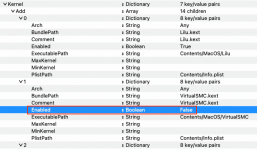
3)Add a new block in Kernel/Block to avoid infinite reboot due your Realtek ethernet and old Skywalk we have to use for broadcom wifi/BT)
4) update your usb mapping for tahoe (there is a script by CorpNewt), it helps to update it in an easy way
5) if it is mandatory Whatevergreen kext to boot your GPU , you have to use a modded one or disable it in the first three installation steps (in tahoe)

Then cross fingers
 
  • Like
Reactions: jazzygff
  AdBlock Detected
Sure, ad-blocking software does a great job at blocking ads, but it also blocks some useful and important features of our website. For the best possible site experience please take a moment to disable your AdBlocker.