Hackintosh stuck at Blocked sign

blackrcses

New member
AMD OS X Member
Feb 24, 2026
29
0
1
USA (Eastern)
CPU:
AMD Ryzen 7 7700X
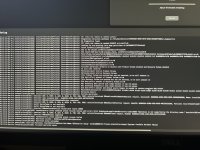
This is my first time creating a EFI for hackintosh but Macos gives me a blocked sign, I tried doing what dortainia said in the trouble shooting guide but it didn’t work. I have USBToolBox Mapping but still not working does anyone know how to fix this?

Specs:
Ryzen 7 7700X
Radeon 570
SMbios: MacPro7,1
 
The kernel panic happened very quickly after the installation started, according to the log you posted. So leaving it overnight wouldn’t make any difference.
 
The kernel panic happened very quickly after the installation started, according to the log you posted. So leaving it overnight wouldn’t make any difference.
Did you look at the EFI folder yet?
 
No, I’ve been installing Sequoia on an Intel Z390 system for my son this afternoon & evening. So not had a chance to look as yet.
 
Looking through your EFI folder attached to post #38 I would commend as follows:

1. You do not need the 3 x sensor kexts listed below, when installing or troubleshooting a macOS installation.
  1. AMDRyzenCPUPowerManagement.kext
  2. SMCAMDProcessor.kext
  3. SMCRadeonSensors.kext
You should remove these three kext until you have your system up and running and actually have an Application installed that can read and display the sensor kext data.

2. Your USBMap.kext is not good (I am being polite!). It is missing a lot of ports. It is likely to cause as many USB issues as it solves with the port configuration it contains. Personally I would remove this kext and start again with the USB port discovery.

You need to remember that as this is an AMD system it is not limited to 15 x ports, as an Intel system would be. As this AMD system contains 3 x USB controllers and each Controller can activate a maximum of 15 x ports, your motherboard could in theory activate a maximum of 45 x ports before hitting Apple's USB port limit.

The list of ports below are those present in your motherboard. You USBMap doesn't come close to this configuration.

CPU:
  • 2 x USB 3.2 Gen 2 Type-A ports (red) on the back panel
  • 1 x USB Type-C® port on the back panel, with USB 3.2 Gen 1 support
CPU+USB 2.0 Hub:
- 4 x USB 2.0/1.1 ports on the back panel
Chipset:
  • 2 x USB 3.2 Gen 1 ports available through the internal USB header
  • 1 x USB Type-C® port with USB 3.2 Gen 1 support, available through the internal USB header
  • 4 x USB 2.0/1.1 ports (2 ports on the back panel, 2 ports available through the internal USB header)
Chipset+USB 2.0 Hub:
- 4 x USB 2.0/1.1 ports available through the internal USB headers

The list above means you have between 24 & 28 x ports available in your system. With the 24/28 x ports spread across 3 x USB controllers it is possible, but unlikely, that one of the controllers would contain 15 or more ports. I would expect you to be able to activate all of the ports you discover in your system, as that is what I have done on my many AMD Hacks. Apple look to limit us, don't limit your system as well.

This is the methodology I use when configuring the USB ports on any of my systems (Intel and AMD).

USB Port Configuration:
USB2 (0) - Physical USB2 ports on rear I/O plate, these ports always have a Black coloured tang.

USB3 (3) - Physical USB3 ports on rear I/O plate, these ports can have a Red, Blue, Yellow or Cyan coloured tang.
Virtual USB2 ports - served from physical USB3 ports should be set the same as the physical port, i.e. as USB3 not USB2.

USB3 (3) - Motherboard Header, usually serving the case front USB3 ports.
Virtual USB2 ports - served from physical USB3 ports should be set the same as the physical port, i.e. as USB3 not USB2.

Internal (255) - Motherboard USB2 header, this will be any device served from a header port, such as Bluetooth module, case front USB2 ports, case front card reader etc.

Internal (255) - Built-in M.2 WiFi/BT connector, motherboard LEDs and CPU Cooler USB connection.

Type-c+sw (9) - will only show two ports being available, 1 x Physical Type-C and 1 x virtual USB2 port.

Type-c (10) - will show 4 x ports being available. This occurs when the Type-C device initially inserted, then removed, the device is flipped 180° and reinserted in the same port, 2 x Type-C and 2 x virtual USB2 ports will be discovered.


3. Config.plist:
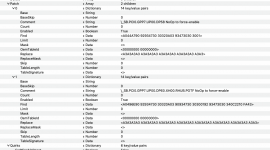
This is missing the 2 x ACPI > Patches shown below, required for AMD AM5 motherboards, which I think are required no matter who manufactured the board.

Screenshot 2026-03-15 at 21.43.35.png ACPI > Patches have been added to your config.plist.

I have enabled Booter > Quirks > SetupVirtualMap, to match the setup in my B650 system.

I have deleted the 3 x Sensor kexts and the USBMap.kext entries from your config and kexts folder.

I have enabled Kernel > Quirks > XhciPortLimit entry, so you have a better chance of booting without losing the USB port you are using for the installation drive.

See if this revised EFI & config.plist helps.

 

Attachments

Looking through your EFI folder attached to post #38 I would commend as follows:

1. You do not need the 3 x sensor kexts listed below, when installing or troubleshooting a macOS installation.
  1. AMDRyzenCPUPowerManagement.kext
  2. SMCAMDProcessor.kext
  3. SMCRadeonSensors.kext
You should remove these three kext until you have your system up and running and actually have an Application installed that can read and display the sensor kext data.

2. Your USBMap.kext is not good (I am being polite!). It is missing a lot of ports. It is likely to cause as many USB issues as it solves with the port configuration it contains. Personally I would remove this kext and start again with the USB port discovery.

You need to remember that as this is an AMD system it is not limited to 15 x ports, as an Intel system would be. As this AMD system contains 3 x USB controllers and each Controller can activate a maximum of 15 x ports, your motherboard could in theory activate a maximum of 45 x ports before hitting Apple's USB port limit.

The list of ports below are those present in your motherboard. You USBMap doesn't come close to this configuration.

CPU:
  • 2 x USB 3.2 Gen 2 Type-A ports (red) on the back panel
  • 1 x USB Type-C® port on the back panel, with USB 3.2 Gen 1 support
CPU+USB 2.0 Hub:
- 4 x USB 2.0/1.1 ports on the back panel
Chipset:
  • 2 x USB 3.2 Gen 1 ports available through the internal USB header
  • 1 x USB Type-C® port with USB 3.2 Gen 1 support, available through the internal USB header
  • 4 x USB 2.0/1.1 ports (2 ports on the back panel, 2 ports available through the internal USB header)
Chipset+USB 2.0 Hub:
- 4 x USB 2.0/1.1 ports available through the internal USB headers

The list above means you have between 24 & 28 x ports available in your system. With the 24/28 x ports spread across 3 x USB controllers it is possible, but unlikely, that one of the controllers would contain 15 or more ports. I would expect you to be able to activate all of the ports you discover in your system, as that is what I have done on my many AMD Hacks. Apple look to limit us, don't limit your system as well.

This is the methodology I use when configuring the USB ports on any of my systems (Intel and AMD).

USB Port Configuration:
USB2 (0) - Physical USB2 ports on rear I/O plate, these ports always have a Black coloured tang.

USB3 (3) - Physical USB3 ports on rear I/O plate, these ports can have a Red, Blue, Yellow or Cyan coloured tang.
Virtual USB2 ports - served from physical USB3 ports should be set the same as the physical port, i.e. as USB3 not USB2.

USB3 (3) - Motherboard Header, usually serving the case front USB3 ports.
Virtual USB2 ports - served from physical USB3 ports should be set the same as the physical port, i.e. as USB3 not USB2.

Internal (255) - Motherboard USB2 header, this will be any device served from a header port, such as Bluetooth module, case front USB2 ports, case front card reader etc.

Internal (255) - Built-in M.2 WiFi/BT connector, motherboard LEDs and CPU Cooler USB connection.

Type-c+sw (9) - will only show two ports being available, 1 x Physical Type-C and 1 x virtual USB2 port.

Type-c (10) - will show 4 x ports being available. This occurs when the Type-C device initially inserted, then removed, the device is flipped 180° and reinserted in the same port, 2 x Type-C and 2 x virtual USB2 ports will be discovered.


3. Config.plist:
This is missing the 2 x ACPI > Patches shown below, required for AMD AM5 motherboards, which I think are required no matter who manufactured the board.

View attachment 19034 ACPI > Patches have been added to your config.plist.

I have enabled Booter > Quirks > SetupVirtualMap, to match the setup in my B650 system.

I have deleted the 3 x Sensor kexts and the USBMap.kext entries from your config and kexts folder.

I have enabled Kernel > Quirks > XhciPortLimit entry, so you have a better chance of booting without losing the USB port you are using for the installation drive.

See if this revised EFI & config.plist helps.
Ok thanks but for the USB thing, does that mean I can inject all my usb ports as their on different controllers?
 
  AdBlock Detected
Sure, ad-blocking software does a great job at blocking ads, but it also blocks some useful and important features of our website. For the best possible site experience please take a moment to disable your AdBlocker.