
Gigabyte A520m-DS3H Ryzen 7 5800x RX5600 xt
- Thread starter Moozuki
- Start date
You are using an out of date browser. It may not display this or other websites correctly.
You should upgrade or use an alternative browser.
You should upgrade or use an alternative browser.

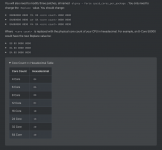
In case anyone else is confused about this, here is the extract from the Dortania OC guide related to changing the core count in the three patches:
Another quick update on this..
I've removed the boot argument for Moozuki's GPU
I've also generated a serial number, uuid, smb etc and have added these to the config.plist
the only other thing i'm not sure about is removing the reference to Moozuki's wifi card, I couldn't see this in the config.plist?
I've removed the boot argument for Moozuki's GPU
I've also generated a serial number, uuid, smb etc and have added these to the config.plist
the only other thing i'm not sure about is removing the reference to Moozuki's wifi card, I couldn't see this in the config.plist?
Have you added the ROM as well? This is needed if you are to get Messages, iCloud etc. working.
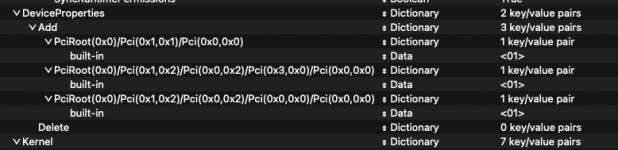
You are not wrong about not being able to tell which DeviceProperties entry relates to the WiFi card.
Not without a bit of help from Moozuki.
Or being able to boot macOS on the system, and then using Hackintool or a similar app to see which Device your system doesn't use/contain.
You are not wrong about not being able to tell which DeviceProperties entry relates to the WiFi card.
Not without a bit of help from Moozuki.
Or being able to boot macOS on the system, and then using Hackintool or a similar app to see which Device your system doesn't use/contain.
Am I correct in saying the ROM's the Mac address of my ethernet port? If so, I've got windows 10 installed on the machine so should be able to find the Mac addressHave you added the ROM as well? This is needed if you are to get Messages, iCloud etc. working.
You are not wrong about not being able to tell which DeviceProperties entry relates to the WiFi card.
View attachment 5238
Not without a bit of help from Moozuki.
Or being able to boot macOS on the system, and then using Hackintool or a similar app to see which Device your system doesn't use/contain.

Re the device ID for the WiFi card.. thanks for confirming it's not just me who can't find it! Do you think that system will run ok if I don't remove it?

Until I have the time to figure it all out, I would disable all of them. Then enable one at a time until you find the one that makes the ethernet show as internal.
There are 3 of them:
one for the ethernet,
one for the NVMe drive,
one for the WIFI/BT card.
The system should run fine without them.
If your system is booting you can use Hackintool to identify which is which.
The one for the ethernet is there so messages etc works correctly.
I need to remember to remove them before I upload my EFI, .
.
There are 3 of them:
one for the ethernet,
one for the NVMe drive,
one for the WIFI/BT card.
The system should run fine without them.
If your system is booting you can use Hackintool to identify which is which.
The one for the ethernet is there so messages etc works correctly.
I need to remember to remove them before I upload my EFI,
.Ok thanks.. now for my next daft question.. how do I disable them? Is there a way to comment them out so that I don't have to delete them completely?Until I have the time to figure it all out, I would disable all of them. Then enable one at a time until you find the one that makes the ethernet show as internal.
There are 3 of them:
one for the ethernet,
one for the NVMe drive,
one for the WIFI/BT card.
The system should run fine without them.
If your system is booting you can use Hackintool to identify which is which.
The one for the ethernet is there so messages etc works correctly.
I need to remember to remove them before I upload my EFI,

The ROM in Clover was often set as the Ethernet address.
Depending on how you generate your SMBIOS some apps and scripts will generate a ROM code that is based on the SMBIOS rather than the MAC address of the Ethernet port.
Clover Configurator has an option to generate a ROM code, based on the SMBIOS Serial Number, SmUUID and Board Serial Number, which is used to populate the MLB.
Depending on how you generate your SMBIOS some apps and scripts will generate a ROM code that is based on the SMBIOS rather than the MAC address of the Ethernet port.
Clover Configurator has an option to generate a ROM code, based on the SMBIOS Serial Number, SmUUID and Board Serial Number, which is used to populate the MLB.
Thanks both
I used genSMBIOS from the terminal to generate the serials which I don't believe generated a ROM. As such, should I go ahead and find the mac address of my ethernet port and use that?
Also, I decided to order the same WiFi card as Moozuki, just seemed the easiest option
I used genSMBIOS from the terminal to generate the serials which I don't believe generated a ROM. As such, should I go ahead and find the mac address of my ethernet port and use that?
Also, I decided to order the same WiFi card as Moozuki, just seemed the easiest option
I used my actual MAC address as my rom.
I used windows to find out what it was.
You do not need those device properties for the hack to work, I just liked my internal devices to show as built in as a real Mac does.
And there is nothing saying the Pci addresses are the same on your board as they are on mine.
I used windows to find out what it was.
You do not need those device properties for the hack to work, I just liked my internal devices to show as built in as a real Mac does.
And there is nothing saying the Pci addresses are the same on your board as they are on mine.
Another quick update.. sorry for the delay, I'm in the middle of a house move so things are a bit hectic!
I've created the installer and made all of the changes discussed in this thread (added serials, ROM etc.. commented out device IDs, removed GPU boot argument, changed core count setting)
The installer USB boots, opencore loads but the only option I see is to boot windows which is installed on another drive, there's no option to load the osx installer.. any thoughts?
I've created the installer and made all of the changes discussed in this thread (added serials, ROM etc.. commented out device IDs, removed GPU boot argument, changed core count setting)
The installer USB boots, opencore loads but the only option I see is to boot windows which is installed on another drive, there's no option to load the osx installer.. any thoughts?
Do you have HfsPlus.efi or OpenHfsPlus.efi driver in the /EFI/OC/Drivers folder?
Without one of these two drivers you probably won't be able to see any HFS+ drives.
Your macOS USB installer should be a HFS+ formatted drive.
Without one of these two drivers you probably won't be able to see any HFS+ drives.
Your macOS USB installer should be a HFS+ formatted drive.
Thanks both..
I've tried a variety of usb ports but this didn't help..
I've also checked in the Drivers folder and can see the HfsPlus.efi file..
Also, when creating the drive I selected Mac OS Extended (Journaled) with a GUID Partition map, is this not correct?
I'm wondering if there's maybe something I've missed in the bios? I've got tpm enabled but have disabled secure boot.
I'm using Big Sur that I downloaded directly from the app store.. and used the "createinstallmedia" command to create the usb which seemed to work fine..
And I'm using moozuki's latest efi..
Any further ideas?
I've tried a variety of usb ports but this didn't help..
I've also checked in the Drivers folder and can see the HfsPlus.efi file..
Also, when creating the drive I selected Mac OS Extended (Journaled) with a GUID Partition map, is this not correct?
I'm wondering if there's maybe something I've missed in the bios? I've got tpm enabled but have disabled secure boot.
I'm using Big Sur that I downloaded directly from the app store.. and used the "createinstallmedia" command to create the usb which seemed to work fine..
And I'm using moozuki's latest efi..
Any further ideas?
Mac OS Extended (Journaled) is a more complete name for a HFS+ formatted drive.
Do you have the Kernel > Quirk > XhciPortLimit enabled in your config.plist? This Quirk stopped working in Big Sur 11.3. So needs to be disabled in the config.plist.
Where have you placed the OpenCore EFI folder?
Do you have the Kernel > Quirk > XhciPortLimit enabled in your config.plist? This Quirk stopped working in Big Sur 11.3. So needs to be disabled in the config.plist.
Where have you placed the OpenCore EFI folder?
- Is it on the Root of the USB installer alongside the macOS installation app? or
- Is it on the EFI partition on the installer?