Error during installation - Kernel panic !?

Who_Am_I

New member
AMD OS X Member
Jan 14, 2026
12
0
1
CPU:
Ryzen 5600G
I have a desktop with AMD Ryzen 5600G (no graphics card), Motherboard Gigabyte B450MDS3H V2. Tried the Opencore method to dual boot MacOS & Windows 11 and getting the below kernal panic
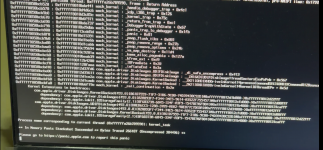
1768402662259.png

I have also tried the Olarila vanila image dual boot install using youtube video guide (
) but getting the error
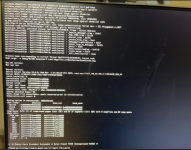
1768402696810.png
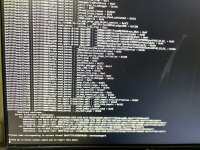
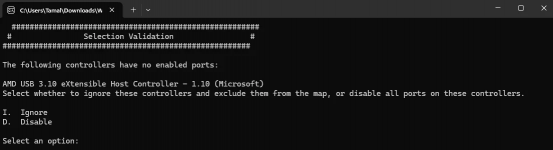
Also, while USB port detection I got this message which I didn't see on any tutorial videos. I've tried both Ignore & Disable options but the result is the same.
1768402734958.png
Can anyone help ?!
 
NVME Drive:
Which NVME drive are you using?
What is on the drive?
How is it formatted?
Do you have CSM disabled in your Bios?

Bluetooth:
Which Bluetooth module/dongle are you using?
Which kexts have you added to your OC EFI to allow the BT device to connect?
Have you added the Bluetooth NVRAM entries to your config.plist?

Apple drive formatting:
The macOS drive showing as empty in Windows is normal.
Windows doesn’t natively read APFS formatted drives.
You need to add a third-party driver/app for Windows to be able to read/write APFS or HFS+ drives.
 
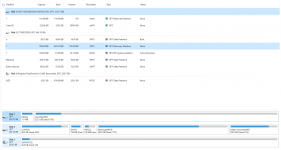
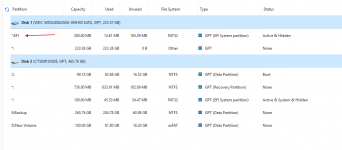
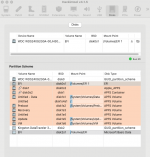
Here is the drive/SSD situation
1769266838850.png

Do you have CSM disabled in your Bios?
Yes I do.

Bluetooth:
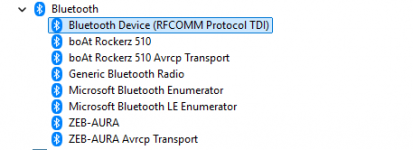
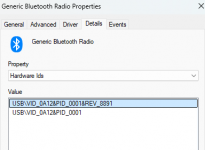
Which Bluetooth module/dongle are you using?

1769267053507.png


Which kexts have you added to your OC EFI to allow the BT device to connect?
Have you added the Bluetooth NVRAM entries to your config.plist?

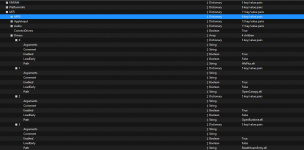
I've attached the EFI that I used to install the macOS, but like I said in my last post I could not mount ESP as no drives are showing when I choose that option in OCAuxiliaryTools !
 

Attachments

You have some issues with your drive formatting:
1. The macOS drive should be HFS+ if running an older version, pre High Sierra.
2. The macOS drive should be formatted GPT/GUID & APFS if running any version since High Sierra.
3. As you have posted in the Sequoia forum, I assume that is the OS you are using.
4. Your macOS drive should not/never be formatted as ExFat.

Your Windows drive is a mess as far as formatting and the order of the partitions. Is this a cloned drive?
5. The ‘System’ partition should be first on the NVME drive, I.e. before the main NTFS partition containing the Windows OS. With 2 x additional ‘Microsoft’ partitions following the main Windows partition.
6. OpenCore will be looking for the Windows ‘System’ partition, in order to include an icon or text entry on the OC Boot screen.
7. If it doesn’t find it where it expects it to be located, or named as expected, then your Windows drive won’t be available via OpenCore.

With regards your Bluetooth module, you need to be more explicit about the make and model of the device. That Device Manager screen snip tells me nothing useful.

Not being able to mount the hidden EFI partition is down to you using the ExFat format on your macOS drive. The ExFat format doesn't create a 200MB EFI partition as the first partition on the disk. The partition it does create isn’t an EFI partition, which is full of data, it has the wrong name and format for an EFI partition. It should be an empty FAT32 formatted partition 200MB in size, which is created as part of the APFS format process.

The best thing you could do is to wipe and reinstall macOS, but this time use Disk Utility, which is available as part of the install process, to format the disk correctly, I.e. APFS & GUID/GPT.

Your choice what’s to do with your Windows disk. But a clean install wouldn’t hurt, as you want dual boot both OS’s from the OC boot screen.

Just make sure you backup anything you can’t reinstall from an existing backup.
 
  AdBlock Detected
Sure, ad-blocking software does a great job at blocking ads, but it also blocks some useful and important features of our website. For the best possible site experience please take a moment to disable your AdBlocker.