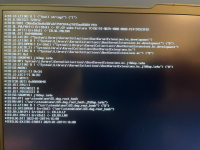
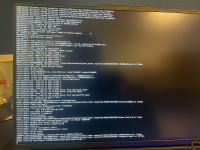
Have a read of the EXITBS:START troubleshooting guide linked below. There are a few different solutions to this kernel panic, which one works for your system is unknown at this time, so you may have to try a few to see what happens.
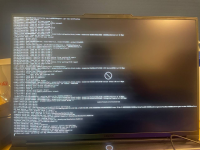
The EXITBS:START could be resolved by restarting it again. However I always stuck here with another issue. And then there is a forbidden sign in my screen after here.
I have two USB ports in my laptop. I tired both, but it didn’t work. Do you mean plugged off my usb and plug it to another port during loading installer?
Kext. Contribute to USBToolBox/kext development by creating an account on GitHub.
github.com
You have 2 x physical USB3 ports on the rear, and 2 x Type-C ports on the right hand side of the laptop, yes?
Each USB3 port will have a physical USB3 and a Virtual USB2 port when it comes to the USB configuration.
The companion ports will be named something like HS01 & SS01, HS02 & SS02
The 4 x ports all need to be set with the connector type USB3 (3). This is important, don't set the two virtual USB2 ports as USB2 (0)
The 2 x Type-C ports will have the physical Type-C port and a Virtual USB2 ports, these ports would need to be set as Type-c+sw (9) or Type-c (10) depending on how they work.
You will need to include the USB Port connections for your Bluetooth and Webcam in the UTBMap.kext
You would need to set these ports with the connector type 'Internal' (255).
So in total your laptop could have the following:
4 x ports set as USB3
4 x ports set as Type-c with or without switch
2 x ports set as Internal.
10 ports in total.
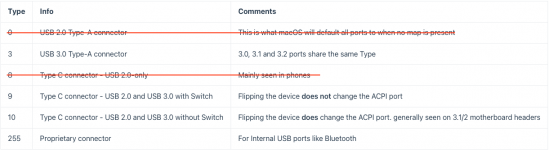
The screenshot below shows the types of connector the ports in your laptop will use.
You will not have any physical USB2 (0) or Type-C (8) ports.
Here is a link to a guide for Usb port mapping using USBToolBox
Kext. Contribute to USBToolBox/kext development by creating an account on GitHub.
github.com
You have 2 x physical USB3 ports on the rear, and 2 x Type-C ports on the right hand side of the laptop, yes?
Each USB3 port will have a physical USB3 and a Virtual USB2 port when it comes to the USB configuration.
The companion ports will be named something like HS01 & SS01, HS02 & SS02
The 4 x ports all need to be set with the connector type USB3 (3). This is important, don't set the two virtual USB2 ports as USB2 (0)
The 2 x Type-C ports will have the physical Type-C port and a Virtual USB2 ports, these ports would need to be set as Type-c+sw (9) or Type-c (10) depending on how they work.
You will need to include the USB Port connections for your Bluetooth and Webcam in the UTBMap.kext
You would need to set these ports with the connector type 'Internal' (255).
So in total your laptop could have the following:
4 x ports set as USB3
4 x ports set as Type-c with or without switch
2 x ports set as Internal.
10 ports in total.
The screenshot below shows the types of connector the ports in your laptop will use.
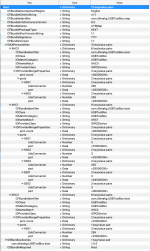
You have 8 x ports activated in your UTBMap.kext/Contents/Info.plist.
As I said in post #8, your laptop has a maximum of 10 ports.
You have set 4 x ports as Internal (255),
When your laptop probably only has 2 x Internal ports, serving the Bluetooth module and Webcam.
You have set 4 x ports as USB3 (3),
This is the correct number and includes 2 x Virtual USB2 ports and 2 x USB3 physical ports, which is also correct.
4 x ports will be from the 2 x physical Type-C ports on the right hand edge of the laptop.
You don't have any ports set as Type-c in your UTBMap.kext.
Seeing as you are activating 8 of the 10 ports, at least 2 of them should be set as Type-c+sw (9).
Info.plist showing the 8 x ports being activated in your kext.
You need to recheck each port and generate a new kext that includes the 10 ports, even if you are not using the 2 x USB2 speed ports served from the Type-C ports.
Adding descriptions of the the port, or location of the port really helps others understand which port is being activated.
You only have 4 x physical ports so the descriptions would be simple.
Rear USB3 left or Rear USB3 right
Type-C left or Type-C right.
Name the Bluetooth module as BT Internal
Name the Webcam as Webcam internal
Simples!
Do you have a Type-C device to test the 2 x Type-C ports?
You may need aType-C to Type-A adapter to test the USB2 sides of the Type-C ports, this is what I use.
You have 8 x ports activated in your UTBMap.kext/Contents/Info.plist.
As I said in post #8, your laptop has a maximum of 10 ports.
You have set 4 x ports as Internal (255),
When your laptop probably only has 2 x Internal ports, serving the Bluetooth module and Webcam.
You have set 4 x ports as USB3 (3),
This is the correct number and includes 2 x Virtual USB2 ports and 2 x USB3 physical ports, which is also correct.
4 x ports will be from the 2 x physical Type-C ports on the right hand edge of the laptop.
You don't have any ports set as Type-c in your UTBMap.kext.
Seeing as you are activating 8 of the 10 ports, at least 2 of them should be set as Type-c+sw (9).
View attachment 9521 Info.plist showing the 8 x ports being activated in your kext.
You need to recheck each port and generate a new kext that includes the 10 ports, even if you are not using the 2 x USB2 speed ports served from the Type-C ports.
Adding descriptions of the the port, or location of the port really helps others understand which port is being activated.
You only have 4 x physical ports so the descriptions would be simple.
Rear USB3 left or Rear USB3 right
Type-C left or Type-C right.
Name the Bluetooth module as BT Internal
Name the Webcam as Webcam internal
Simples!
Do you have a Type-C device to test the 2 x Type-C ports?
You may need aType-C to Type-A adapter to test the USB2 sides of the Type-C ports, this is what I use.
This site uses cookies to help personalise content, tailor your experience and to keep you logged in if you register.
By continuing to use this site, you are consenting to our use of cookies.
Sure, ad-blocking software does a great job at blocking ads, but it also blocks some useful and important features of our website. For the best possible site experience please take a moment to disable your AdBlocker.