I have newly bought a Legion Slim 7 laptop with 6600s. I have never installed hakintosh on laptop. Is there any tutorial on installing hackintosh on laptop of similar models? How should I set bios settings? And how should I set config.plist? Thank you.
I have newly bought a Legion Slim 7 laptop with 6600s. I have never installed hakintosh on laptop. Is there any tutorial on installing hackintosh on laptop of similar models? How should I set bios settings? And how should I set config.plist? Thank you.
Hello everyone, the Monterey kernel panic problem has been solved for AMD R7 5800H notebook installation. It is a great thing that the CPU can now run on 8 cores. Thank you guys very much.Thank them for discovering the problem and providing kernel patches @ExtremeX@Visual Brand: Lenovo Model...
Hello everyone, the Monterey kernel panic problem has been solved for AMD R7 5800H notebook installation. It is a great thing that the CPU can now run on 8 cores. Thank you guys very much.Thank them for discovering the problem and providing kernel patches @ExtremeX@Visual Brand: Lenovo Model...
You may not need them all and they may not all be present in your laptop's bios.
I would initially recommend you use the Load Optimised Defaults, then make the necessary changes in your bios, including setting the Graphics priority to Discrete GPU as recommended by @ExtremeXT
If you are not willing to open the laptop and physically replace the card, you may be able to disable the MediaTek WiFi in the bios and use something like the TP-Link T3U Plus USB dongle in macOS.
The Intel AC 9260 card is on the compatibility list for Itlwm.kext & AirportItlwm.kext, so it should work.
From what I can see from looking around, the Lenovo Slim 7 laptop has an M.2 connector for the WiFi/BT card. So the Intel card should work. However if you are going to open up the laptop and replace the MediaTek card, you would be better served replacing it with a macOS compatible/natively supported Broadcom WiFi/BT card.
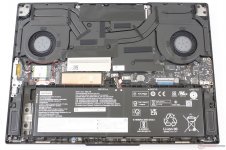
Image of the internals for the Lenovo Slim 7 laptop
M.2 WiFi/BT card highlighted on left hand side below speaker.
Question now is whether this is an A, E, or A+E keyed M.2 connector.
Here is a link to the Broadcom M.2 WiFi/BT cards page from the Wireless Buyers Guide.
Using a Broadcom card should enable all the Apple WiFi/BT services, i.e. Handoff, Continuity, SideCar, AirDrop, AirPlay and Universal Control etc. subject to the other devices also meeting the system requirements for these features.
When using an Intel WiFi/BT card most of these Apple features don't work.
This one has the similar model, but the provided EFI seems not working on legion s7 16arha7, as many tests on similar models doesn't work. Anyone would provide a fix?
This site uses cookies to help personalise content, tailor your experience and to keep you logged in if you register.
By continuing to use this site, you are consenting to our use of cookies.
Sure, ad-blocking software does a great job at blocking ads, but it also blocks some useful and important features of our website. For the best possible site experience please take a moment to disable your AdBlocker.