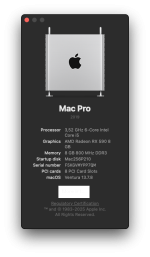
hi! I am looking for help for my Hackintosh GPU problem. I have been hackintoshing for some years now (since OSX Maverick). Usually I managed to solve most problems even by hacking GPU drivers. But my attempt to upgrade to Monterey has failed. I have a system based on: mobo GA-990XA-UD3 (UEFI), CPU FX-6300, Mem 8GB, GPU NITRO+ AMD Radeon RX590 8GB, 1TB SSD with Monterey and 120GB SSD with Big Sur. Big Sur works just fine. Monterey works only without GPU acceleration (NVRAM > boot-args = -amd_no_dgpu_accel). If I enable GPU acceleration in OpenCore (remove the -amd_no_dgpu_accel argument) then after the accelerated Apple logo during boot the screen goes black. Any ideas?
AMD Radeon RX590 problem with Monterey - No GPU acceleration
- Thread starter spykor
- Start date
-
Hello Guest. Before you post check the Troubleshooting guide here, Dortania Troubleshooting
You are using an out of date browser. It may not display this or other websites correctly.
You should upgrade or use an alternative browser.
You should upgrade or use an alternative browser.

I mean physically record with your phone. There may be a message of use that shows while this is happening which we can see if we slow playback / look frame by frame.
Good evening! I did what you said and I am posting 2 videos from (failed) Monterey boot attempt. In the 2nd video near the end there are some messages, but I don't think they are relevant to the problem (failure to land the Login Screen).I mean physically record with your phone. There may be a message of use that shows while this is happening which we can see if we slow playback / look frame by frame.
Attachments

Neither of the two videos is very helpful.
The first video is too out of focus/blurred to allow anyone to read the Verbose Text. You need to set the phone camera so it is held steady and focused on the verbose text, then shoot the video to show the whole screen in focus.
The second video is showing nothing hack related, rather it is showing a hardware issue between your GPU and Samsung screen.
I assume you are using a DisplayPort to connect the GPU and Samsung screen.
Are you using a DP to DP cable to connect the GPU and screen?
Are you using any adapters or cable adapters or anything else to connect the GPU and screen?
Is the cable fully seated in the GPU and screen DisplayPort connectors?
Is the cable in good condition, i.e. no kinks or sharp bends in the cable?
Is there any damage to the connectors at either end of the cable?
How many drives do you have connected to this system. When troubleshooting issues on a Hack it is best to remove any non macOS drives, e.g. backups, data or other OS drives. All. that should be connected is your macOS drive and the USB drive you are using to boot the system. These other drives can be reconnected once you have macOS Monterey booting to the desktop on a regular basis.
The first video is too out of focus/blurred to allow anyone to read the Verbose Text. You need to set the phone camera so it is held steady and focused on the verbose text, then shoot the video to show the whole screen in focus.
The second video is showing nothing hack related, rather it is showing a hardware issue between your GPU and Samsung screen.
I assume you are using a DisplayPort to connect the GPU and Samsung screen.
Are you using a DP to DP cable to connect the GPU and screen?
Are you using any adapters or cable adapters or anything else to connect the GPU and screen?
Is the cable fully seated in the GPU and screen DisplayPort connectors?
Is the cable in good condition, i.e. no kinks or sharp bends in the cable?
Is there any damage to the connectors at either end of the cable?
How many drives do you have connected to this system. When troubleshooting issues on a Hack it is best to remove any non macOS drives, e.g. backups, data or other OS drives. All. that should be connected is your macOS drive and the USB drive you are using to boot the system. These other drives can be reconnected once you have macOS Monterey booting to the desktop on a regular basis.
The 1st video shows just the messages of the display. A message aknowledging the pressence of Display Port and the bottom messages are the screen's messages regarding display characteristics and controls. Have nothing to do with the system GPU init process. The GPU and Display are connected with DP to DP cable and work fine on Big Sur installation.Neither of the two videos is very helpful.
The first video is too out of focus/blurred to allow anyone to read the Verbose Text. You need to set the phone camera so it is held steady and focused on the verbose text, then shoot the video to show the whole screen in focus.
The second video is showing nothing hack related, rather it is showing a hardware issue between your GPU and Samsung screen.
I assume you are using a DisplayPort to connect the GPU and Samsung screen.
Are you using a DP to DP cable to connect the GPU and screen?
Are you using any adapters or cable adapters or anything else to connect the GPU and screen?
Is the cable fully seated in the GPU and screen DisplayPort connectors?
Is the cable in good condition, i.e. no kinks or sharp bends in the cable?
Is there any damage to the connectors at either end of the cable?
How many drives do you have connected to this system. When troubleshooting issues on a Hack it is best to remove any non macOS drives, e.g. backups, data or other OS drives. All. that should be connected is your macOS drive and the USB drive you are using to boot the system. These other drives can be reconnected once you have macOS Monterey booting to the desktop on a regular basis.
I have rebuilt my AMD Sabertooth FX990 / FX 8320 / RX 580 system on a test frame to check out the black screen issues you ran into and can confirm the following:
For some reason the OCLP Polaris and USB1.1 Root Patches that were offered in Ventura weren’t available in Monterey. I am not sure if this was an issue with my Monterey installation or the EFI amendments listed above, which worked for Ventura.
As with most hacks for systems that are lacking a specific instruction set, there will still be some graphical glitches and artefacts in Ventura.
- Big Sur fully supports the RX 580 / 590 dGPU, as the Polaris drivers don’t require the AVX2.0 CPU Instruction Set.
- When Apple dropped the Mac Pro 6,1 system with the release of Monterey all of their supported systems included the AVX2.0 Instruction Set (Haswell or newer systems).
- Apple changed the Polaris, Vega and Navi GPU drivers in Monterey and newer so they have to work with AVX2.0.
- The old AMD Piledriver and Bulldozer (FX AM3+) systems lack the AVX2.0 Instruction Set, so when running Monterey or newer there is no graphics acceleration and commonly when booting ends on a black screen instead of the macOS login screen or desktop.
- I have installed Big Sur, Monterey and Ventura on a 240GB SSD (3 x 80GB partitions set as APFS)
- Big Sur works as expected with full graphics acceleration.
- Monterey and Ventura both boot to a black screen.
- Add the latest version of CryptexFixup.kext to your bootloaders kext folder and config.plist.
- Add -amd_no_dgpu_accel boot argument to your config.plist.
- This boot argument will boot the system with the AMD GPU disabled, temporarily getting around the black screen issue.
- Then download and install OpenCore Legacy Patcher (OCLP) on your Bulldozer system running Monterey or Ventura.
- You will need to add AMFIPass.kext to your bootloader’s kext folder, to enable OCLP to run the Polaris and USB1.1 Root Patches.
- You will need to remove the amd_no_dgpu_accel boot argument before rebooting the system.
- This will allow graphics acceleration for your RX 590 when you next boot in to the system.
For some reason the OCLP Polaris and USB1.1 Root Patches that were offered in Ventura weren’t available in Monterey. I am not sure if this was an issue with my Monterey installation or the EFI amendments listed above, which worked for Ventura.
As with most hacks for systems that are lacking a specific instruction set, there will still be some graphical glitches and artefacts in Ventura.

Thank a lot for all your help! I did what you say in your above message but...something "does not compute" LOL. I installed CryptexFixup.kext and AMFIPass.kext in my EFI/OC kexts list and config.plist and also the -amd_no_dgpu_accel boot argument in my current Monterey EFI/OC installation. I booted into Monterey non-accelarated graphics and downloaded and installed OCLP 2.5. I run the OCLP app but the Buld and install menu is grayed aout and when I run the menu Root Patches it reports back that all patches are present. I run Root Patch reverse, rebooted the system and run the "Root Patches" menu again and still the same response. I removed the -amd_no_dgpu_accel boot argument to see what happens but the problem (black screen) still insists. Any idea? Shoud I remove my current EFI and let OCLP create a new EFI?I have rebuilt my AMD Sabertooth FX990 / FX 8320 / RX 580 system on a test frame to check out the black screen issues you ran into and can confirm the following:
The fix for the black screen issue is as follows:
- Big Sur fully supports the RX 580 / 590 dGPU, as the Polaris drivers don’t require the AVX2.0 CPU Instruction Set.
- When Apple dropped the Mac Pro 6,1 system with the release of Monterey all of their supported systems included the AVX2.0 Instruction Set (Haswell or newer systems).
- Apple changed the Polaris, Vega and Navi GPU drivers in Monterey and newer so they have to work with AVX2.0.
- The old AMD Piledriver and Bulldozer (FX AM3+) systems lack the AVX2.0 Instruction Set, so when running Monterey or newer there is no graphics acceleration and commonly when booting ends on a black screen instead of the macOS login screen or desktop.
- I have installed Big Sur, Monterey and Ventura on a 240GB SSD (3 x 80GB partitions set as APFS)
- Big Sur works as expected with full graphics acceleration.
- Monterey and Ventura both boot to a black screen.
Just for clarification I used the above process to get graphics acceleration working in Ventura.
- Add the latest version of CryptexFixup.kext to your bootloaders kext folder and config.plist.
- Add -amd_no_dgpu_accel boot argument to your config.plist.
- This boot argument will boot the system with the AMD GPU disabled, temporarily getting around the black screen issue.
- Then download and install OpenCore Legacy Patcher (OCLP) on your Bulldozer system running Monterey or Ventura.
- You will need to add AMFIPass.kext to your bootloader’s kext folder, to enable OCLP to run the Polaris and USB1.1 Root Patches.
- You will need to remove the amd_no_dgpu_accel boot argument before rebooting the system.
- This will allow graphics acceleration for your RX 590 when you next boot in to the system.
For some reason the OCLP Polaris and USB1.1 Root Patches that were offered in Ventura weren’t available in Monterey. I am not sure if this was an issue with my Monterey installation or the EFI amendments listed above, which worked for Ventura.
As with most hacks for systems that are lacking a specific instruction set, there will still be some graphical glitches and artefacts in Ventura.
No, do not replace your current working EFI.
Never use OCLP to create an EFI for a Hack, it isn’t designed for that purpose. It creates EFI’s for real Macs only. The only time a Hack user should use OCLP is to run root patching.
I had the same issue in Monterey, root patches not available. No idea why. Only the boot argument to disable the dGPU worked when booting Monterey. It was why I installed Ventura, where the root patches worked. I used OCLP v2.4.1 and then updated to v2.5.
Never use OCLP to create an EFI for a Hack, it isn’t designed for that purpose. It creates EFI’s for real Macs only. The only time a Hack user should use OCLP is to run root patching.
I had the same issue in Monterey, root patches not available. No idea why. Only the boot argument to disable the dGPU worked when booting Monterey. It was why I installed Ventura, where the root patches worked. I used OCLP v2.4.1 and then updated to v2.5.
Thanks for your response. I will try to install Ventura on a small spare SSD and see what happens. Last time I tried that, I ws not able to finish the installation. we'll see what happens this time (I'll use your proposed extra kexts). I am going out of town for the weekend, so I'll work on it next Monday or Tuesday and report back to you. Have a nice weekendNo, do not replace your current working EFI.
Never use OCLP to create an EFI for a Hack, it isn’t designed for that purpose. It creates EFI’s for real Macs only. The only time a Hack user should use OCLP is to run root patching.
I had the same issue in Monterey, root patches not available. No idea why. Only the boot argument to disable the dGPU worked when booting Monterey. It was why I installed Ventura, where the root patches worked. I used OCLP v2.4.1 and then updated to v2.5.
.
Thanks for your response. I will try to install Ventura on a small spare SSD and see what happens. Last time I tried that, I ws not able to finish the installation. we'll see what happens this time (I'll use your proposed extra kexts). I am going out of town for the weekend, so I'll work on it next Monday or Tuesday and report back to you. Have a nice weekend
.
Hi! I tried your suggestion and unfortunately it didn't work. I installed Ventura on a small spare SSD. I used the kexts you suggested and did the OCLP routine. I used -amd_no_dgpu_accel boot argument to boot without graphics acceleration and install OCLP app. The non-accelerated system recognizes the graphics card fine. I run OCLP, run Root Patch and could not perform Root Patch because the program found "Root volume dirty"! Anyway, I run the menu choice to "Reverse Root Patches", reboot and run OCLP again. This time it did the patching. I rebooted, removed -amd_no_dgpu_accel boot argument and rebooted. The result was the same with what happesn in Monterey. Black screen! Below I attach the EFI and screenshots from the non-accelerated system. I would greately appreciate it if you have any ideasNo, do not replace your current working EFI.
Never use OCLP to create an EFI for a Hack, it isn’t designed for that purpose. It creates EFI’s for real Macs only. The only time a Hack user should use OCLP is to run root patching.
I had the same issue in Monterey, root patches not available. No idea why. Only the boot argument to disable the dGPU worked when booting Monterey. It was why I installed Ventura, where the root patches worked. I used OCLP v2.4.1 and then updated to v2.5.