Hello Hackintosh community,
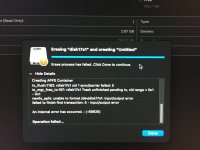
I’m currently facing a very difficult issue with the configuration below. I’ve spent an entire week trying all kinds of tips and guides from GitHub and YouTube, but with this setup, I simply cannot boot into recovery, and of course, I haven’t been able to successfully install macOS 15.
Due to work requirements, I need macOS for certain tasks, and since my workload is quite heavy, using a virtual machine is not an option. I’m currently using Linux, but the lack of Adobe software makes things quite challenging. According to my company policy, I’m not allowed to use Windows, so I’m really hoping to get some help setting up a Hackintosh as a temporary solution until I can afford a real Mac if things go well.
I would greatly appreciate any help from the community. If anyone has a similar configuration, could you please share your EFI file with me?
This setup does not support Bluetooth and Wi-Fi, but that’s not important to me. Thank you all in advance.
With my current EFI and USB installer, I get a grey circle with a slash error. When using the com.apple.recovery.boot file, I get stuck at the loading screen.
I really need to use macOS 15. Thank you so much, everyone!
Hardware Configuration
Motherboard
BIOS
CPU
GPU
I’m currently facing a very difficult issue with the configuration below. I’ve spent an entire week trying all kinds of tips and guides from GitHub and YouTube, but with this setup, I simply cannot boot into recovery, and of course, I haven’t been able to successfully install macOS 15.
Due to work requirements, I need macOS for certain tasks, and since my workload is quite heavy, using a virtual machine is not an option. I’m currently using Linux, but the lack of Adobe software makes things quite challenging. According to my company policy, I’m not allowed to use Windows, so I’m really hoping to get some help setting up a Hackintosh as a temporary solution until I can afford a real Mac if things go well.
I would greatly appreciate any help from the community. If anyone has a similar configuration, could you please share your EFI file with me?
This setup does not support Bluetooth and Wi-Fi, but that’s not important to me. Thank you all in advance.
With my current EFI and USB installer, I get a grey circle with a slash error. When using the com.apple.recovery.boot file, I get stuck at the loading screen.
I really need to use macOS 15. Thank you so much, everyone!
Hardware Configuration
Motherboard
- Model: GIGABYTE X670 GAMING X AX
- Chipset: X670
- Platform: Desktop
BIOS
- Version: F38
- Release Date: 2025-12-12
- Firmware Type: UEFI
- Secure Boot: Disabled
CPU
- Manufacturer: AMD
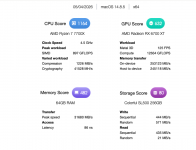
- Model: AMD Ryzen 7 7700X (Raphael)
- Cores: 8
- CPU Count: 1
- SIMD Features: SSE, SSE2, SSE3, SSSE3, SSE4.1, SSE4.2, SSE4a, AVX, AVX2
GPU
- Model: AMD Radeon RX 6700 XT (Navi 22)
- Device ID: 1002-73DF
- Type: Discrete GPU
- Subsystem ID: 23311458
- PCI Path: PciRoot(0x0)/Pci(0x1,0x1)/Pci(0x0,0x0)/Pci(0x0,0x0)/Pci(0x0,0x0)
- ACPI Path: \SB.PCI0.GPP0.SWUS.SWDS.VGA
- Resizable BAR: Disabled


 F] usr\standalone\OS.dmg.root_hash
 T] 2026-04-05T11:13:59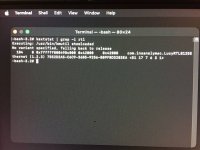

 , i'll notify when have something news,thank for reply !