7700x + 6700xt | Can't boot recovery !!

leone

New member
AMD OS X Member
Apr 3, 2026
8
1
1
3
CPU:
7700x
Hello Hackintosh community,


I’m currently facing a very difficult issue with the configuration below. I’ve spent an entire week trying all kinds of tips and guides from GitHub and YouTube, but with this setup, I simply cannot boot into recovery, and of course, I haven’t been able to successfully install macOS 15.


Due to work requirements, I need macOS for certain tasks, and since my workload is quite heavy, using a virtual machine is not an option. I’m currently using Linux, but the lack of Adobe software makes things quite challenging. According to my company policy, I’m not allowed to use Windows, so I’m really hoping to get some help setting up a Hackintosh as a temporary solution until I can afford a real Mac if things go well.


I would greatly appreciate any help from the community. If anyone has a similar configuration, could you please share your EFI file with me?


This setup does not support Bluetooth and Wi-Fi, but that’s not important to me. Thank you all in advance.


With my current EFI and USB installer, I get a grey circle with a slash error. When using the com.apple.recovery.boot file, I get stuck at the loading screen.


I really need to use macOS 15. Thank you so much, everyone!


Hardware Configuration


Motherboard


  • Model: GIGABYTE X670 GAMING X AX
  • Chipset: X670
  • Platform: Desktop

BIOS


  • Version: F38
  • Release Date: 2025-12-12
  • Firmware Type: UEFI
  • Secure Boot: Disabled

CPU


  • Manufacturer: AMD
  • Model: AMD Ryzen 7 7700X (Raphael)
  • Cores: 8
  • CPU Count: 1
  • SIMD Features: SSE, SSE2, SSE3, SSSE3, SSE4.1, SSE4.2, SSE4a, AVX, AVX2

GPU


  • Model: AMD Radeon RX 6700 XT (Navi 22)
  • Device ID: 1002-73DF
  • Type: Discrete GPU
  • Subsystem ID: 23311458
  • PCI Path: PciRoot(0x0)/Pci(0x1,0x1)/Pci(0x0,0x0)/Pci(0x0,0x0)/Pci(0x0,0x0)
  • ACPI Path: \SB.PCI0.GPP0.SWUS.SWDS.VGA
  • Resizable BAR: Disabled
 

Attachments

Solution
Hello everyone following my journey,

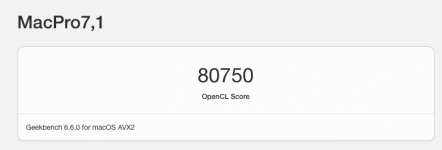
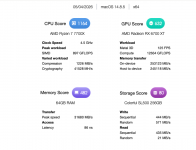
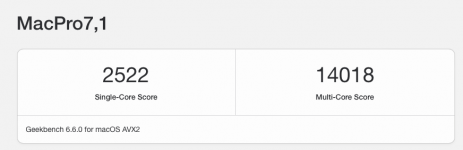
I’ve now successfully configured OpenCore for my hardware. Everything is working perfectly and is highly compatible. I’ll run some benchmarks later.

I’ve attached the EFI file for anyone who needs it. The main issue I faced from the beginning was not finding the correct ACPI configuration for my hardware. After many fixes, I’m now typing these lines on macOS Sonoma (even though I originally wanted to install macOS 15 haha).


One issue with my hardware: the LAN network didn’t work from the start, even though I used the LucyRTL8125Ethernet kext v1.2.3. This forced me to install offline and only get internet access afterward by sharing the connection from my iPhone (sad).


After...
Hello @leone your machine should be able to run Sequoia with minimal issues but your EFI, to be kind, is a nonstarter. You are missing any of the critical ACPI files and patches needed to boot and your CPU core counts are incorrect for the 7700x processor you have. The other issue is AMD systems and some Adobe applications do not always play well together. There are fixes you can try but you already seem so far over your head I don't see this as a good option for you, especailly if you need it for mission critcal work applications.

There is a sample EFI for your motherboard here that you can review and potentially get to work. The core counts are wrong and would need to be adjusted for your processor, there are also be other issues to work out like your GPU. https://github.com/KWODO/EFI_GA-X670-GX-AX_REV10

Frankly I think your best option would be to buy a macmini
 
Last edited:
Thank you for your response. I don’t have any experience with Hackintosh—almost everything I’ve done so far has been by following guides on YouTube or GitHub.


It’s unfortunate that I’m just trying to install it on my PC using a few spare SSDs to test some internal company applications on macOS, and I’m still in a pre-official stage. Anyway, any help would be greatly appreciated.


Thank you very much. @leesurone
 
You should have a read of this success story. It will provide you with a clear process to follow.

 
You should have a read of this success story. It will provide you with a clear process to follow.

I’ve searched through many forums and thought carefully before posting this. I wanted to make sure I wasn’t asking a duplicate question, but unfortunately, the previous guides haven’t really helped me.

I’m always stuck before reaching recovery—either freezing at the Apple logo or during the boot process. I haven’t been able to get into the recovery screen at all, even though I’ve tried both online recovery and a full macOS installer USB.

Thank you for your reply.
 
Try booting with this revised EFI folder. See if it gets you any further along the process.
  • I have corrected the CPU core count. You have an 8-core/16-thread CPU, not a 16-core CPU.
  • Enabled the AM5 Kernel patch.
  • Revised the Kexts in the EFI, removing those not required.
  • Added SSDT-EC.aml and SSDT-USBX.aml to your ACPI folder and config.
  • Plus a few other edits in the config.plist.
Post an photo of the Verbose text if the system kernel panics when using this EFI folder.

Also remember to use the ResetNvram option from the OpenCore boot screen before you boot with this EFI folder.
Press the spacebar if the ResetNvram option isn't shown automatically on the boot screen.
 

Attachments

Thank you for your response. I tried your suggestion, but I got stuck at the following log.
I have also disabled the RAM XMP/EXPO (AMP) profile to avoid boot issues
16:534 00:030 AAPL: #[EB.BST.FBS|ADSZ] 0
16:563 00:029 AAPL: #[EB.BST.FBS|KSSZ] 0
16:593 00:029 AAPL: #[EB|SB:SBGMFNS] j160ap.im4m
16:622 00:029 AAPL: #[EB|RH:PF] usr\standalone\OS.dmg.root_hash
16:652 00:029 AAPL: #[EB|RH:MF] <"usr\\standalone\\OS.dmg.root_hash.j160ap.im4m">
16:681 00:029 AAPL: #[EB.LD.LF|IN] 0 1 <"usr\\standalone\\OS.dmg.root_hash"> <"0">
16:713 00:031 AAPL: #[EB.LD.OFS|OPEN!] Err(0xE) <"usr\\standalone\\OS.dmg.root_hash">
16:744 00:030 AAPL: #[EB.RH.LRH|P!] Err(0xE) <- EB.LD.LF
16:773 00:029 AAPL: #[EB.BST.FBS|!] Err(0xE) <- EB.RH.LRH
16:803 00:029 AAPL: #[EB|LOG:DT] 2026-04-05T11:13:59
16:832 00:029 AAPL: #[EB|LOG:EXITBS:START] 2026-04-05T11:13:59

At the moment, I have found several EFI configurations on GitHub and customized them to match my hardware.


There has been some good progress: I can now boot into recovery. However, new issues have appeared:


  • With this EFI, macOS 15 (Sequoia/Tahoe) fails to load and always gets stuck at the log shown above.
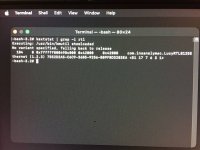
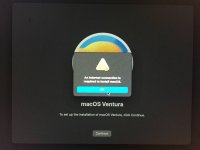
  • With macOS 13 and 14, I can enter recovery, but there is no internet connection. I also checked via Terminal to see if the network kexts were loaded, and it seems they are loaded but not functioning.

Additionally:


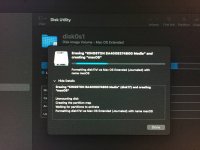
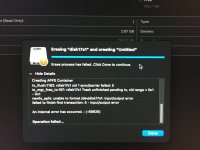
  • On macOS 14, I cannot format the drive in recovery. However, this is not a major issue since it works fine on macOS 13.


So now, since I cannot use macOS 15, I downgraded to 14 and then 13, but I am facing another issue where the internet does not work.


I will try creating an offline installer on USB to see if it can be used, but the lack of LAN/internet is quite frustrating.


Thank you all very much for your help — it truly means a lot to me.
 

Attachments

  • EFI.zip
    EFI.zip
    29.7 MB · Views: 0
  • photo_2026-04-05_12-13-29.jpg
    photo_2026-04-05_12-13-29.jpg
    164.7 KB · Views: 5
  • photo_2026-04-05_12-13-27.jpg
    photo_2026-04-05_12-13-27.jpg
    83.9 KB · Views: 4
  • photo_2026-04-05_12-13-26.jpg
    photo_2026-04-05_12-13-26.jpg
    130.3 KB · Views: 4
  • photo_2026-04-05_12-13-25.jpg
    photo_2026-04-05_12-13-25.jpg
    146 KB · Views: 4
  • photo_2026-04-05_12-13-24.jpg
    photo_2026-04-05_12-13-24.jpg
    266 KB · Views: 6
Good news! I have managed to fix the entire boot process for all macOS versions. The only remaining issue is the lack of internet connection in Recovery mode. I am proceeding with an offline installation and am not sure if the internet will work even after a successful install. Here is the EFI file for anyone who needs it

Your assistance is still essential to me. Thank you all for your support
 

Attachments

Good news! I have managed to fix the entire boot process for all macOS versions. The only remaining issue is the lack of internet connection in Recovery mode. I am proceeding with an offline installation and am not sure if the internet will work even after a successful install. Here is the EFI file for anyone who needs it

Your assistance is still essential to me. Thank you all for your support
Were you able to complete install using the offline method of whatever version of macOS you chose? If so does Ethernet work?
 
Were you able to complete install using the offline method of whatever version of macOS you chose? If so does Ethernet work?
In still working on it. I’ve tried downgrading to lower versions:


  • 26 → failed boot recovery
  • 15 → failed to install offline | stuck at recovery installer
  • 14 → failed to install offline | recovery installer completed, but stuck at boot installer

Now I’m trying macOS version 13.


I’ve seen some tips to fix internet LAN on macOS, but first I need to successfully complete the installation 😅, i'll notify when have something news,thank for reply !
 
  • Like
Reactions: leesurone
In still working on it. I’ve tried downgrading to lower versions:


  • 26 → failed boot recovery
  • 15 → failed to install offline | stuck at recovery installer
  • 14 → failed to install offline | recovery installer completed, but stuck at boot installer

Now I’m trying macOS version 13.


I’ve seen some tips to fix internet LAN on macOS, but first I need to successfully complete the installation 😅, i'll notify when have something news,thank for reply !
Where is the installation stopping, same as post #7? Also best to avoid trying to install Tahoe for now, it'll just make your effort more difficult
 
Hello everyone following my journey,

I’ve now successfully configured OpenCore for my hardware. Everything is working perfectly and is highly compatible. I’ll run some benchmarks later.

I’ve attached the EFI file for anyone who needs it. The main issue I faced from the beginning was not finding the correct ACPI configuration for my hardware. After many fixes, I’m now typing these lines on macOS Sonoma (even though I originally wanted to install macOS 15 haha).


One issue with my hardware: the LAN network didn’t work from the start, even though I used the LucyRTL8125Ethernet kext v1.2.3. This forced me to install offline and only get internet access afterward by sharing the connection from my iPhone (sad).


After digging deeper, I discovered that my RTL8125 is a newer variant, which is why the kext doesn’t work (usually depends on the motherboard production batch). Many people with the same motherboard as mine have older RTL8125 variants that are already supported by Laura Müller:

  • 0x812510ec → Realtek RTL8125
  • 0x81251186 → D-Link RTL8125
  • 0x300010ec → Realtek RTL8125B
Mine is:

  • VEN_10EC = Realtek
  • DEV_8125 = RTL8125
  • SUBSYS_E0001458 = Gigabyte (vendor ID 1458)
  • REV_05 = chip revision 5
Card: Gigabyte RTL8125BG


Fortunately, I found that the author has open-sourced LucyRTL8125Ethernet. After reading the source code, I confirmed that LucyRTL8125Ethernet v1.2.3 does not support RTL8125BG REV_05. The driver loads, but there’s no internet because identifyChip() returns an error.

So, I’m going to patch the source code to make REV_05 fall back to CFG_METHOD_5 (RTL8125B series), then rebuild the kext.

Of course, there are risks. If REV_05 differs significantly from REV_03/04 at the PHY initialization level, it could cause a kernel panic. But I’ll still try it. If a kernel panic happens, I’ll fall back to the old kext and buy another LAN/Wi-Fi card.
 

Attachments

  • EFI_work_without_internet-RTL8125BG.zip
    EFI_work_without_internet-RTL8125BG.zip
    7.5 MB · Views: 0
  • Screenshot 2026-04-05 at 08.39.48.png
    Screenshot 2026-04-05 at 08.39.48.png
    1.8 MB · Views: 3
  • Screenshot 2026-04-05 at 09.16.47.png
    Screenshot 2026-04-05 at 09.16.47.png
    78.4 KB · Views: 2
  • Screenshot 2026-04-05 at 09.25.50.png
    Screenshot 2026-04-05 at 09.25.50.png
    23.3 KB · Views: 1
  • Screenshot 2026-04-05 at 09.26.01.png
    Screenshot 2026-04-05 at 09.26.01.png
    21.1 KB · Views: 1
  • Like
Reactions: Edhawk
Solution
Best of luck!
 
  • Like
Reactions: leone
  AdBlock Detected
Sure, ad-blocking software does a great job at blocking ads, but it also blocks some useful and important features of our website. For the best possible site experience please take a moment to disable your AdBlocker.