What do I need to change? B450i > X570

keef247

Active member
AMD OS X Member
Sep 10, 2020
123
28
28
Hi,
I currently have a B450i and I might be swapping it out for a X570:

What do I need to change in my config please?
I remember seeing something about enable this if a B550M but not if B450, but I can't find it now, when looking at the guide, nor much on X570.

Will I be able to still edit my EFI in Windows using an app once I've mounted the partition?

As I was going to swap boards with my friend, so I was planning on editing the config before I shut the rig down, then removing the motherboard, and fitting the new one, and booting up.

Thanks :)

Merry Christmas to all my fellow EULA breakers ;) :P
 
Here is an OC 1.0.5 EFI from my Asus ROG STRIX X570-F Gaming system. You can use this EFI as a template for your own Asus motherboard.

Just to confirm I have removed entries related to my Aquantia 10G NIC and Broadcom WiFi/BT components. But have left NootRX.kext in place which I use for my RX 6700 XT. You may need to replace this kext with WhateverGreen.kext.

I would recommend using Corpnewt's SSDTTime to generate custom SSDT's for your motherboard, using the system DSDT.aml and other ACPI tables rather than using mine or generic SSDT's from the Dortania guide.


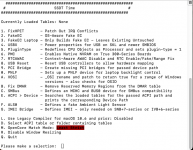
I would normally recommend that you use options 1, 2, 4, 5, A & C from the list of options.

Screenshot 2025-12-18 at 22.49.30.png SSDTTime options as seen when using the script in macOS.

If you use the script in Windows 10 or 11, then another option is enabled, which allows you to download/extract the full set of ACPI tables from the system. This is something I use when I dual boot Windows and macOS on a Hack.

You will need to use/add your Serial Number, SystemUUID, MLB and ROM entries for a MacPro7,1 system definition to the config.plist before it is ready for use.

Hope this is helpful.
 

Attachments

  • Love
Reactions: keef247
Here is an OC 1.0.5 EFI from my Asus ROG STRIX X570-F Gaming system. You can use this EFI as a template for your own Asus motherboard.

Just to confirm I have removed entries related to my Aquantia 10G NIC and Broadcom WiFi/BT components. But have left NootRX.kext in place which I use for my RX 6700 XT. You may need to replace this kext with WhateverGreen.kext.

I would recommend using Corpnewt's SSDTTime to generate custom SSDT's for your motherboard, using the system DSDT.aml and other ACPI tables rather than using mine or generic SSDT's from the Dortania guide.


I would normally recommend that you use options 1, 2, 4, 5, A & C from the list of options.

View attachment 18559 SSDTTime options as seen when using the script in macOS.

If you use the script in Windows 10 or 11, then another option is enabled, which allows you to download/extract the full set of ACPI tables from the system. This is something I use when I dual boot Windows and macOS on a Hack.

You will need to use/add your Serial Number, SystemUUID, MLB and ROM entries for a MacPro7,1 system definition to the config.plist before it is ready for use.

Hope this is helpful.

Thanks you legend!

So I can't just change a few things in my existing one, like with the B550 versus B450 arguments? As that was what I was hoping to do.
 
You could, but it is not something I would recommend.

I think you should create a brand new OC EFI for the new motherboard, even if you are using all the other components from your previous machine. Well that is what I would do if I were in your position.

You will definitely need to create a new USBMap.kext for the X570 board, as the USB ports will be very different compared to those on the old board.

The Ethernet port on the new board may not be compatible with macOS. It uses the Realtek L8200A controller, which I haven’t seen used and I don’t think there is a kext available for that controller. You may need to add a Realtek RTL8125B PCIe x1 card to the system, so you can use Mieze’s RealtekRTL8125 kext. These cards/NIC’s are available from Amazon for a reasonable price. I have 5 of these 2.5GB NIC’s and have not had any issues with any of them.


The audio codec is the same as my X570 board, so alcid=15 should work for the builtin audio alongside AppleALC.kext, in Sequoia or older.
 
  • Like
Reactions: keef247
You could, but it is not something I would recommend.

I think you should create a brand new OC EFI for the new motherboard, even if you are using all the other components from your previous machine. Well that is what I would do if I were in your position.

You will definitely need to create a new USBMap.kext for the X570 board, as the USB ports will be very different compared to those on the old board.

The Ethernet port on the new board may not be compatible with macOS. It uses the Realtek L8200A controller, which I haven’t seen used and I don’t think there is a kext available for that controller. You may need to add a Realtek RTL8125B PCIe x1 card to the system, so you can use Mieze’s RealtekRTL8125 kext. These cards/NIC’s are available from Amazon for a reasonable price. I have 5 of these 2.5GB NIC’s and have not had any issues with any of them.


The audio codec is the same as my X570 board, so alcid=15 should work for the builtin audio alongside AppleALC.kext, in Sequoia or older.

Yeah that makes sense mate :)
I won't be using ethernet, just wifi/BT, I take it this will work? Like it does on my current MSI that has a Intel Wifi/BT combo.
Oh yeah, I forgot about the dreaded usb ports :cry:
I don't use onboard audio, ever - I just use the audio out from the GPU :)
So I suppose that makes everything easier ;)
Does that board support TPM 2.0?
 
Yes, X570 boards support TPM 2.0, so no issues when booting Windows 11.

The builtin Intel WiFi /BT card will work in Sequoia as your current card does. I am not sure how they work in Tahoe, I have seen posts saying they work over on Tonymacx86, but haven’t looked into the process required for Tahoe.
 
  • Like
Reactions: keef247
Yes, X570 boards support TPM 2.0, so no issues when booting Windows 11.

The builtin Intel WiFi /BT card will work in Sequoia as your current card does. I am not sure how they work in Tahoe, I have seen posts saying they work over on Tonymacx86, but haven’t looked into the process required for Tahoe.

Thanks mate.
Seems like it'll work out nicely then!
I'm basically swapping my existing b450i mitx board for a full size atx board, as my mate wants a matx/mitx case so im selling him mine that i dont use anymore + the mobo.
As it's currently in a matx/atx capable mid tower.
I'm done with the mitx stuff for now and just prefer a mid tower with loads of fans running quietly/slowly and nice amounts of airflow.
Hence the random switchup of the motherboard lol.
 
Best of luck with the changeover, give me a shout if you need any assistance.
 
  • Love
Reactions: keef247
I just place an Apple sticker to get over the EULA issue, one Apple provide with every iPhone they sell. As the first thing the EULA says is that the OS should only be installed on an Apple branded device.

I mean who actually reads the EULA?
 
  • Haha
Reactions: keef247
I just place an Apple sticker to get over the EULA issue, one Apple provide with every iPhone they sell. As the first thing the EULA says is that the OS should only be installed on an Apple branded device.

I mean who actually reads the EULA?
People scared of their own shadow/the US government, I'd imagine :cry:
 
@Edhawk I'm a bit half asleep and having a blonde moment lol.
What would you recommend these days to start from scratch?
I usually just the config file from the latest OC, and then edit it using ProperTree, whilst referencing the Dortania guide, then add the generated serials etc?
Are you saying do all the above, BUT just use the aforementioned CORPNEWTS to generate the serial/model number?

Also, seeing as I'll be going from a MITX with no spare PCI-E slots, to a X570, does that mean I could use a network/BT card that will 'just work' without the need for HeliPort? And that doesn't limit my PCI-E lanes back down to PCI-E 3.0?

If so, what would you recommend, that's got decent BT and Wifi? I take it it'd be some kind of Broadcom one?
 
When creating a new OpenCore EFI, which I do for every new release, I do the following:
  1. Download the latest version of OpenCore to a folder on my desktop.
  2. Open the new release (1.0.6 in this case).
  3. Copy the EFI folder to my desktop.
  4. Rename the EFI folder as 'EFI-106' or similar.
  5. Copy the Sample.plist file from the OC 1.0.6 > Docs folder to the OC folder within the new EFI on my desktop.
  6. Rename Sample.plist as config.plist.
If this is a upgrade to an existing OpenCore setup, I do the following:
  1. Copy the ACPI tables from the previous OC folder to the new OC ACPI folder, same for the kexts.
  2. Delete any Drivers and Tools I don't need from their respective sub-folders in the new EFI.
  3. Add HfsPlus.efi to the Drivers folder.
  4. Add a populated Resources folder to the OC folder, usually a copy of the one from my existing OC folder.
    1. I edit the Resources/Audio folder so it only has the English audio files, this makes the folder size more manageable.
  5. Open the new config.plist using Corpnewt's ProperTree.
    1. Use the OC Clean Snapshot feature in ProperTree to populate the config.plist with the SSDT's Kexts, Drivers and Tools from their respective OC sub-folders.
    2. Following the Dortania Ryzen guide, ensure the necessary changes are made to the config.plist.
    3. Copy and paste any OC patches required for the SSDT's to work, these are copied to the ACPI > Patches section of the config.plist.
    4. Order the Kernel > Add section of the config.plist so Lilu.kext is first in the list and VirtualSMC.kext is second in the list.
    5. Add the latest AMD Kernel Patches to the Kernel > Patches section of the config.plist.
      1. I edit the Replace values for the first 4 x patches to match the number of CPU cores present in my system CPU.
    6. Edit and amend the NVRAM > Add & Delete entries to meet the requirements for RestrictEvents (CPU name etc.), boot args, keyboard language, csr-active-config etc.
    7. Copy and paste the existing MacPro7,1 SMBIOS Serial Number, MLB, ROM and SystemUUID from the previous config.plist to the new one.
      1. If this is a new setup, then I would use corpnewt's GenSMBIOS-Master script to generate a new SMBIOS and use this to populate the InfoPlatform > Generic entries.
    8. I always clean up the config.plist by removing any unused and unnecessary entries. If you have opened the config.plist I provided as an example you will see what this entails.
  6. I then save the config.plist and check for errors using the OCValidate Terminal command, obviously using the OCValidate option from the matching OC release.
The new/revised EFI should be ready to test or use.

I use this methodology every time I update OpenCore. I have never used a configurator with OpenCore and don't plan to do so in the future.
 
  • Like
Reactions: keef247
When creating a new OpenCore EFI, which I do for every new release, I do the following:
  1. Download the latest version of OpenCore to a folder on my desktop.
  2. Open the new release (1.0.6 in this case).
  3. Copy the EFI folder to my desktop.
  4. Rename the EFI folder as 'EFI-106' or similar.
  5. Copy the Sample.plist file from the OC 1.0.6 > Docs folder to the OC folder within the new EFI on my desktop.
  6. Rename Sample.plist as config.plist.
If this is a upgrade to an existing OpenCore setup, I do the following:
  1. Copy the ACPI tables from the previous OC folder to the new OC ACPI folder, same for the kexts.
  2. Delete any Drivers and Tools I don't need from their respective sub-folders in the new EFI.
  3. Add HfsPlus.efi to the Drivers folder.
  4. Add a populated Resources folder to the OC folder, usually a copy of the one from my existing OC folder.
    1. I edit the Resources/Audio folder so it only has the English audio files, this makes the folder size more manageable.
  5. Open the new config.plist using Corpnewt's ProperTree.
    1. Use the OC Clean Snapshot feature in ProperTree to populate the config.plist with the SSDT's Kexts, Drivers and Tools from their respective OC sub-folders.
    2. Following the Dortania Ryzen guide, ensure the necessary changes are made to the config.plist.
    3. Copy and paste any OC patches required for the SSDT's to work, these are copied to the ACPI > Patches section of the config.plist.
    4. Order the Kernel > Add section of the config.plist so Lilu.kext is first in the list and VirtualSMC.kext is second in the list.
    5. Add the latest AMD Kernel Patches to the Kernel > Patches section of the config.plist.
      1. I edit the Replace values for the first 4 x patches to match the number of CPU cores present in my system CPU.
    6. Edit and amend the NVRAM > Add & Delete entries to meet the requirements for RestrictEvents (CPU name etc.), boot args, keyboard language, csr-active-config etc.
    7. Copy and paste the existing MacPro7,1 SMBIOS Serial Number, MLB, ROM and SystemUUID from the previous config.plist to the new one.
      1. If this is a new setup, then I would use corpnewt's GenSMBIOS-Master script to generate a new SMBIOS and use this to populate the InfoPlatform > Generic entries.
    8. I always clean up the config.plist by removing any unused and unnecessary entries. If you have opened the config.plist I provided as an example you will see what this entails.
  6. I then save the config.plist and check for errors using the OCValidate Terminal command, obviously using the OCValidate option from the matching OC release.
The new/revised EFI should be ready to test or use.

I use this methodology every time I update OpenCore. I have never used a configurator with OpenCore and don't plan to do so in the future.

Yeah that's what I do :)

Nice and easy then :)

Also, seeing as I'll be going from a MITX with no spare PCI-E slots, to a X570, does that mean I could use a network/BT card that will 'just work' without the need for HeliPort? And that doesn't limit my PCI-E lanes back down to PCI-E 3.0?

If so, what would you recommend, that's got decent BT and Wifi? I take it it'd be some kind of Broadcom one?
 
  AdBlock Detected
Sure, ad-blocking software does a great job at blocking ads, but it also blocks some useful and important features of our website. For the best possible site experience please take a moment to disable your AdBlocker.