
Installer Freeze at 12 Minutes Remaining

AWinkler

New member
AMD OS X Member
Dec 18, 2025
2
0
1
CPU:
Ryzen 9 7950x3D
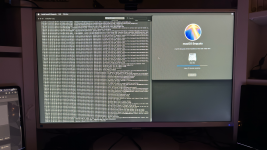
My MacOS installer is freezing at 12 minutes remaining on macOS Sequoia causing the computer to become completely unresponsive and forcing me to force a shutdown. I am unable to discover the issue with my hardware or configuration. Please Help.

Here is my EFI and Specs. I am getting to the installer but getting stack at 12 minutes remaining.
Hackintosh Specs:
CPU: AMD Ryzen 9 7950x3D
GPU: AMD Radeon RX 580
MB: Asus Prime B650-Plus
WiFi: Intel WiFi 6E + Bluetooth M.2 (Not used for initial boot)
RAM: 32GB Corsair Vengeance RGB DDR5-6000 CL 32
SSD: Samsung 870 Evo 500GB SATA (Target Drive), TForce 256GB SATA SSD, Samsung 990 Evo Plus 1TB NVME, Generic Samsung OEM SSD 512GB
 

Attachments
  • EFI.zip
    EFI.zip
    15.8 MB · Views: 1
  • tempImagegnbHn1.png
    tempImagegnbHn1.png
    42.2 MB · Views: 1
Last edited:
Could be your macOS Sequoia installer is borked, it wouldn’t be the first time this has happened to a user. At this later stage in the installation it is unlikely to be an OpenCore issue.

Have you tried running the installation with just your Samsung 870 drive connected, I.e. all other drives temporarily disconnected?
 
Thanks for your response. I just tried removing all the other drives from my system and got stuck at the same spot. I have heard that it may have to do with MacOS not liking the uneven chiplet design of x3D CPUs but I am not sure if this is true. I just rebuilt the installer and am trying again but I seem to have gotten stuck in the same spot. Do you have any other ideas?
 
You need to boot your system using OpenCore Debug release with the following:

Follow this guide for finding MmioWhitelist entries for your system, as you won't be able to boot your AM5 system without adding these to your config.plist.


Change or add the following in your config.plist:
  1. Kernel > Add > Lilu.kext and VirtualSMC.kext 1st & 2nd in the list of kexts to be loaded.
  2. Kernel > Patches > Patch #18 enabled, required for all AM5 systems.
  3. Kernel > Quirks > XhciPortLimit - should be set as False/disabled as you have a UTBMap.kext in your setup, which I assume contains a custom USB configuration.
  4. NVRAM > Add> remove dart=0 boot argument, not required when using OpenCore.
I would recommend removing or at least disabling any un-essential kexts, such as:
  • AMDRyzenCPUPowerManagement.kext
  • CtlnaAHCIPort.kext - doesn't work with AMD systems, it is solely aimed at Intel systems so should not be present.
  • IntelBluetoothFirmware.kext
  • IntelBTPatcher.kext
  • SMCAMDProcessor.kext
  • SMCRadeonSensors.kext
None of the kexts above are required for your system to boot macOS.

The two Intel Bluetooth kexts require another kext, BlueToolFixup.kext for the Intel Bluetooth module to work. That is assuming your UTBMap.kext includes the activation of the Internal USB port the Bluetooth device uses.

Your UTBMap.kext is looking to activate 18 x ports on the XH00 USB controller. This is not allowed. Apple has imposed a 15 x port limit on each USB controller. So SS04, SS05 & SS06 under the XH00 controller will not work in macOS as it currently stands.

Your motherboard only has 2 x USB2.0 physical ports on the rear I/O plate (Black coloured tang) as shown below.

Screenshot 2025-12-21 at 15.56.45.png Rear I/O plate, with 2 x USB2 ports highlighted in RED rectangles.

USB port issues:
  1. The port numbers for the 18 x ports under the XH00 controller doesn't appear to be correct.
  2. The 2 x USB2.0 ports are the only ports that should ever be set with connector type USB2 (0). You have 6 x ports set as USB2 with connector type (0).
  3. All other USB2 ports, whether virtual and served from a physical USB3 or via a Type-C connector should be set to match the physical port, i.e. (3) for a USB3 port and Type-C virtual USB2 port set with connector type type-c+sw (9) or Type-c (10).
  4. The USB2 port served from the WiFi/BT M.2 connector should be set as 'Internal' with connector type (255). During USB port discovery it this port is normally seen with the Bluetooth device attached, assuming the Bluetooth device has been enabled in the Bios.
  5. Any ports or devices served from the 2 x USB2 headers, which can be found along the base of the motherboard, should be set with connector type 'Internal' (255), no matter if they serve a case front USB port or other case device (card reader etc).
  6. You have have port HS01 set as a Physical USB2 port under USB controller XHC0, this is wrong. It is more likely to be a virtual USB2 port served from a USB3 physical port, and that being the case needs to be set with connector type USB3 (3), not as USB2 (0).
  7. SS01 set as 'Internal' (255) also under the XHC0 USB controller. This is wrong. You never have any SSxx ports set as Internal, as all internal ports are either USB 1.1 or 2.0. Again this is probably a USB3 physical port, which should be set with Connector Type USB3 (3), not Internal (255).
  8. I would again question the correctness of the single HS01 port under XHC2 USB controller, which is one of the 6 x ports set as USB2 (0).

Make the changes recommended above to your config.plist and EFI folder, and see how you get on installing Sequoia.
 
  AdBlock Detected
Sure, ad-blocking software does a great job at blocking ads, but it also blocks some useful and important features of our website. For the best possible site experience please take a moment to disable your AdBlocker.