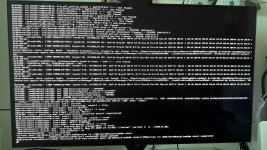
Hardstuck in ACPI Exception: AE_NOT_FOUND
sometimes Registered CoreAnalyticsHub functions with xnu.virtual
logs of pictures attached below
My pc specs:
CPU: AMD 9800x3D
Motherboard: ASUS ROG B650-A
GPU 1: ASUS ROG 5080 ASTRAL
GPU 2: AMD ASROCK RX6600 (conntected display port)
RAM: Kingston Fury 64GB 6000mhz
Bios settings
- Above 4G Decoding Enabled.
- Re-Size BAR Disabled
- Secure Boot Disabled.
- CSM Disabled.
- XHCI Hand-off Enabled
- SATA: AHCI
I'm using Opencore simplify and tried some different approach and still no luck.
Can anyone help me?
Thank you in advance!
sometimes Registered CoreAnalyticsHub functions with xnu.virtual
logs of pictures attached below
My pc specs:
CPU: AMD 9800x3D
Motherboard: ASUS ROG B650-A
GPU 1: ASUS ROG 5080 ASTRAL
GPU 2: AMD ASROCK RX6600 (conntected display port)
RAM: Kingston Fury 64GB 6000mhz
Bios settings
- Above 4G Decoding Enabled.
- Re-Size BAR Disabled
- Secure Boot Disabled.
- CSM Disabled.
- XHCI Hand-off Enabled
- SATA: AHCI
I'm using Opencore simplify and tried some different approach and still no luck.
Can anyone help me?
Thank you in advance!