Ventura/Sonoma installation problem on AMD FX

QCherry

New member
AMD OS X Member
Nov 10, 2024
13
2
3
CPU:
AMD FX
Hi,

I have an error while trying to install OSX Ventura or Sonoma (the same errors occur). I am attaching a video, logs, and my EFI files. Please help. I created the EFI myself based on information from various forums and other EFI files.

Error Video on youtube:

Logs:

EFI in attachment.

My specs:

Processor: AMD FX-8320E
RAM: 32GB RAM DDR3
Mainboard: asrock 970 extreme 3 2.0
Graphics: Sapphire Radeon RX580 8GB

On the bios i have all perfectly configured
 

Attachments

Can you post a copy of your System DSDT.aml so we can generate any necessary custom SSDTs for your system.

Follow one of the guides in the link below.


I am going through your EFI folder, so hopefully will have something to offer this evening.
 
  • Love
Reactions: QCherry
I have been looking at the specification for your Motherboard and think you will have issues with the USB ports, specifically the USB3 ports. These function with the help of an Etron EJ188H controller, which as far as I know has never been supported in macOS.

If possible I would recommend adding a PCIe USB card to your system. Preferably one with either a Fresco Logic (FL1100) or ASMedia controller. The two cards below are supposed to be PCIe 2.0 and macOS compatible.


Alternatively for Type-C ports:


I will have a look at the OEM folder you provided shortly.
 
  • Like
Reactions: QCherry
I have been looking at the specification for your Motherboard and think you will have issues with the USB ports, specifically the USB3 ports. These function with the help of an Etron EJ188H controller, which as far as I know has never been supported in macOS.

If possible I would recommend adding a PCIe USB card to your system. Preferably one with either a Fresco Logic (FL1100) or ASMedia controller. The two cards below are supposed to be PCIe 2.0 and macOS compatible.


Alternatively for Type-C ports:


I will have a look at the OEM folder you provided shortly.


That's no problem, I can buy an expansion card. But first I'd like to get this system up and running. Thank you for your interest and I look forward to your further response.
 
INSTALLATION:
  1. OK, you will have to use one of the 4 x USB2 ports for your installation, this will slow it down, I mean really slow it down, as the ports will probably only work at 1.1 speed.
  2. If you try to use a USB3 port the installation will probably kernel panic. Well that is what I found to be the case with my FX-8350/Asus Sabertooth 990-FX system.
  3. Patience will be the word for you to remember during the installation. As the system might seem to have froze but will in fact be working in the background, just really slowly.
SSDTs:
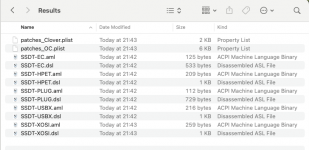
  1. I have generated the custom SSDT's for your system, using your system DSDT.aml and Corpnewt's SSDTTime script. The 'Results' folder attached contains the custom SSDT's and ACPI patches that were generated.
  2. Screenshot 2024-11-12 at 22.24.13.png Results folder contents.
  3. You only need to add the .aml tables to your /EFI/OC/ACPI folder. You also need to add the ACPI > Patches in the patches_OC.plist, otherwise the SSDT's associated with the patches won't work.

USB:
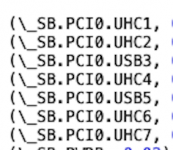
  1. As expected your DSDT.aml shows the USB controllers in your motherboard are not fully macOS compatible. This means the normal USB fixes provided for Intel and Ryzen systems won't work with yours. The USB controllers that show in the DSDT.aml are as follows:
  2. Screenshot 2024-11-12 at 22.17.15.png
  3. Don't expect all of these to have ports set against them, some will be empty. Again that was what I found with my FX system.
  4. Using XLNCUSBFix.kext was the only 'kext' that seemed to help my system. GenericXHCI.kext caused kernel panics, as did trying to generate a custom USBPorts, UTBMap or USBMap.kext.

AUDIO:
  1. Your motherboard uses a Realtek ALC892 Audio Codec, which sounds all fine until you try finding a layout-id that works with this audio codec.
  2. AppleALC.kext supports the use of the audio codec on Intel and possibly some Ryzen systems. It does not support any AMD-FX systems with this codec.
  3. You will probably end up having use VoodooHDA.kext to get the internal audio working.
  4. This is something I didn't sort out on my FX systems, as I have a number of USB speakers, which work as long as the USB port works in macOS or any other OS.
REVISED EFI:
  1. I have created a revised EFI folder for your system, based on OpenCore 1.0.2, using the latest AMD kernel patches, set for your 8-core CPU and RX 580 GPU.
  2. The Revised EFI is attached below and includes the following:
    1. The latest essential kexts
    2. Other kexts that hopefully will help your AMD-FX system work.
    3. The SSDT's and patches from the Results folder.
    4. In case you are using an old PS2 Mouse/keyboard I have included these drivers.
    5. I have done the same with the XhciDxe.efi driver for your USB3 ports, just in case they are needed.
      1. I don't usually include either of these two Driver options.
    6. I have included a populated Resources folder, so you have the OC GUI boot screen not the Picker List (text boot screen).
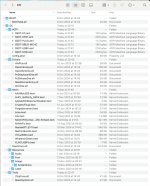
  3. The screenshot below shows the contents of the revised EFI.
    1. Screenshot 2024-11-12 at 22.51.28.png EFI folder contents.
  4. The revised config.plist has been created based on the Dortania Bulldozer guide.
    1. I have cleaned out any unnecessary entries from the config.plist, to make it easier to read.
    2. When checked, OCValidate completed with no errors.
Testing/Booting:
Assuming you want to try this revised EFI.
  1. Don't make any changes to the OC setup.
  2. Copy the revised EFI folder as is to the EFI partition on your macOS USB installation drive
You will need to use the ResetNvramEntry.efi option before you boot with this revised OC setup.
  • Boot from the USB pen drive, then press the Spacebar when you arrive on the OC boot screen (GUI),
    • This will unhide the tools and drivers contained in your OC setup.
  • Select the ResetNvramEntry.efi and the system should automatically reboot.
  • Select your USB pen drive from the system Boot Menu again, and
    • This time boot in to macOS installer using the revised EFI.
If you have a kernel panic, take a photo of the Verbose text shown on the display. Post a copy of the photo here so I can hopefully see what has caused the KP.

Remember that the installation via a USB2 port will go a lot slower, so don't rush to restart the system if you get past the macOS setup Wizard.

Patience is the word when trying to install macOs on an old FX system!
 

Attachments

  • Like
  • Love
Reactions: QCherry and Shaneee
On your EFI - Opencore won't load without any message (stays on the motherboard logo)

//Very thanks for big helping
 
You need to check the bios has been enabled for UEFI booting.

The other possible cause is you have the EFI folder on the root of the USB drive, it should be in the EFI Partition of the USB drive for UEFI booting.
 
You need to check the bios has been enabled for UEFI booting.

The other possible cause is you have the EFI folder on the root of the USB drive, it should be in the EFI Partition of the USB drive for UEFI booting.
I have all in good placed with uefi usb booting. My efi files from first post boot normally opencore.
 
Last edited:
No idea why the EFI wouldn't show in your Bios boot menu. As I added an entry to the config.plist so a boot option called 'OpenCore' would be visible for you to select.
 
Yes, there is OpenCore but it does not load. My EFI which I gave in the first post works only during installation there is the error which I described.
I think the only problem that needs to be solved is why the installer cannot create certain entries in EFI on the (internal) disk (in my EFI). USB3 works in my efi file but USB2 no.
 
Have you mounted the hidden EFI partition on the USB pen drive and copied the EFI folder to the normally hidden partition?

With a Legacy EFI it can be placed in the Root of the USB pen drive, alongside the Boot.efi file and macOS installer. That isn't the case with a UEFI EFI.

Have a look this post over at InsanelyMac, it provides instruction on how to mount the EFI partition in Windows.

 
Yes i copy to hidden partition with special software. Bro, when i copy my EFI files its works but have installation problems. I don't know why your EFI files not working
 
If the EFI is located in the EFI partition on your macOS installation pen drive, then the only option is to go back to your Bios and check that UEFI booting is enabled.

I am assuming you haven't changed any of the EFI folder contents I provided, i.e. the BOOT folder is located within the EFI adjacent to the OC folder.

Also that you renamed the EFI-QCherry folder to EFI, before copying it to the EFI partition. If it is not named EFI then the bios won't see it as a possible boot option.
 
Every other EFI boots OpenCore for me (this is how I run it with UEFI support), but yours seems to freeze and doesn't go any further. I'm copying the files correctly, and the option UEFI: OpenCore appears in the boot list, but after selecting it, only the motherboard logo shows up, and nothing happens. I’m copying it to the hidden EFI partition—I'm doing it right because other configurations work. Please check it, as there might be some special flags that need to be added or removed. Thanks.
 
Last edited:
Finally, I managed to get it running. The problem turned out to be the SSD (Intenso SSD SATA), which is not supported by macOS. All USB 3 ports are working except for USB 2. Audio also works after setting AppleALC to 1 or 2. Ethernet is working as well.

Funny thing, I only figured this out after buying new hardware and trying to install macOS on this drive (even though it was new), which resulted in the same error (on a board with an i7-9700k). I’ll post the EFI with the configuration for FX platforms on the forum and will do my best to help anyone using these processors, as they are affordable and still have a lot of potential. :)
 
  • Like
Reactions: Edhawk
Finally, I managed to get it running. The problem turned out to be the SSD (Intenso SSD SATA), which is not supported by macOS. All USB 3 ports are working except for USB 2. Audio also works after setting AppleALC to 1 or 2. Ethernet is working as well.

Funny thing, I only figured this out after buying new hardware and trying to install macOS on this drive (even though it was new), which resulted in the same error (on a board with an i7-9700k). I’ll post the EFI with the configuration for FX platforms on the forum and will do my best to help anyone using these processors, as they are affordable and still have a lot of potential. :)
hello! I am also trying hackintosh on fx system. After installing Ventura/Sonoma, applying the OCLP Root Patch went smoothly. However, when I enter the login screen after rebooting, scenekit crashes and a black screen appears. I can use it by going directly to the desktop without asking for a login password, but I want to use a screen saver and loginscreen. How did you solve this problem?

FX-8350
AMD Radeon Vega FE
Crosshair V Formula-Z
 
  AdBlock Detected
Sure, ad-blocking software does a great job at blocking ads, but it also blocks some useful and important features of our website. For the best possible site experience please take a moment to disable your AdBlocker.