UPDATED ON 14 APRIL 2026
MY SECOND AMD HACKINTOSH
and its working perfectly - big thanks to this awesome community

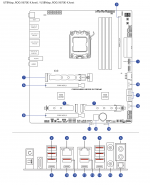
MAINBOARD
ASUS ROG Crosshair X870E Extreme (BIOS_1 1715 / BIOS_2 2202 / 5"LCD FW0109 / ASM4242 FW250708 / IT8857 FW0206GX / ALC4082 FW16)
ROG-X870E-X
Realtek SupremeFX USB Audio (ALC4082) √
Realtek 5Gbit Network Adapter (RTL8126A) √
Aquantia/Marvell FastLinQ Edge 10Gbit Network Adapter (AQC113CS) √
MediaTek Wi-Fi 7 BT5.3 (MT7927) X (not supported in macOS) (removed from mainboard)
ASMedia USB4 (ASM4242) X (not supported in macOS)
VRM-Fan @ 2000 RPM fixed (PWM-Mode)
USB-Mapping
1x Front USB Type-C Port with switch (USB3.2)
U20G_C6 (1)
4x Front USB Type-A Ports (USB3.0)
U5G_E1234 (18)
2x Rear USB Type-C Port with switch (USB3.1)
U10G_C23/U10G_C22 (14)
8x Rear USB Type-A Ports (USB2.0)
U10G_3/U10G_4/U10G_18 (2) / U10G_19 (11) / U10G_20 (13) / U10G_9/U10G_8/U10G_21 (5)
1x Internal USB 2.0 Port for Bluetooth
M.2(WIFI) (15)
1x Internal USB 2.0 Port for USB Audio
USB Audio (6)(16)
CPU
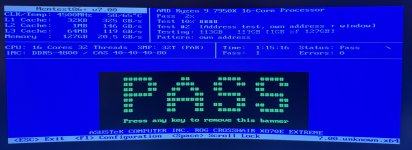
AMD Ryzen 9 7950X 4.5 GHz AM5
100-100000514WOF
iGPU AMD Radeon Graphics X (disabled in BIOS)
PBO-Enhanced (Level 1 90°C)
RAM
Kingston FURY Beast DDR5-5200 MHz 288-Pin 128 GB-Kit (4 x 32 GB)
KF552C40BBK4-128
(DOCP I configuration for 4 modules in dual channel running @ 4800 MHz / CL 40-40-40-80 / 1.25v)
PCI EXPRESS CARDS
Sapphire TOXIC AMD Radeon RX 6950 XT Limited Edition 16 GB √
11317-01-20G
(Riser PCIe-Slot)
OC-BIOS Mode running @ 2565 MHz Core speed
Thermal Grizzly PhaseSheet PTM
TG-PS-50-40
Repaste 3.5 years after purchase.
ASUS T_Sensor @ Waterblock
Thermaltake PCIe 4.0 Dual 90 Degree Riser Cable (130mm / black)
AC-071-CO1OTN-C1
(PCIe-Slot1) PCIEX16(G5)_1 (A)
Broadcom BCM94360CD √
6871658863422
(M.2 NGFF Slot) M.2(WIFI) (15)
DISPLAY
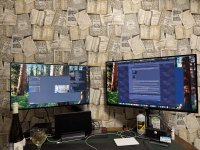
Dell 34“ Curved Monitor
S3422DW
WQHD 3440 x 1440 @ DisplayPort 100Hz
HP Series 5 Pro 34“ Curved Monitor
534PM
WQHD 3440 x 1440 @ DisplayPort 100Hz
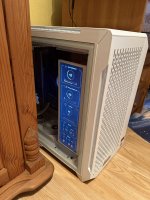
VSDisplay 14,5" Wide Display PC Case Monitor (white)
VS145ZJ01
HD 720 x 2560 @ HDMI 60Hz
SensorPanel Software:
Widgetter (macOS)
AIDA64 Extreme (Windows)
STORAGE
Internal
WD Black SN850X NVMe SSD 2TB (Windows 11)
WDS200T2X0E-00BCA0
(Storage Interface Socket 3) M.2_1 (7)
WD Black SN850X NVMe SSD 1TB (macOS Ventura)
WDS100T2X0E-00BCA0
(Q-DIMM.2 Slot) DIMM.2_1 (8)
WD Black SN850X NVMe SSD 2TB (macOS Beta/Test)
WDS100T2X0E-00BCA0
(Q-DIMM.2 Slot) DIMM.2_2 (8)
WD Green SN350 NVMe SSD 2TB (Grub/OC/OC-Debug/OC-Test/Ubuntu Linux/Acronis Rescue Boot macOS+WinPE/Gparted/Installation Win+macOS)
WDS100T2G0C-00CDH0
(U.2 SFF-8639) SLIMSAS (10)
KingSpec P3 SSD 4TB SATA-3 (Games NTFS)
B0BKL4PQM2
(SATA-3 Port 1) SATA6G_1 (9)
External
ORICO MacData Vault 4Big DAS Studio
9948C3
(USB 3.1 Gen2 + Hub)
Seagate Exos 7E10 8TB SATA-3 (Data ExFAT)
ST8000NM017B-2TJ103
(Slot 1)
Seagate Exos 7E8 8TB SATA-3 (System-Backups ExFAT)
ST8000NM000A-2KE101
(Slot 2)
Seagate Exos X22 22TB SATA-3 (Backups ExFAT)
ST22000NM001E
(Slot 3)
KingSpec P3 SSD 2TB SATA-3
B0BKL4PQM2
(Slot 4)
Crucial P5 Plus NVMe 2280 512GB (Portable-Data ExFAT)
MTFDKBK512QFM
(USB-C 40gbps - Thunderbolt 3/4 & USB 4.0 Enclosure - ORICO M234C3-U4-GY-BP-V1)
CASE
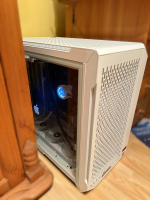
Thermaltake CTE C750 Air Snow Full Tower Chassis
CA-1X6-00F6WN-00
CABLES
AsiaHorse 16AWG Sleeved Cable Kit (300mm / white)
B0B4V8T8BD
Sleeved Cables for CPU (4+4-Pin) & Mainboard (24-Pin)
deleyCON 18AWG Sleeved PCIe Cable Kit (300mm / black & grey)
MK5570
Sleeved Cables for GPU (8+8+6-Pin)
PSU
NZXT C1000 Gold
PA-0G1BB-EU
CPU COOLING
Thermaltake TH420 V2 Ultra ARGB AIO Liquid Cooler Snow Edition (420mm)
CL-W407-PL14SW-A
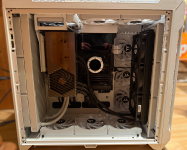
(Back-Intake PUSH with 3x Thermaltake CT140 ARGB white - 140mm PC Cooling Fans)
Water pump @ 2200 RPM (PWM-Mode) / Curve (Trigger) 3300 RPM @ 70-95°C CPU Core-temp
-> Liquid-temps @ idle 23°C / normal 25°C / max 33°C
Radiator-Fans @ 700 RPM (PWM-Mode) / Curve (Linear) 1000 RPM @ 30-35°C Liquid-temp
-> CPU Core-temps @ idle 38°C / normal 40-65°C / max 90°C
Thermal Grizzly AM5 Contact Sealing Frame
TG-CSF-AM5
GPU COOLING
Sapphire TOXIC AMD Radeon RX 6950 XT Limited Edition Build-in Asetek AIO Liquid Hybrid Cooler (360mm)
11317-01-20G
(3x Front-Intake PULL with Sapphire branded FirstDo FD1225H12D ARGB black - 120mm PC Cooling Fans)
ZeroRPM disabled (PowerPlayTable @ DeviceProperties -> 700rpm)
SYSTEM COOLING
Thermaltake CT140 EX ARGB Sync white - 140mm PC Cooling Fans
CL-F191-PL14SW-A
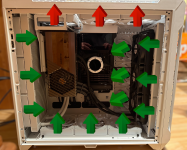
(3x Front-Intake PUSH)
Thermaltake CT140 EX Reverse ARGB Sync white - 140mm PC Cooling Fans
CL-F195-PL14SW-A
(3x Side-Intake + 3x Bottom-Intake)
Thermaltake CT140 white - 140mm PC Cooling Fans
CL-F152-PL14WT-A
(3x Top-Exhaust)
Chassis Fans (Intake) @ 700 RPM (PWM-Mode) / Curve (Trigger) 1000 RPM @ 75-95°C CPU Core-temp
Chassis Fans (Exhaust) @ 500 RPM (PWM-Mode) / Curve (Linear) 1000 RPM @ 40°C T_Sensor-Temp
AUDIO INTERFACE
Focusrite Scarlett Solo 4th Generation USB √ Output: Logitech Speaker System Z523 / Input: E-Guitar
PCM0017717-000
Creative Sound Blaster PLAY! 3 USB DAC AMP and External Sound Card √ Plantronics RIG 400HX XBOX Headset with Microphone
0054651191273
KEYBOARD/MOUSE/CONTROLLER
Logitech Craft Wireless Keyboard (Win/Mac)
920-008484
Logitech G502 LIGHTSPEED Wireless Gaming Mouse
MR0076
Xbox Wireless Controller (Robot White)
QAT-00009
(with Xbox Wireless Adapter for Windows)
check my Github page for files and more information
If anyone finds mistakes or has suggestions for improvement, please post them here, thank you
MY SECOND AMD HACKINTOSH
and its working perfectly - big thanks to this awesome community
MAINBOARD
ASUS ROG Crosshair X870E Extreme (BIOS_1 1715 / BIOS_2 2202 / 5"LCD FW0109 / ASM4242 FW250708 / IT8857 FW0206GX / ALC4082 FW16)
ROG-X870E-X
Realtek SupremeFX USB Audio (ALC4082) √
Realtek 5Gbit Network Adapter (RTL8126A) √
Aquantia/Marvell FastLinQ Edge 10Gbit Network Adapter (AQC113CS) √
MediaTek Wi-Fi 7 BT5.3 (MT7927) X (not supported in macOS) (removed from mainboard)
ASMedia USB4 (ASM4242) X (not supported in macOS)
VRM-Fan @ 2000 RPM fixed (PWM-Mode)
USB-Mapping
1x Front USB Type-C Port with switch (USB3.2)
U20G_C6 (1)
4x Front USB Type-A Ports (USB3.0)
U5G_E1234 (18)
2x Rear USB Type-C Port with switch (USB3.1)
U10G_C23/U10G_C22 (14)
8x Rear USB Type-A Ports (USB2.0)
U10G_3/U10G_4/U10G_18 (2) / U10G_19 (11) / U10G_20 (13) / U10G_9/U10G_8/U10G_21 (5)
1x Internal USB 2.0 Port for Bluetooth
M.2(WIFI) (15)
1x Internal USB 2.0 Port for USB Audio
USB Audio (6)(16)
CPU
AMD Ryzen 9 7950X 4.5 GHz AM5
100-100000514WOF
iGPU AMD Radeon Graphics X (disabled in BIOS)
PBO-Enhanced (Level 1 90°C)
RAM
Kingston FURY Beast DDR5-5200 MHz 288-Pin 128 GB-Kit (4 x 32 GB)
KF552C40BBK4-128
(DOCP I configuration for 4 modules in dual channel running @ 4800 MHz / CL 40-40-40-80 / 1.25v)
PCI EXPRESS CARDS
Sapphire TOXIC AMD Radeon RX 6950 XT Limited Edition 16 GB √
11317-01-20G
(Riser PCIe-Slot)
OC-BIOS Mode running @ 2565 MHz Core speed
Thermal Grizzly PhaseSheet PTM
TG-PS-50-40
Repaste 3.5 years after purchase.
ASUS T_Sensor @ Waterblock
Thermaltake PCIe 4.0 Dual 90 Degree Riser Cable (130mm / black)
AC-071-CO1OTN-C1
(PCIe-Slot1) PCIEX16(G5)_1 (A)
Broadcom BCM94360CD √
6871658863422
(M.2 NGFF Slot) M.2(WIFI) (15)
DISPLAY
Dell 34“ Curved Monitor
S3422DW
WQHD 3440 x 1440 @ DisplayPort 100Hz
HP Series 5 Pro 34“ Curved Monitor
534PM
WQHD 3440 x 1440 @ DisplayPort 100Hz
VSDisplay 14,5" Wide Display PC Case Monitor (white)
VS145ZJ01
HD 720 x 2560 @ HDMI 60Hz
SensorPanel Software:
Widgetter (macOS)
AIDA64 Extreme (Windows)
STORAGE
Internal
WD Black SN850X NVMe SSD 2TB (Windows 11)
WDS200T2X0E-00BCA0
(Storage Interface Socket 3) M.2_1 (7)
WD Black SN850X NVMe SSD 1TB (macOS Ventura)
WDS100T2X0E-00BCA0
(Q-DIMM.2 Slot) DIMM.2_1 (8)
WD Black SN850X NVMe SSD 2TB (macOS Beta/Test)
WDS100T2X0E-00BCA0
(Q-DIMM.2 Slot) DIMM.2_2 (8)
WD Green SN350 NVMe SSD 2TB (Grub/OC/OC-Debug/OC-Test/Ubuntu Linux/Acronis Rescue Boot macOS+WinPE/Gparted/Installation Win+macOS)
WDS100T2G0C-00CDH0
(U.2 SFF-8639) SLIMSAS (10)
KingSpec P3 SSD 4TB SATA-3 (Games NTFS)
B0BKL4PQM2
(SATA-3 Port 1) SATA6G_1 (9)
External
ORICO MacData Vault 4Big DAS Studio
9948C3
(USB 3.1 Gen2 + Hub)
Seagate Exos 7E10 8TB SATA-3 (Data ExFAT)
ST8000NM017B-2TJ103
(Slot 1)
Seagate Exos 7E8 8TB SATA-3 (System-Backups ExFAT)
ST8000NM000A-2KE101
(Slot 2)
Seagate Exos X22 22TB SATA-3 (Backups ExFAT)
ST22000NM001E
(Slot 3)
KingSpec P3 SSD 2TB SATA-3
B0BKL4PQM2
(Slot 4)
Crucial P5 Plus NVMe 2280 512GB (Portable-Data ExFAT)
MTFDKBK512QFM
(USB-C 40gbps - Thunderbolt 3/4 & USB 4.0 Enclosure - ORICO M234C3-U4-GY-BP-V1)
CASE
Thermaltake CTE C750 Air Snow Full Tower Chassis
CA-1X6-00F6WN-00
CABLES
AsiaHorse 16AWG Sleeved Cable Kit (300mm / white)
B0B4V8T8BD
Sleeved Cables for CPU (4+4-Pin) & Mainboard (24-Pin)
deleyCON 18AWG Sleeved PCIe Cable Kit (300mm / black & grey)
MK5570
Sleeved Cables for GPU (8+8+6-Pin)
PSU
NZXT C1000 Gold
PA-0G1BB-EU
CPU COOLING
Thermaltake TH420 V2 Ultra ARGB AIO Liquid Cooler Snow Edition (420mm)
CL-W407-PL14SW-A
(Back-Intake PUSH with 3x Thermaltake CT140 ARGB white - 140mm PC Cooling Fans)
Water pump @ 2200 RPM (PWM-Mode) / Curve (Trigger) 3300 RPM @ 70-95°C CPU Core-temp
-> Liquid-temps @ idle 23°C / normal 25°C / max 33°C
Radiator-Fans @ 700 RPM (PWM-Mode) / Curve (Linear) 1000 RPM @ 30-35°C Liquid-temp
-> CPU Core-temps @ idle 38°C / normal 40-65°C / max 90°C
Thermal Grizzly AM5 Contact Sealing Frame
TG-CSF-AM5
GPU COOLING
Sapphire TOXIC AMD Radeon RX 6950 XT Limited Edition Build-in Asetek AIO Liquid Hybrid Cooler (360mm)
11317-01-20G
(3x Front-Intake PULL with Sapphire branded FirstDo FD1225H12D ARGB black - 120mm PC Cooling Fans)
ZeroRPM disabled (PowerPlayTable @ DeviceProperties -> 700rpm)
SYSTEM COOLING
Thermaltake CT140 EX ARGB Sync white - 140mm PC Cooling Fans
CL-F191-PL14SW-A
(3x Front-Intake PUSH)
Thermaltake CT140 EX Reverse ARGB Sync white - 140mm PC Cooling Fans
CL-F195-PL14SW-A
(3x Side-Intake + 3x Bottom-Intake)
Thermaltake CT140 white - 140mm PC Cooling Fans
CL-F152-PL14WT-A
(3x Top-Exhaust)
Chassis Fans (Intake) @ 700 RPM (PWM-Mode) / Curve (Trigger) 1000 RPM @ 75-95°C CPU Core-temp
Chassis Fans (Exhaust) @ 500 RPM (PWM-Mode) / Curve (Linear) 1000 RPM @ 40°C T_Sensor-Temp
AUDIO INTERFACE
Focusrite Scarlett Solo 4th Generation USB √ Output: Logitech Speaker System Z523 / Input: E-Guitar
PCM0017717-000
Creative Sound Blaster PLAY! 3 USB DAC AMP and External Sound Card √ Plantronics RIG 400HX XBOX Headset with Microphone
0054651191273
KEYBOARD/MOUSE/CONTROLLER
Logitech Craft Wireless Keyboard (Win/Mac)
920-008484
Logitech G502 LIGHTSPEED Wireless Gaming Mouse
MR0076
Xbox Wireless Controller (Robot White)
QAT-00009
(with Xbox Wireless Adapter for Windows)
check my Github page for files and more information
If anyone finds mistakes or has suggestions for improvement, please post them here, thank you
Last edited: