Samsung M7 Monitor HDMI audio problem

BCBoy1

Member
AMD OS X Member
May 28, 2020
39
11
8
Hello,

I have the configuration below.
I just got back to hackintos, but the hmdi sound is crackling.
I can't figure out what the problem could be.
If I mirror the display or use the jack, the sound is fine.
But my monitor doesn't have a jack.
Only HDMI.

Attached is EFI, maybe someone can find a solution.
 

Attachments

Which OCLP variant/method are you using to enable the Broadcom WiFi and Realtek audio ?

Is the RX 580 4G dGPU fully recognised by macOS, I.e. does the IOReg path contain any ‘pci-bridge’ entries when viewed in Hackintool > PCIe tab?
 
Which OCLP variant/method are you using to enable the Broadcom WiFi and Realtek audio ?

Is the RX 580 4G dGPU fully recognised by macOS, I.e. does the IOReg path contain any ‘pci-bridge’ entries when viewed in Hackintool > PCIe tab?


Hello,

I used this version:

Hackintool:
Képernyőfotó 2026-08-05 - 7.11.56.png
 
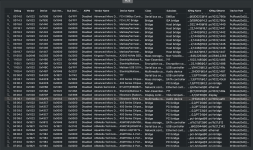
Can you post a screenshot of the PCIe tab with the IOReg Name fully expanded, so we can see the full name. Some of the devices show ‘pci-bridge’ in their IOReg Names, but we can’t see if the GPU or GPU Audio devices contain the same.
 
Can you post a screenshot of the PCIe tab with the IOReg Name fully expanded, so we can see the full name. Some of the devices show ‘pci-bridge’ in their IOReg Names, but we can’t see if the GPU or GPU Audio devices contain the same.


it will be good like this
Képernyőfotó 2026-08-05 - 15.17.00.png
 
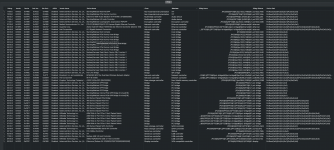
Yes, that is fine.

I can now see the GFX0 and HDAU devices are correctly named, which is what I wanted to check.

There are a few other devices that have missing sections of their IOReg Names, but these shouldn't affect the HDMI audio from the dGPU. It may mean these devices are not fully enabled and visible to macOS, as the OS won't know how to integrate these devices.

2 x WiFi devices (Broadcom & Intel). Hopefully only one of these is enabled in macOS.

Screenshot 2026-08-05 at 14.58.59.png

2 x Ethernet controllers.

Screenshot 2026-08-05 at 14.59.33.png

5 x Asmedia PCIe switch devices & a 400 series Chipset PCIe port.

Screenshot 2026-08-05 at 15.00.17.png

These devices would only require renaming with an SSDT-Bridge ACPI table if they don't work correctly in macOS. Is that the case for any of these devices?

Which method have you used for reinstalling AppleHDA.kext in macOS Tahoe?

Is AppleALC.kext showing as being installed and enabled on the Hackintool > Extensions tab and in the 'Resources' section of IORegistryExplorer?

I see you are using WhateverGreen.kext v1.7.1, does this contain the same fixes that were added to the v1.7.1d7 fork of WhateverGreen.kext to prevent a Black Screen issue when running Tahoe? I have attached a copy of WhateverGreen.kext v1.7.1d7 for you to use, see if this makes any difference to how the HDMI audio functions.

Both AppleALC (AALC) and WhateverGreen (WEG) contain configuration files for HDMI and DP audio, but I am not sure any changes were made to these functions when the forked version of WEG was released.

Something you should be aware of is that USBToolBox.kext and UTBMap.kext aren't supported in macOS Tahoe. You need to generate a new USBMap.kext or USBPorts.kext in order for your custom USB configuration to work correctly in macOS Tahoe. As Apple changed some of the port naming & numbering conventions with the release of Tahoe.

 

Attachments

Yes, that is fine.

I can now see the GFX0 and HDAU devices are correctly named, which is what I wanted to check.

There are a few other devices that have missing sections of their IOReg Names, but these shouldn't affect the HDMI audio from the dGPU. It may mean these devices are not fully enabled and visible to macOS, as the OS won't know how to integrate these devices.

2 x WiFi devices (Broadcom & Intel). Hopefully only one of these is enabled in macOS.

View attachment 19568

2 x Ethernet controllers.

View attachment 19569

5 x Asmedia PCIe switch devices & a 400 series Chipset PCIe port.

View attachment 19570

These devices would only require renaming with an SSDT-Bridge ACPI table if they don't work correctly in macOS. Is that the case for any of these devices?

Which method have you used for reinstalling AppleHDA.kext in macOS Tahoe?

Is AppleALC.kext showing as being installed and enabled on the Hackintool > Extensions tab and in the 'Resources' section of IORegistryExplorer?

I see you are using WhateverGreen.kext v1.7.1, does this contain the same fixes that were added to the v1.7.1d7 fork of WhateverGreen.kext to prevent a Black Screen issue when running Tahoe? I have attached a copy of WhateverGreen.kext v1.7.1d7 for you to use, see if this makes any difference to how the HDMI audio functions.

Both AppleALC (AALC) and WhateverGreen (WEG) contain configuration files for HDMI and DP audio, but I am not sure any changes were made to these functions when the forked version of WEG was released.

Something you should be aware of is that USBToolBox.kext and UTBMap.kext aren't supported in macOS Tahoe. You need to generate a new USBMap.kext or USBPorts.kext in order for your custom USB configuration to work correctly in macOS Tahoe. As Apple changed some of the port naming & numbering conventions with the release of Tahoe.


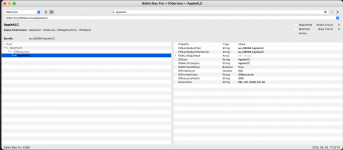
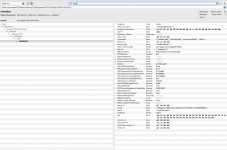
attached pictures of the sound devices in IORegisryExplorer:
Képernyőfotó 2026-08-05 - 17.02.22.pngKépernyőfotó 2026-08-05 - 17.04.27.pngKépernyőfotó 2026-08-05 - 17.06.45.png

For wifi, AX200 is disabled in bios, but both windows and macOS show this is an Asrock bug.

Since the Intel i211 is not in the best working condition, I installed a realtek ethernet.

The other parts you highlighted were not installed by me, the system shows them automatically.

WhateverGreen was replaced but there is no change.

The sound still works on the external speaker, so this solution may remain.

By the way, I tried the display port and the sound is crackling there too.
 
  AdBlock Detected
Sure, ad-blocking software does a great job at blocking ads, but it also blocks some useful and important features of our website. For the best possible site experience please take a moment to disable your AdBlocker.