Hi everyone,
I'm trying to boot the macOS BigSur installer on a laptop with a locked/restrictive BIOS, but I'm getting stuck at a persistent kernel panic related to the Embedded Controller / ACPI ERAM region. I use OCAT.
Hardware Specifications:
Current EFI Setup:
2. Rename _REG to XREG (Find: 5F524547 / Replace: 58524547)
Issue:
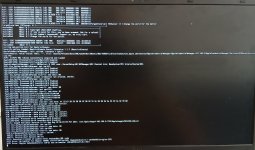
During the verbose boot process, the kernel crashes with the following error:
"Error: No handler for Region [ERAM] (ffffff93621d14b0) [EmbeddedControl]"
Even with ECEnabler.kext active and the _REG to XREG ACPI patch enabled, the OS fails to attach a handler to the native BIOS ERAM region before the panic occurs.
I have attached my config.plist and the boot error screenshot. Any guidance on how to properly bypass or patch this ERAM region call for this Ryzen BIOS would be greatly appreciated!
Thanks in advance for your help!
I'm trying to boot the macOS BigSur installer on a laptop with a locked/restrictive BIOS, but I'm getting stuck at a persistent kernel panic related to the Embedded Controller / ACPI ERAM region. I use OCAT.
Hardware Specifications:
- Model: Thomson N15R53
- CPU: AMD Ryzen 5 3500U (Picasso / Zen+)
- iGPU: AMD Radeon Vega 8
- RAM: 8 GB
- Storage: 256 GB SATA SSD
- Bootloader: OpenCore 0.8.8+
Current EFI Setup:
- Kexts: Lilu, VirtualSMC, ECEnabler (v1.0.3+), NootedRed (v0.8.10+), RestrictEvents.
- ACPI: SSDT-EC-USBX-AMD.aml enabled.
- ACPI Patches applied:
2. Rename _REG to XREG (Find: 5F524547 / Replace: 58524547)
Issue:
During the verbose boot process, the kernel crashes with the following error:
"Error: No handler for Region [ERAM] (ffffff93621d14b0) [EmbeddedControl]"
Even with ECEnabler.kext active and the _REG to XREG ACPI patch enabled, the OS fails to attach a handler to the native BIOS ERAM region before the panic occurs.
I have attached my config.plist and the boot error screenshot. Any guidance on how to properly bypass or patch this ERAM region call for this Ryzen BIOS would be greatly appreciated!
Thanks in advance for your help!