Post-install issues Ventura 13.7.8

leading_zero

New member
AMD OS X Member
Jan 14, 2026
4
3
3
CPU:
AMD Ryzen 5900XT
Hi peeps,

Having a few issues with the new build. I used OC Simplify to put together the EFI, due to struggling with the Dortania guides. I have a feeling that some kexts are conflicting or incorrect, or SSDT configuration shenanigans.
  1. Machine not shutting down/booting properly
I'll sometimes need to reboot the machine a number of times to get to the login screen and a proper shut down requires holding the power button until the machine turns off.​
  1. Bluetooth not working properly
I have a Broadcom card with BCM_4350C2 chipset, I had Bluetooth and Handoff working on one boot but it's disabled on subsequent boots.​
  1. Ethernet not working
Realtek8111.kext not working, motherboard chip is a Reaktek 8118 chip. I've tried a few older versions of this kext but haven't had any luck activating the port.​
If this is unable to be used is a USB to Ethernet adapter a viable option?​
  1. Best way to map USB ports?
I think the limit for MacOS is 15 ports so I should be fine to enable them using USBTool however I have something like 30 ports appear. I have a feeling this means that USB3 ports are appearing as 2 ports due to being USB 2 & 3.​
  • Motherboard has 1 x USB C, 4 x USB 3 & 2 x USB 2 ports
  • FW card (Sonnet FW800 PCI card) has 2x USB 3 ports
  • 2 x USB 3 & 2 x USB 2 on the PC case
Just to note - Anytime I've added or removed kexts I've used ProperTree to rebuild the config file so hopefully there's no redundant entries in there. Have also reset NVRAM when applying new kexts if they don't appear to work after rebooting the system.​
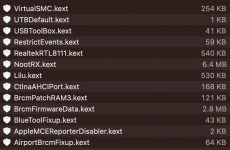
Snapshot of kext directory and config.plist file attached.​
Thanks in advance for your assistance.​
 

Attachments

  • Screenshot 2026-01-17 at 5.09.35 pm.png
    Screenshot 2026-01-17 at 5.09.35 pm.png
    118.7 KB · Views: 2
  • config.plist
    config.plist
    43.2 KB · Views: 0
1. The system not shutting down and auto rebooting is a common issue on a Hack, when USB ports are not correctly defined and configured in macOS. As uncalled for USB power events prevent the system shutting down. Simple answer to this is for you to generate a custom USB configuration/kext for your system. See 4. below.

2. Which Broadcom WiFi/BT card are you using? How is it mounted in your system M.2 or PCIe connector & USB header cable/port?

The Bluetooth showing correctly and working on one boot usually means the USB port the Bluetooth module is connected to worked in that instance. The most common reason for a Broadcom Bluetooth module to show as BCM_4350C2 in Hackintool's > System > Peripherals tab is the USB port it is using is not configured correctly for macOS.

Have you disabled or physically removed the Realtek WiFi/BT card that is built in to your motherboard when purchased? Having 2 x WiFi/BT card present and enabled in the system can cause unnecessary conflicts.

3. Your Realtek 8118 Ethernet controller should work with the latest version of the RealtekRTL8111.kext v3.0.0, see the link below.


If you still can't get the Ethernet port to work, then yes a USB to Ethernet adapter is a good option. Just make sure you haven't disabled the Ethernet/LAN port in your Bios.

4. The best way to create a custom USB configuration for your Hack, while not having access to macOS on the system, is to use USBToolBox Tool in Windows.
  • You will not need USBInjectAll.kext for your AMD system, as this is solely an Intel based kext.
  • You will not require UTBDefault.kext either, if you create the UTBMap.kext in Windows.
  • You will not require XhciPortLimit Quirk to be enabled, if you create the UTBMap.kext in Windows.
The 15 x port limit imposed by Apple is for each USB Controller. So as your AMD system is likely to have two/three or more USB controllers present it means you are not restricted to a maximum of 15 x ports. You should be able to include every USB port present in your system in the UTBMap.kext.

The Sonnet card will have a separate USB controller, which you will be able to include as part of your USB configuration. This is also seen when a PCIe Thunderbolt card is present in the system.

When discovering and configuring your USB ports you need to remember the following:
  1. USB2 (0) - Physical USB2 ports on rear I/O plate, these ports always have a Black coloured tang. These are the only ports that should ever be set as USB2 (0).
  2. USB3 (3) - Physical USB3 ports on rear I/O plate, these ports can have a Red, Blue, Yellow or Cyan coloured tang.
    1. Virtual USB2 ports - served from physical USB3 ports should be set the same as the physical port
  3. USB3 (3) - Motherboard Header, usually serving the case front USB3 ports.
    1. Virtual USB2 ports - served from the case front USB3 ports should be set the same as the physical port
  4. Internal (255) - Motherboard USB2 header, this will be any device served from a header port, such as Bluetooth module, case front USB2 ports, case front card reader etc.
  5. Internal (255) - Built-in M.2 WiFi/BT connector, motherboard LEDs and CPU Cooler USB connections.
  6. Type-c+sw (9) - will only show two ports being available, 1 x Physical Type-C and 1 x virtual USB2 port.
  7. Type-c (10) - will show 4 x ports being available. This occurs when the Type-C device initially inserted, then removed, the device is flipped 180° and reinserted in the same port, 2 x Type-C and 2 x virtual USB2 ports.
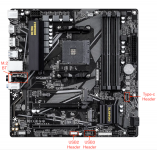
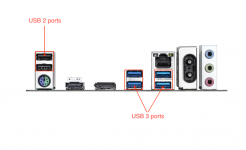
The two screenshots below show the USB ports present on your motherboard and the rear I/O plate.

Screenshot 2026-01-17 at 14.36.44.png Motherboard layout with USB headers highlighted

Screenshot 2026-01-17 at 14.36.58.png Rear I/O plate with USB ports highlighted.

You haven't said which GPU is installed in your system, so I don't know if you need to use NootRX.kext or if you would be better served using WhateverGreen.kext.

I hope this helps.
 
  • Like
Reactions: leading_zero
Appreciate the quick reply Edhawk, will make my way through your suggestions today and report back.

I'm going to wing it and see if I can map the USB ports in MacOS. I've avoided the Windows partition since getting MacOS running as I think the NVRAM resets have caused the Win partition to want to repair itself. My reason for avoiding Windows now (and it repairing itself) is that my old Intel Hackintosh would sometimes have issues with MacOS apps (namely CPU usage in my DAW - Bitwig) after Windows would force itself to update. If there's any validity to me holding this suspicion (that Windows does unwanted "stuff" to MacOS EFI partitions) - are you aware of any way I can nudge Windows to stay in it's lane so that I can confidently use both OSs side by side?

GPU added to my signature - it's a Gigabyte Radeon 6700XT and I added NootRX to the kexts folder after successfully installing MacOS.

The Broadcom card is a BCM94360CD and is currently plugged in only by PCI. I'll have to take a look at what else is plugged into the motherboard USB headers and see which one I want to sacrifice if the Broadcom card needs a header to function correctly.

I'll also make sure to physically remove the existing Wifi card if I can't disable it in the BIOS.

If I can't get Ethernet going I'll look into a USB to Ethernet adapter. Hopefully sorting out the above will have a knock on effect here.

Thanks again for your help, much appreciated.
 
Last edited:
Update time!

Did a bit of a wonky (read: lazy) USBTool mapping before unplugging the machine to remove the M.2 Wifi card and plug in the Broadcom card to the USB header on the motherboard.

Restarted the machine and was able to get back into MacOS. Phew! Happy to say that handoff stuff worked straight of the bat, can see the machine every time I open up the sharing pane on my iPhone so it looks like that issue is sorted. But still no ethernet.

Tested shutting the machine down and this time it worked. Fired her back up, lo and behold, ethernet is sitting right there at the top of the network panel in System Prefs!

I'll get the USB mapping sorted a little later on today, but from what I can gather, I've only had to sacrifice the two front USB 2 ports on my case to get everything working as I'd like it to.

Thanks for the help Edhawk!️

Edit: Edhawk, if you could please share your thoughts on how to get Windows and MacOS running happily side by side in regards to the comment I made in my previous post I'd really appreciate it. I only want to use Windows for gaming and am not too fussed about not gaming if it means everything is swell in MacOS-land. Cheers!
 
If I am honest I haven’t noticed any detrimental interaction between macOS and Windows on any of my dual booting Hacks. So I am not sure what to suggest.
 
  AdBlock Detected
Sure, ad-blocking software does a great job at blocking ads, but it also blocks some useful and important features of our website. For the best possible site experience please take a moment to disable your AdBlocker.