Hello everyone i'am new on mackintosh I have successful installation of Asus tuf gaming x570- plus wifi, with and ryzen 9 5900x , but after install my cpu show just 3,7 ghz Unknown, ant bluetooth and wifi not working, maybe someone could help me, thanks.
sorry for my English
Without more detail about your wifi / BT card, it's difficult to know what the issue is. What card?, What chip does it use?, is it Broadcom etc. The processor naming in 'about this Mac' I can help with, here's a short video I made.
I think it works best with a MacPro6,1/7,1 SMBIOS. It worked with my two older FX based AMD systems.
Intel WiFi and Bluetooth modules, which I assume the OP is using, when booting Monterey requires the following kexts:
Airportitlwm.kext - for use with native Apple WiFi app
IntelBluetoothFirmware.kext - to fix firmware issues
BlueToolFixup.kext - fix BT issues in Monterey
You should not use the IntelBluetoothInjector.kext when booting Monterey. As the changes Apple made to the Bluetooth stack in Monterey mean this kext won't work. It should only be used if you are booting Big Sur or older versions of macOS. You need to set the MaxKernel entry for the kext to 20.99.99 (Big Sur) in the config.plist to prevent it loading in Monterey, if it has already been added to your OC setup.
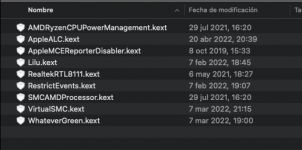
The three kexts your system needs when booting Monterey are attached below.
I think it works best with a MacPro6,1/7,1 SMBIOS. It worked with my two older FX based AMD systems.
Intel WiFi and Bluetooth modules, which I assume the OP is using, when booting Monterey requires the following kexts:
Airportitlwm.kext - for use with native Apple WiFi app
IntelBluetoothFirmware.kext - to fix firmware issues
BlueToolFixup.kext - fix BT issues in Monterey
You should not use the IntelBluetoothInjector.kext when booting Monterey. As the changes Apple made to the Bluetooth stack in Monterey mean this kext won't work. It should only be used if you are booting Big Sur or older versions of macOS. You need to set the MaxKernel entry for the kext to 20.99.99 (Big Sur) in the config.plist to prevent it loading in Monterey, if it has already been added to your OC setup.
The three kexts your system needs when booting Monterey are attached below.
Without more detail about your wifi / BT card, it's difficult to know what the issue is. What card?, What chip does it use?, is it Broadcom etc. The processor naming in 'about this Mac' I can help with, here's a short video I made.
I will try this method, because that other method didn't help, kext I install but still doesn't recognize my cpu cpu. info shows good information, just I don't know what type of my AMD Ryzen 9 5900x
The latest builds of Acidanthera's RestrictEvents also fixes AMD CPU names in About This Mac: Required is just the latest build of the upcoming 1.0.2: RELEASE: https://dortania.github.io/builds/?product=RestrictEvents&viewall=true This also removes the need to map memory on MacPro7,1 SMBIOS...
forum.amd-osx.com
Nota de Aluveitie
Si su CPU se muestra como Desconocido en OC 0.6.7 o posterior, intente configurar ProcessorType en 1537 para 6 núcleos o menos y 3841 para 8 núcleos o más en config.plist en PlatformInfo > Generic.
This site uses cookies to help personalise content, tailor your experience and to keep you logged in if you register.
By continuing to use this site, you are consenting to our use of cookies.
Sure, ad-blocking software does a great job at blocking ads, but it also blocks some useful and important features of our website. For the best possible site experience please take a moment to disable your AdBlocker.