No wifi no bluetooth and cpu show just 3.7 Ghz Unknown

nenada

New member
AMD OS X Member
May 29, 2022
7
0
1
CPU:
Ryzen 9 5900x
Hello everyone i'am new on mackintosh I have successful installation of Asus tuf gaming x570- plus wifi, with and ryzen 9 5900x , but after install my cpu show just 3,7 ghz Unknown, ant bluetooth and wifi not working, maybe someone could help me, thanks.
sorry for my English
 
Without more detail about your wifi / BT card, it's difficult to know what the issue is. What card?, What chip does it use?, is it Broadcom etc. The processor naming in 'about this Mac' I can help with, here's a short video I made.

 
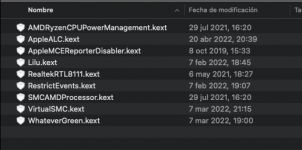
Adding the RestrictEvents.kext to your setup usually fixes the CPU naming issue.
 
I think it works best with a MacPro6,1/7,1 SMBIOS. It worked with my two older FX based AMD systems.

Intel WiFi and Bluetooth modules, which I assume the OP is using, when booting Monterey requires the following kexts:
  • Airportitlwm.kext - for use with native Apple WiFi app
  • IntelBluetoothFirmware.kext - to fix firmware issues
  • BlueToolFixup.kext - fix BT issues in Monterey
You should not use the IntelBluetoothInjector.kext when booting Monterey. As the changes Apple made to the Bluetooth stack in Monterey mean this kext won't work. It should only be used if you are booting Big Sur or older versions of macOS. You need to set the MaxKernel entry for the kext to 20.99.99 (Big Sur) in the config.plist to prevent it loading in Monterey, if it has already been added to your OC setup.

The three kexts your system needs when booting Monterey are attached below.

 

Attachments

  • Like
Reactions: nenada
I think it works best with a MacPro6,1/7,1 SMBIOS. It worked with my two older FX based AMD systems.

Intel WiFi and Bluetooth modules, which I assume the OP is using, when booting Monterey requires the following kexts:
  • Airportitlwm.kext - for use with native Apple WiFi app
  • IntelBluetoothFirmware.kext - to fix firmware issues
  • BlueToolFixup.kext - fix BT issues in Monterey
You should not use the IntelBluetoothInjector.kext when booting Monterey. As the changes Apple made to the Bluetooth stack in Monterey mean this kext won't work. It should only be used if you are booting Big Sur or older versions of macOS. You need to set the MaxKernel entry for the kext to 20.99.99 (Big Sur) in the config.plist to prevent it loading in Monterey, if it has already been added to your OC setup.

The three kexts your system needs when booting Monterey are attached below.
Thanks man, all Bluetooth and wifi is working, but CPU still showing Unknown
 
Without more detail about your wifi / BT card, it's difficult to know what the issue is. What card?, What chip does it use?, is it Broadcom etc. The processor naming in 'about this Mac' I can help with, here's a short video I made.

I will try this method, because that other method didn't help, kext I install but still doesn't recognize my cpu cpu. info shows good information, just I don't know what type of my AMD Ryzen 9 5900x
 
ok, many thaks everyone for answers, Bluetooth and wifi is working, but CPU info still unknown
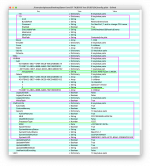
Compare your config.plist with mine check you have the info, (underlined in green) in your config.

Screen Shot 2021-11-22 at 11.30.48 AM.png
 
¿CPU desconocido?


Nota de Aluveitie
Si su CPU se muestra como Desconocido en OC 0.6.7 o posterior, intente configurar ProcessorType en 1537 para 6 núcleos o menos y 3841 para 8 núcleos o más en config.plist en PlatformInfo > Generic.


Captura de Pantalla 2022-06-01 a las 16.14.48.png


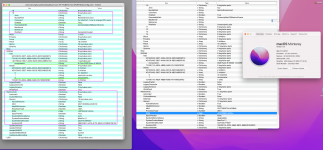
hi everyone I don't understand what I doing wrong
 

Attachments

  • Screenshot 2022-06-01 at 09.53.31.png
    Screenshot 2022-06-01 at 09.53.31.png
    1.5 MB · Views: 6
Did you use the ClearNvram.efi and ResetSystem.efi tools after making the necessary changes in your config.plist?

If not the system may have continued to use the settings in NVRAM, so you don't see any change.
 
  • Like
Reactions: uzmi
Did you use the ClearNvram.efi and ResetSystem.efi tools after making the necessary changes in your config.plist?

If not the system may have continued to use the settings in NVRAM, so you don't see any change.
no , I don't, like I say i new on hackintosh :)
 
I had the same problem, I was able to resolve it just by adding the kext.
That’s what I meant, just adding the text didn’t display the processor in about this Mac.
 
  AdBlock Detected
Sure, ad-blocking software does a great job at blocking ads, but it also blocks some useful and important features of our website. For the best possible site experience please take a moment to disable your AdBlocker.