
I used this tutorial alongside this to make an installer for Catalina from Windows. However, the installer boots into Russian (I don't remember language option in config.plist) and only has an internet installation, saying something along the lines of "you have to be connected to the internet to install MacOS", it is the menu right below "Restore from Time Machine"). This can be walked through with Google Translate on my phone
I did use the Recovery option (around 500MB) as the tutorial showed.
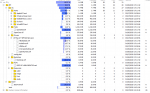
Here is a screenshot of my EFI partition on my installer
Edit: Well, it looks like I don't read documentation enough. Here is the solution for Russian. As for the "You must be connected to the internet to reinstall macOS", I just used a USB hub with some Realtek 10/100 Ethernet controller, and that got picked up by the installer immediately.
I did use the Recovery option (around 500MB) as the tutorial showed.
Here is a screenshot of my EFI partition on my installer
Edit: Well, it looks like I don't read documentation enough. Here is the solution for Russian. As for the "You must be connected to the internet to reinstall macOS", I just used a USB hub with some Realtek 10/100 Ethernet controller, and that got picked up by the installer immediately.
Last edited: