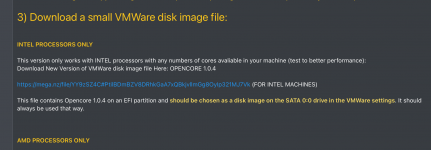
yeah i put cores on 3 instead of 4 also can i use this opencore on an actual machine or can someone give me the drivers for wifi i think my wifi isnt supported
Mac OS install on AMD Ryzen/INTEL (VMWare) Opencore - Improved Performance - Works with Tahoe / Sequoia / Sonoma / etc
- Thread starter tucano2000
- Start date
You are using an out of date browser. It may not display this or other websites correctly.
You should upgrade or use an alternative browser.
You should upgrade or use an alternative browser.

No the OpenCore configuration you have won’t work on your machine for a bare-metal installation of macOS, any version. It is specifically configured for a VM.
A clean installation of macOS will probably require a lot of work on your part putting together a working OC EFI, depending on your system specs.
A clean installation of macOS will probably require a lot of work on your part putting together a working OC EFI, depending on your system specs.
Just for the VM.
Your CPU can have more than 8 cores, but using the 8 core vmdk only allocates 8 cores to the VM.
Your CPU can have more than 8 cores, but using the 8 core vmdk only allocates 8 cores to the VM.
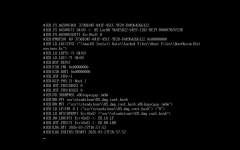
Read and follow the instructions in the guide, as that is an early kernel panic, which most likely means you haven’t been as precise with the process as you might have been.
Some information about your system and which VM file you have used would be useful.
Some information about your system and which VM file you have used would be useful.
just installed macOS Tahoe 26.3 and everything is running fine. First of all thanks for providing the links plus all the useful information for getting it installed.
There is however one problem: in the meantime Apple released macOS 26.4 but i cannot update. Whenever i'm searching for updates i see the message my Mac is up to date with 26.3. Any ideas how to fix this?
Using Sonoma before, i didn't have such an issue for minor updates.
There is however one problem: in the meantime Apple released macOS 26.4 but i cannot update. Whenever i'm searching for updates i see the message my Mac is up to date with 26.3. Any ideas how to fix this?
Using Sonoma before, i didn't have such an issue for minor updates.

If it's like my experience with sequoia, you'll go to app store and search for Tahoe.just installed macOS Tahoe 26.3 and everything is running fine. First of all thanks for providing the links plus all the useful information for getting it installed.
There is however one problem: in the meantime Apple released macOS 26.4 but i cannot update. Whenever i'm searching for updates i see the message my Mac is up to date with 26.3. Any ideas how to fix this?
Using Sonoma before, i didn't have such an issue for minor updates.
according to my information, Apple no longer provides macOS in app store for Tahoe. Any other options?If it's like my experience with sequoia, you'll go to app store and search for Tahoe.
when i said in my initial message "Whenever i'm searching for updates..." i was talking about what you proposed (System Settings > General > Software Update). Problem is, i always see here a message like "Mac is up to date; macOS Tahoe 26.3". It doesn't show 26.4 or any other updates so i can't select anything.Use System Settings > General > Software Update pane to select the update.
If I am honest what you were asking wasn't clear, so you got my best stab at an answer. The options below might be more what you are looking for.
1. Are you using RestrictEvents.kext and the revpatch=auto,sbvmm boot argument in your setup?

 github.com

 osxdaily.com
2. Do you have Misc > Security > SecureBootModel set as 'Disabled' in your config.plist?
If you can answer no to either of those two questions, try adding them to your setup or download and use Corpnewt's gibMacOS script.
1. Are you using RestrictEvents.kext and the revpatch=auto,sbvmm boot argument in your setup?
GitHub - acidanthera/RestrictEvents
Contribute to acidanthera/RestrictEvents development by creating an account on GitHub.
github.com
The sbvmm boot argument allows systems to use the Over The Air (OTA) updates from within macOS.
The auto boot argument fixes memory and PCIe errors when using the MacPro7,1 SMBIOS, which is the go to option for an AMD Hack.
The alternative is to use a direct full download of the next macOS release or whichever version you want to update to. I use Corpnewt's gibMacOS script to download full version macOS installers.
You can create an ISO for the VM from the downloaded installer.
How to Convert a MacOS Installer to ISO
Advanced Mac users may wish to convert a MacOS Installer application into an ISO file. Typically the resulting installer ISO files are used for installing macOS into virtual machines like VMWare or…
osxdaily.com
2. Do you have Misc > Security > SecureBootModel set as 'Disabled' in your config.plist?
AMD systems need the SecureBootModel entry to be set as Disabled, not as Default.
If you can answer no to either of those two questions, try adding them to your setup or download and use Corpnewt's gibMacOS script.

is this opencore now for tahoe last i tried it didnt work and why is it a hell to make an efi for my laptop
Yes, the latest EFI folders attached to post #1 in this thread are compatible with Tahoe. But only if you want to run macOS as a Virtual Machine on a desktop system.
Configuring OpenCore for a laptop is difficult because Apple never used a similar AMD setup, simple really. So an AMD laptop owner has a long learning curve and chances are not everything in the laptop will be supported. So compromises are required with an AMD laptop Hack.
Configuring OpenCore for a laptop is difficult because Apple never used a similar AMD setup, simple really. So an AMD laptop owner has a long learning curve and chances are not everything in the laptop will be supported. So compromises are required with an AMD laptop Hack.