Install freezes at 12 min; AMD Threadripper 3970x

maccaroni

New member
AMD OS X Member
Jan 9, 2026
5
0
1
CPU:
AMD Ryzen Threadripper 3970x
I was gifted a Threadripper w/ motherboard from a friend so I decided to try my hands at a Ryzentosh before I go back to a Apple. The website has been super helpful in getting started, but after many adjustments and attempts I'm stuck with the same results. Install of MacOS Ventura / Sonoma hangs at 12 min and computer freezes up (mouse stops working). I've tried different OpenCore versions, Quirks, boot-args, kexts, MMIO Whitelist with the same results. I've also patched for the 32-core Threadripper in the kernel but I feel like there could be patches I'm overlooking in the ACPI. Any help getting the install done would be appreciated.

Build:
AMD Ryzen Threadripper 3970x 32-core 3.7GHz
Gigabyte Aorus Trx40 Xtreme ver 1.1 (BIOS Feg latest)
G.Skill Trident Z Neo RGB 192B (6 x 32GB) 2666MHz
EVGA NVIDIA GTX 1080ti Hybrid (temporary until my RX 6600 arrives)
WD Black SN7100 1TB PCIe 4.0
SanDisk 64GB UHS-I USB 3.2 (installer thumb drive)
Dynatron L29 Liquid Cooler (280W TDW)
Lian-Li Edge Gold 750W PSU
Lian-Li Odyessey X Black Ed XL-ATX Case

OpenCore 1.05
MacOS Ventura (latest)
 

Attachments

Last edited:
The most common cause for the installation stalling at the 12 minutes remaining mark, is a borked macOS installer. It is not likely to be a issue with the OC EFI, as an issue in the EFI is more likely to cause an early kernel panic.

You would be advised to delete/erase the current USB installer and macOS application. Download a new installation app using gibMacOS and recreating your USB installation drive. Obviously you have a working OC EFI, so the hard part has already been done.
 
  • Like
Reactions: maccaroni
I tried the install using MacOS Sonoma. This time the system rebooted at 12 min, and I expected to see the partition on the SSD appear, but no luck. I’ll try a Monterey installer when my Radeon card arrives; GeForce card may have pulled too much wattage and the PSU fan stopped working.
 
After a month of my RX 6600 XT being lost in the mail, I've finally have it installed and configured to get me to the macOS installer, but the system still freezes at 12 minutes left. I'm going to attempt to redo my thumb drive with builds from the gibMacOS instead of the AppleStore. 🤞
 
FYI. The installers are downloaded/served from the same location, i.e. Apple’s servers.
 
Tried a new thumb drive. Progress bar moved slightly differently but same result, Stuck at 12 minutes remaining. I even let it run for 10 hours to see if it resumed like another user experienced; it did nothing but keep my room warm. 😩
 
You tried a new thumb drive, was it created with the same macOS installation application your previous USB drive used, or was it created with a completely new macOS download?

The fix for a 12 minute remaining stoppage is to recreate the USB with a new download. Using the same macOS application to create the new drive will just move the borked installer to the new thumb drive.
 
I tried a new download, I've tried 3 thumb drives, and I've tried Monterey, Ventura and Sonoma. All end up with the same result of stuck at 12 min remaining. the only thing I could do differently besides something in the EFI is to create it using a different computer.
 

Attachments

Are you using a USB3 or USB2 port when running the installer? You don't have a custom USB configuration in your OC setup, so that might be part of the issue.

I would recommend booting in to Windows, downloading and running USBToolBox Tool and creating a custom UTBMap.kext for your system before you try to change anything else.

Also the SSDTEC-USBX-Desktop.aml and MaLd0n.aml ACPI tables do the same task, so you only need one of the two tables to be present and enabled in your setup.

I am not sure why you have the SSDT-RX-5700-XT-Version-1.0.aml table in your setup. I have a couple of RX 5700 XT dGPU's and don't require a similar SSDT. I would also look at the extra '.' in the name, as that is not likely to be helping.

Your /EFI/OC/Kexts folder contains a lot of non-essential kexts for booting macOS Ventura. Personally I would recommend reducing these kexts to just above the minimum. By that I mean don't include any Sensor, WiFi or Bluetooth kexts until you reach the Ventura desktop, as this will minimise the issues that might occur due to kext clashes etc.

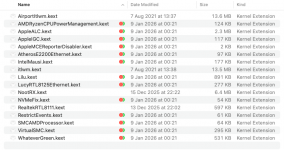
You have 5 x Ethernet kexts in your setup, I doubt you need any of them.
  1. AppleIGC.kext
  2. AtherosE2200Ethernet.kext
  3. IntelMausi.kext
  4. LucyRTL8125Ethernet.kext
  5. RealtekRTL8111.kext
The specification page for your TRX40 motherboard says it contains Intel® X550-AT2 Dual 10GbE BASE-T LAN. None of the kexts listed above work with this Server grade Ethernet controller.

You need to add IntelLucy.kext to your setup for your Intel 10GB ports to work.


This is a screenshot showing your current Kexts folder.

Screenshot 2026-02-19 at 14.51.24.png

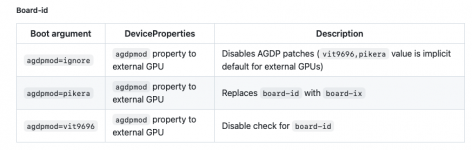
You have WhateverGreen.kext and NootRX.kext present in your Kexts folder, you should never use both at the same time. With your RX 5700 XT I would recommend using WhateverGreen.kext and the agdpmod=pikera boot argument.

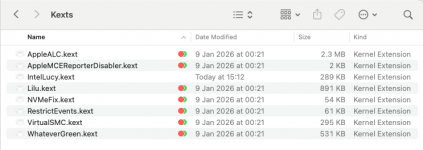
This is a screenshot showing your reduced Kexts folder, which I would use just for the installation process. The WiFi/BT and any Sensor kexts can be added once you have macOS installed.

Screenshot 2026-02-19 at 15.13.21.png cut down kexts folder contents, so only essential kexts are present during installation.

Hope this helps.
 
  • Like
Reactions: maccaroni
  AdBlock Detected
Sure, ad-blocking software does a great job at blocking ads, but it also blocks some useful and important features of our website. For the best possible site experience please take a moment to disable your AdBlocker.