Hackintosh on a laptop with Ryzen 5 5500U

Alexeych

New member
AMD OS X Member
Dec 25, 2025
5
0
1
CPU:
AMD Ryzen 5 5500U
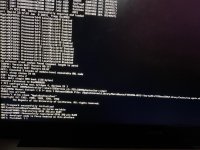
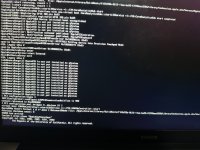
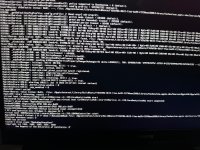
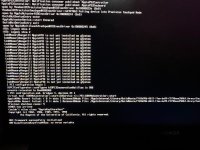
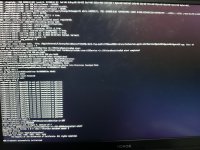
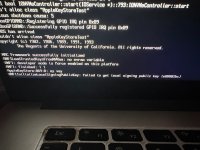
Hi. For like 3 days I tried to install hackintosh on my Honor Magicbook 15 with AMD Ryzen 5 5500U and Vega 7 iGPU. I tried Ventura and Sonoma(macrecovery image if it’s important) and it gets stuck at different lines everytime I retry. Sometimes at MAC framework successfully initialized, sometimes after start processor AMD ryzen 5 5500U with radeon graphics, sometimes at #######Ryzen 5######. And everytime it gets stuck coolers start to work faster and the laptop gets hotter like it’s actually doing something. Please guys could you help me?

My laptop specs

Honor Magicbook 15 BMH-WCX9-PCB
CPU - Ryzen 5 5500U
iGPU - Vega 7
WiFi+Bluetooth - Intel Wi-Fi 6 AX200 160MHz
Audio - HDMI - ATI/AMD Renoir/Cezanne
- Built-In - AMD Zen Senary Conexant CX8070(layout 15, 21)
Touchpad I2C - Shenzhen Goodix Technology
SSD - WDC PC SN530 SDBPNPZ-512G-1027
 

Attachments

☹️
 
Try using this revised EFI folder in place of your current one. See if it gets you past the kernel panic.
 

Attachments

Try using this revised EFI folder in place of your current one. See if it gets you past the kernel panic.
It feels like it just randomly freezes. Here are photos of my every try and every time it freezes close to where MAC Framework Successfully initialized would be(thanks for your previous answer btw)
 

Attachments

  • IMG_9839.jpeg
    IMG_9839.jpeg
    2.4 MB · Views: 8
  • IMG_9838.jpeg
    IMG_9838.jpeg
    3.4 MB · Views: 3
  • IMG_9837.jpeg
    IMG_9837.jpeg
    3.6 MB · Views: 2
  • IMG_9836.jpeg
    IMG_9836.jpeg
    2.4 MB · Views: 2
  • IMG_9835.jpeg
    IMG_9835.jpeg
    3.1 MB · Views: 2
  • IMG_9834.jpeg
    IMG_9834.jpeg
    2 MB · Views: 8
Looks as though you have a few issues:

First with your NVME drive, as that is the first point of failure, but it is not the cause of the Kernel Panic on its own.

Second Not processing the DSMOS - with the ‘couldn’t alloc class “AppleKeyStoreTest” error.

Third It appears that you are seeing an AMFI error.

I am currently not at my desk, but will have a look to see what might be required to fix the second and third points above when I am later today.
 
Looks as though you have a few issues:

First with your NVME drive, as that is the first point of failure, but it is not the cause of the Kernel Panic on its own.

Second Not processing the DSMOS - with the ‘couldn’t alloc class “AppleKeyStoreTest” error.

Third It appears that you are seeing an AMFI error.

I am currently not at my desk, but will have a look to see what might be required to fix the second and third points above when I am later today.
Thank you so much for spending your time on my problems with hackintosh, you are the best. There is one thing I didn’t tell you cuz I didn’t think it was connected to the kernel panic and wanted to concentrate on other things. When I tried to create the efi for the first time it was on Linux which as far as I know can’t map USBs properly like Windows can so I didn’t do that. Now I’m on Windows and if it’s important I will do it and send you the new efi based on your revised version but with usb mapped
 
Mapping the USB ports would be really helpful for your system going forward. If done correctly it would eliminate a number of common issues straight out the box.
 
Mapping the USB ports would be really helpful for your system going forward. If done correctly it would eliminate a number of common issues straight out the box.
Here's efi with mapped usb with USBMap.kext(someone on reddit said it's better for AMD than UTB) based on your revised version
 

Attachments

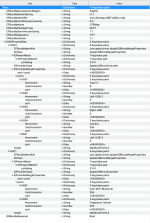
Your USBMap.kext/Contents/Info.plist is shown below, as seen when viewed in ProperTree plist editor.

Screenshot 2026-01-02 at 22.46.56.png

You appear to be missing a number of USB ports from this configuration.
  1. You don't have a physical Type-C port, just the XHC0 > HS01 which is a virtual USB2 port served from the type-c+sw (9) port. The physical Type-c has not been included in the kext, this port would normally show as SS01 or similar.
  2. Are you sure the SS01 port is a physical USB3 port? Could it be the Physical Type-c port?
  3. You have HS02 and HS03 set with connector type USB3, but these again are just the virtual USB2 ports served from the external USB3 physical ports. The 2 x physical USB3 ports have not been included in the kext. These physical USB3 ports would normally show as SS02 & SS03 under the XHC0 USB controller.
The Internal Bluetooth, camera and fingerprint reader appear to be correct. Not that the Fingerprint reader will work in macOS.

As you are looking to get an Intel Bluetooth device to work, you need to add BlueToolFixup.kext to your /EFI/OC/Kexts folder with a corresponding entry for the kext in your config.plist. Without this kext the bluetooth device is unlikely to work.
 
  AdBlock Detected
Sure, ad-blocking software does a great job at blocking ads, but it also blocks some useful and important features of our website. For the best possible site experience please take a moment to disable your AdBlocker.