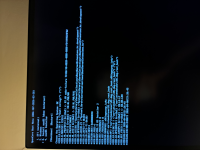
Booting into the prohibited symbol
- Thread starter momchilh
- Start date
-
Hello Guest. Before you post check the Troubleshooting guide here, Dortania Troubleshooting
You are using an out of date browser. It may not display this or other websites correctly.
You should upgrade or use an alternative browser.
You should upgrade or use an alternative browser.

Booting in to a prohibited symbol usually means the USB port you are using for the installer has been dropped as part of the switch from Bios control, to OpenCore control and finally to the macOS installer control.
Often a USB port that happily boots the OpenCore EFI and installer will be dropped by macOS, due to USB configuration issues in the OpenCore setup being used. An incorrectly configured UTBMap.kext or USBMap.kext or the total lack of a custom USB configuration is the normal culprit for this issue.
Looking through your EFI's Kext folder it is clear that you lack a custom UTBMap.kext to pair with USBToolBox.kext. The later kext does nothing on its own. You need to run the USBToolBox Tool in Windows, discover the system USB ports and generate a custom UTBMap.kext for your system to have working USB ports.
If the system lacks a custom USB configuration then this more often than not leads to USB port failure during the installation phase.
I assume this is your initial installation of maCOS on this B850M system. That being the case I would recommend you try running an earlier version of maCOS, Ventura, Sonoma or Sequoia would all work better than Tahoe as a first time installation.
Your EFI isn't configured for the installation of macOS on any B850 motherboard, To be honest I don't think it would work on any AMD Hack.
You need to do some more research and read through the guides over at Dortania's OpenCore site.
Your alternative is to look to see if anyone else has managed to install macOS on the same or a similar 800 series AMD board as you are using and use their EFI as a base.
Often a USB port that happily boots the OpenCore EFI and installer will be dropped by macOS, due to USB configuration issues in the OpenCore setup being used. An incorrectly configured UTBMap.kext or USBMap.kext or the total lack of a custom USB configuration is the normal culprit for this issue.
Looking through your EFI's Kext folder it is clear that you lack a custom UTBMap.kext to pair with USBToolBox.kext. The later kext does nothing on its own. You need to run the USBToolBox Tool in Windows, discover the system USB ports and generate a custom UTBMap.kext for your system to have working USB ports.
If the system lacks a custom USB configuration then this more often than not leads to USB port failure during the installation phase.
I assume this is your initial installation of maCOS on this B850M system. That being the case I would recommend you try running an earlier version of maCOS, Ventura, Sonoma or Sequoia would all work better than Tahoe as a first time installation.
Your EFI isn't configured for the installation of macOS on any B850 motherboard, To be honest I don't think it would work on any AMD Hack.
You need to do some more research and read through the guides over at Dortania's OpenCore site.
Your alternative is to look to see if anyone else has managed to install macOS on the same or a similar 800 series AMD board as you are using and use their EFI as a base.
Thanks a ton, not sure how i missed to add the USBMap.kext. Also, what do you mean by my EFI isn't configured correctly for the Motherboard? Just hint me in a direction and i'll look into it. Thanks again!
Off the top of my head your setup is missing the following elements:
I would recommend you look at another 800-series setup for a more complete idea of what is required. Below are a couple of links to success stories for 800-series systems, which might help.
- ACPI patches, which are required for AM5 systems.
- The config.plist doesn’t have any MmioWhitelist entries.
- The AM5 Kernel patch (No. 18) in your config.plist is not enabled.
I would recommend you look at another 800-series setup for a more complete idea of what is required. Below are a couple of links to success stories for 800-series systems, which might help.
UPDATED ON 25 JULY 2026
MY SECOND AMD HACKINTOSH
and its working perfectly - big thanks to this awesome community

Supported macOS-Versions:
macOS High Sierra (10.13.0-10.13.6) EOL ? (should work / not tested)
macOS Mojave (10.14.0-10.14.6) EOL ? (should work / not tested)
macOS Catalina (10.15.0-10.15.8) EOL ? (should work / not tested)
macOS BigSur (11.0.0-11.7.11) EOL ? (should work / not tested)
macOS Monterey...
MY SECOND AMD HACKINTOSH
and its working perfectly - big thanks to this awesome community
Supported macOS-Versions:
macOS High Sierra (10.13.0-10.13.6) EOL ? (should work / not tested)
macOS Mojave (10.14.0-10.14.6) EOL ? (should work / not tested)
macOS Catalina (10.15.0-10.15.8) EOL ? (should work / not tested)
macOS BigSur (11.0.0-11.7.11) EOL ? (should work / not tested)
macOS Monterey...
- KWODO
- Replies: 22
- Forum: Success Stories


Just wanted to share that I got macOS Sequoia running stable on the new Zen 5 platform. I am using a Ryzen 5 9600X with an MSI X870-P WiFi board and an ASUS RX 6600.
Performance is really good, feels similar to an M3 chip for my daily work and Xcode builds. The only hardware headache is networking. I couldn't get the onboard Ethernet or WiFi working, so I am using TP-Link USB adapters for now (AC1300 and AC600).
For BIOS, I just did the usual stuff like disabling Secure Boot and Resize BAR, and making sure Above 4G Decoding was enabled.
I started the config myself using the...
Performance is really good, feels similar to an M3 chip for my daily work and Xcode builds. The only hardware headache is networking. I couldn't get the onboard Ethernet or WiFi working, so I am using TP-Link USB adapters for now (AC1300 and AC600).
For BIOS, I just did the usual stuff like disabling Secure Boot and Resize BAR, and making sure Above 4G Decoding was enabled.
I started the config myself using the...
- realmranshuman
- Replies: 10
- Forum: Success Stories
Okay so i guess progress has been made. I generated the ACPI patches my system needs: SSDT-EC.aml; SSDT-PLUG-ALT.aml and SSDT-USBX.aml. I checked whether i need SSDT-AWAC/RTC0, but the SSDTTime tool said there are no devices to patch. About MmioWhitelist, i dont understand what entries i need to have in my efi configuration (probably to map the USB ill be booting from?), the Dortania guide only has information about it for the TRx40 models. Since thats not my case, i dont see what i have to add here. Or do i? I read on reddit that it may be useful to play around with the DevirtualiseMmio quirk and match it with something? The cases you sent me are with motherboards from the same 800-series, yes, but i still dont know if i should follow the dortania guide that mainly targets machines with "TRx40"s, since i can see that the link leads me to a fix in kaslr. BTW the log is from my latest configuration, just attaching it in case somebody needs it in the future.
Attachments
You need to boot with the OpenCore Debug version and follow the guidelines in the link below. So you can extract the MmioWhitelist entries for your system. It doesn’t matter if your system doesn’t boot to macOS, as the settings to generate the MmioWhitelist entries will be in the OC log that is generated by the Debug EFI.
Okay, i extraxted the MMIOs from the debug log. I made the 5 entries under MmioWhitelist, but thing is, if i understood everything correctly, just enabling one at a time and checking if the system boots, the system doesnt get far. The OpenCore bootloader loaded faster having different MMIOs enabled. My idea is i didnt even get to the prohibited symbol when trying the single MMIOs. I didnt have enough time to look into every single bootlog, but i compared the logs from enabling MMIOs 1 and 2 in my configuration. Everything was the same until about the 400th line, since i dont really understand the processes i wont say anything. Only interesting thing i saw in the second one was this line: OCOS: OS set: Apple Inc. macos 11.0. Ill attach the bootlogs in case they contain something crucial.
Attachments
-
MMIO4 opencore-2026-04-01-132126.txt256 KB · Views: 3
-
MMIO1 opencore-2026-04-01-131435.txt256 KB · Views: 0
-
MMIO2 opencore-2026-04-01-131643.txt256 KB · Views: 0
-
MMIO5 opencore-2026-04-01-132322.txt256 KB · Views: 0
-
MMIO3 opencore-2026-04-01-131930.txt256 KB · Views: 0
-
ALL MMIOS ENABLED opencore-2026-04-01-131111.txt256 KB · Views: 1
Right now im at the point where im not sure whether the MMIOs are the problem. I had a different approach this time, having 4/5 MMIO entries enabled and the other one simply deleted from the MmioWhitelist array. I have 3 different outcomes here, which i have listed in the attachment below. I tested them in reversed order, e.g. deleting 5 first, then 4 and so on. The Dortania guide wasnt clear for me and im not sure whether i have to try all possible combinations of the 5 MMIO regions being enabled or not (5!). Since this will take a serious amount of time, im leaving it aside for now. Please somebody tell me if thats what i have to do.
Attachments
The most common working process for the MmioWhitelist entries is that only the second entry needs to be enabled, the other four can be disabled. But your system may not follow that process.
You may need to use a USB to Ethernet adapter so you have a working internet connection in macOS. These UGREEN adapters work perfectly well for me in macOS., when troubleshooting Ethernet issues.
Yeah installer is done and a few restarts later im stuck to "A required firmware update could not be installed." I changed the SMBIOS a few times (regenerating the serial etc.) I guess thats the equivalent to this issue from the troubleshooting page: https://dortania.github.io/OpenCore...are-update-in-order-to-install-to-this-volume
Even when following those steps the outcomes the same.
About the ethernet, i went back to where its explained what kext is needed on what systems, so i was using the RTL812xLucy.kext but read that it may not work sometimes so i switched to other one mentioned there, LucyRTL8125Ethernet.kext, but still no connection when in the online macos installer. I know there is another option, RealtekRTL8111, but i havent tried it.
Edit: I even tried the combination for Dell and VAIO machines and after a few restarts in the installer i was greeted with the same firmware update error. Since my machine isnt stable (before getting to the installer gui for the first time i booted a few times to different stages) i guess i can try using all possible combinations of CustomSMBIOSGuid and UpdateSMBIOSMode to see if anything will happen. Also, i may just keep rebooting when i get the error message in case there is the slightest chance that the installer will continue without displaying the message (since my machine is unstable).
Even when following those steps the outcomes the same.
About the ethernet, i went back to where its explained what kext is needed on what systems, so i was using the RTL812xLucy.kext but read that it may not work sometimes so i switched to other one mentioned there, LucyRTL8125Ethernet.kext, but still no connection when in the online macos installer. I know there is another option, RealtekRTL8111, but i havent tried it.
Edit: I even tried the combination for Dell and VAIO machines and after a few restarts in the installer i was greeted with the same firmware update error. Since my machine isnt stable (before getting to the installer gui for the first time i booted a few times to different stages) i guess i can try using all possible combinations of CustomSMBIOSGuid and UpdateSMBIOSMode to see if anything will happen. Also, i may just keep rebooting when i get the error message in case there is the slightest chance that the installer will continue without displaying the message (since my machine is unstable).
Last edited:
Update: i followed the steps mentioned by Cyberdevs on this forum: https://www.insanelymac.com/forum/t...firmware-update-could-not-be-installed-issue/
Although i added the run-efi-updater=NO strings under NVRAM > Add > 4D1EDE05-38C7-4A6A-9CC6-4BCCA8B38C14 / 4D1FDA02-38C7-4A6A-9CC6-4BCCA8B30102, nothing happened. Only when i changed the string value under 7C436110-AB2A-4BBB-A880-FE41995C9F82 (its original place) to YES did something happen. The "A required firmware update could not be installed." error message changed to "An error occurred while preparing the software update." Not really sure how to get around that one though, i dont even know whether i did get around the first one or im just tricking the installer.
Edit: Ive had AvoidRuntimeDefrag enabled for a really long time, so thats what got me thinking about having some other problem.
Although i added the run-efi-updater=NO strings under NVRAM > Add > 4D1EDE05-38C7-4A6A-9CC6-4BCCA8B38C14 / 4D1FDA02-38C7-4A6A-9CC6-4BCCA8B30102, nothing happened. Only when i changed the string value under 7C436110-AB2A-4BBB-A880-FE41995C9F82 (its original place) to YES did something happen. The "A required firmware update could not be installed." error message changed to "An error occurred while preparing the software update." Not really sure how to get around that one though, i dont even know whether i did get around the first one or im just tricking the installer.
Edit: Ive had AvoidRuntimeDefrag enabled for a really long time, so thats what got me thinking about having some other problem.
Your motherboard has a Realtek® 2.5GbE LAN chip (2.5 Gbps/1 Gbps/100 Mbps). So the RTL8111 kext won’t work.
Newer versions of the Realtek 2.5Gb Ethernet chip (RTL8125 BG) may not be supported by the normally robust RTL8125Ethernet kext. This is something that the kext creator is aware of, but hasn’t addressed the issue yet.
Using a USB to Ethernet adapter or adding a compatible PCIe Ethernet card might be your best option at this time.
Newer versions of the Realtek 2.5Gb Ethernet chip (RTL8125 BG) may not be supported by the normally robust RTL8125Ethernet kext. This is something that the kext creator is aware of, but hasn’t addressed the issue yet.
Using a USB to Ethernet adapter or adding a compatible PCIe Ethernet card might be your best option at this time.
I reset the NVRAM a few times already. Did it again and decided to star a fresh install, so i booted into the Installer and reformatted the SSD ill be installing on. The installation starts with no issues. A bunch of restarts later just after the verbose log (the one you see when booting up) i got sent in the installers gui and was greeted with "A required firmware update could not be installed.". Okay, a few seconds later my pc just rebooted and on the next boot i saw the apple logo with the progress bar and it said 29 minutes remaining. Not sure if its a universal experience, but my cursor was visible. Sometimes i can move it and sometimes - not, when i can move it it may be smooth or laggy, depends on the boot. To be honest, thats my indicator whether the installer will stop and give out an error message. Same things been happening to me when installing an unsupported os through OCLP. Back to the point, The progress bar sometimes moves to 28 mins left and in rare occasions to 27! This time it moved to 27 and the installer gui popped out again this time with "An error occurred while preparing the software update.". Right now im stuck here, not knowing what to do. Ill leave my pc rebooting and trying to get past the issues.
Sounds like you have a borked macOS installer.
Best to erase the USB drive and recreate the macOS installer. Don’t use the same install macOS application for the new installer, as that will just repeat the issue. You should delete the current macOS application and download a completely new/different application.
Best to erase the USB drive and recreate the macOS installer. Don’t use the same install macOS application for the new installer, as that will just repeat the issue. You should delete the current macOS application and download a completely new/different application.
Okay so what i did was i used an installer for 26.3 (i was doing everything on a 26.4 before that) which i had on a hard drive, god knows when it was downloaded, and i booted into the installer. Now it was the same process of 5-10 boots to get to the apple boot logo. Progress bar wasnt at the same load level i guess, small detail. Having the absolute same EFI configuration, in the end the installer gui popped out with "An error occurred while preparing the software update." mouse is really laggy and sometimes input just stops for a few seconds, although this happened on the old installer too. Ill attach my EFI in case there is a clue inside.
Attachments
The laggy mouse and stutter is probably caused by the incomplete UTBMap.kext you are using.
I have revised your EFI folder to use a minimal Kexts compliment.
I have deleted the USBToolBox & UTBMap kexts, as they weren't set correctly.
I have deleted three AMD Sensor kexts, which aren't required until you have macOS installed, if then.
I have enabled the Kernel > Quirks > XhciPortLimit entry to replace the UTBMap.
I have also cleaned up the config.plist removing some unnecessary elements, which aren't of use for an AMD system.
Try this EFI in place of your current one and see if it behaves any better.
I have revised your EFI folder to use a minimal Kexts compliment.
I have deleted the USBToolBox & UTBMap kexts, as they weren't set correctly.
I have deleted three AMD Sensor kexts, which aren't required until you have macOS installed, if then.
I have enabled the Kernel > Quirks > XhciPortLimit entry to replace the UTBMap.
I have also cleaned up the config.plist removing some unnecessary elements, which aren't of use for an AMD system.
Try this EFI in place of your current one and see if it behaves any better.