
bigsur restarts after a while
- Thread starter laurent
- Start date
-
Hello Guest. Before you post check the Troubleshooting guide here, Dortania Troubleshooting
You are using an out of date browser. It may not display this or other websites correctly.
You should upgrade or use an alternative browser.
You should upgrade or use an alternative browser.


SSDT-PLUG.aml is usually an Intel SSDT. Did you generate this with corpnewt's SSDTTime? I would remove this SSDT.
If you are desperate for an alternative SSDT, see what Corpnewt's SSDTTime generates for your FX8350. Usually for an AMD system the script generates SSDT-PLUG-ALT.aml.
Nothing else stands out as being wrong or needing attention in the config.plist.
If you are desperate for an alternative SSDT, see what Corpnewt's SSDTTime generates for your FX8350. Usually for an AMD system the script generates SSDT-PLUG-ALT.aml.
Nothing else stands out as being wrong or needing attention in the config.plist.
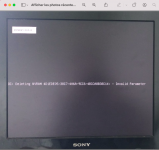
thank you it works better but I have this at startupSSDT-PLUG.aml is usually an Intel SSDT. Did you generate this with corpnewt's SSDTTime? I would remove this SSDT.
If you are desperate for an alternative SSDT, see what Corpnewt's SSDTTime generates for your FX8350. Usually for an AMD system the script generates SSDT-PLUG-ALT.aml.
Nothing else stands out as being wrong or needing attention in the config.plist.
maybe a graphics problem?
Attachments
Last edited:
Means you have an unnecessary entry in your config.plist in the NVRAM section, under that number. You can delete it from your config.plist to remove this message.
You are missing a section under the NVRAM > Delete options, one that is present in the Add section above, see screenshot from your config.
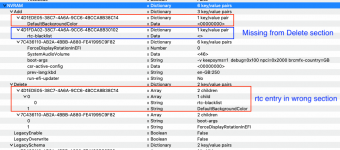 current NVRAM > Add & Delete sections with incorrect entries.
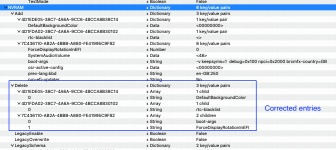 revised NVRAM > Add & Delete sections with corrected entries.
Revised config.plist containing correct NVRAM entries is attached.
You are missing a section under the NVRAM > Delete options, one that is present in the Add section above, see screenshot from your config.
current NVRAM > Add & Delete sections with incorrect entries. revised NVRAM > Add & Delete sections with corrected entries.Revised config.plist containing correct NVRAM entries is attached.
Attachments

thank you it's greatCela signifie que vous avez une entrée inutile dans votre config.plist dans la section NVRAM, sous ce numéro. Vous pouvez le supprimer de votre config.plist pour supprimer ce message.
Il vous manque une section sous les options NVRAM > Supprimer, celle qui est présente dans la section Ajouter ci-dessus, voir capture d'écran de votre configuration.
View attachment 13685 NVRAM actuelle > Ajouter et supprimer des sections avec des entrées incorrectes.
View attachment 13686 NVRAM révisé > Ajouter et supprimer des sections avec des entrées corrigées.
Le fichier config.plist révisé contenant les entrées NVRAM correctes est joint.
no more unwanted restarts
but I just noticed that when I remove the -v entry the computer no longer shuts down but restarts
if I put the -v entry back it turns off correctly
another weird thing
it was a faulty memory ramNo idea why your system would behave like that. As the Verbose boot argument isn't normally related to sleep/wake/reboot issues.
THANKS