ASUS VivoBook X513UA (Ryzen 7 5700U Lucienne) - Kernel Panic Before macOS Installer Starts

rahulgan11

New member
AMD OS X Member
Jul 2, 2026
4
0
1
CPU:
Ryzen 7
Hi everyone,


I am new to the Hackintosh community and this is my first AMD Hackintosh build. I have spent several days reading the Dortania guide and trying different EFI configurations, but I am unable to boot into the macOS installer.


I would really appreciate any help or guidance.


Laptop Information​


  • Model: ASUS VivoBook X513UA (KM513UA)
  • Platform: Laptop
  • BIOS: UEFI
  • BIOS Version: 311
  • Secure Boot: Disabled
  • CSM: Disabled / Not Available
  • SVM: Enabled
  • Firmware: UEFI


Hardware​


CPU​


  • AMD Ryzen 7 5700U (Lucienne)
  • 8 Cores / 16 Threads

GPU​


  • AMD Radeon Vega Integrated Graphics
  • Device ID: 1002:164C

Display​


  • Internal OLED Display
  • Resolution: 1920 × 1080

Audio​


  • Realtek ALC897
  • Device ID: 10EC:0897

Wi-Fi​


  • Intel Wi-Fi 6 AX200
  • Device ID: 8086:2723

Bluetooth​


  • Intel Wireless Bluetooth

Storage​


  • Intel 670p NVMe SSD
  • Model: INTEL SSDPEKNU512GZ

Touchpad​


  • ELAN1300 I2C HID Precision Touchpad

Keyboard​


  • ASUS PS/2 Keyboard

Fingerprint​


  • ELAN Fingerprint Sensor (I know this is unsupported.)
 

Attachments

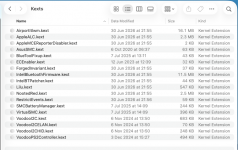
You kexts folder is lacking some Laptop keyboard/trackpad 'essentials'.
  • VoodooPS2Controller.kext
  • Voodooi2c.kext
  • VoodooI2CHID.kext
  • VoodooI2CELAN.kext
For your Intel Bluetooth module to work you need to add BlueToolFixup.kext. Also without the Internal USB port that the Bluetooth module uses being activated and set with the correct Usb port connector type, it is likely to be flakey if it works at all.

For your USB ports to work you need to add a custom UTBMap.kext, UTBDefault.kext is a waste of space and will do nothing helpful.

You may need to use a USB to Ethernet adapter, if you are using an 'Online' installer, i.e. one created in Windows. As your Intel WiFi may not work prior to the OS being installed.

You may need the following kexts for your battery to work in macOS.
  • ECEnabler.kext
  • SMCBatteryManager.kext
Mot sure if AsusSMC.kext will be of much help, but it is worth a try.


This is how I would build your /EFI/OC/Kexts folder.

Screenshot 2026-07-02 at 21.38.50.png

Looking through your config.plist I would comment as follows:
  1. You should not have any DeviceProperties in your config.plist when using NootedRed.kext. They are likely to cause unnecessary issues when booting the system.
    1. Replace The Audio layout-id with alcid=98.
  2. The order of the sub-headings within the Kernel section are wrong. The Add section should come first not the Quirks section.
  3. I always set Lilu.kext as the first and VirtualSMC.kext as the second entry in the Add section, the rest can fall as the Plist editor sorts them.
  4. You aren't using the latest version of the AMD Kernel patches, but as you are trying to install Sequoia this is not a fatal issue.
  5. Because you are not using a custom USB kext, I would suggest enabling the Kernel > Quirks > XhciPortLimit entry, so your USB ports have a chance of working in macOS.
Try this revised EFI see if it gets you any further along the installation path.
 

Attachments

Thank you so much for taking the time to create and share an EFI for my system. I really appreciate your help and the effort you've put into it. As a beginner with Hackintosh/OpenCore, your guidance means a lot to me.

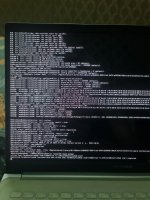
I tested the EFI you provided, but unfortunately it still gets stuck at a memory panic during boot. I've attached a screenshot of the panic screen in case it helps identify the issue.

If you have any suggestions on what I should try next or if you need any additional logs or files from my system, I'd be happy to provide them.

Thank you again for your patience and support!
 

Attachments

  • IMG_20260703_200303_054.jpg
    IMG_20260703_200303_054.jpg
    192.3 KB · Views: 3
Check this section of the OC Troubleshooting guide against the entries in your config.plist. This section of the guide references 'Invalid Frame Pointer' errors, which appears to be the cause of your kernel panic (according to the text in the screen image above).

 
Hi Edhawk,

Thank you so much for pointing me toward the Invalid Frame Pointer section! You were absolutely right to suspect the memory layout.

I was actually able to completely resolve that specific kernel panic and the IOTimeSyncFamily panics! Since I am on a laptop, I had a desktop-specific SSDT-CPUR.aml in my ACPI that was duplicating my threads and destroying the memory map. I deleted it, rearranged my Kext order (Lilu -> VirtualSMC -> ForgedInvariant), and applied the standard Ryzen memory quirks (SetupVirtualMap=True, RebuildAppleMemoryMap=True).

The New Roadblock: NootedRed Triple Fault / Instant RebootThe kernel now successfully boots in the background and reaches CoreAnalyticsHub start completed perfectly. However, the exact millisecond NootedRed attempts to initialize my VivoBook's internal screen, the laptop instantly triple-faults and reboots straight into Windows. It happens so fast that it completely bypasses ApplePanic=True and keepsyms=1, leaving no crash log on the screen.

Here is what I have already applied to try and fix the display handoff:

  1. BIOS: UMA Framebuffer Size is strictly forced to 512M (Not Auto).
  2. Boot-args: Added -NRedDPDelay.
  3. Backlight: Generated and enabled a custom SSDT-PNLF.aml using SSDTTime.
  4. SMBIOS: Set strictly to MacBookPro16,3.
  5. Conflicts: WhateverGreen is completely removed, and Resizable BAR quirks are strictly set to -1.
Have you ever seen an ASUS Ryzen laptop instantly reboot like this when NootedRed tries to take over the eDP display? Is there a specific ACPI patch or property injection I might be missing for this specific 5700U APU?

I have attached my completely updated config.plist showing the fixed memory quirks and current setup. Thank you again for your time!
 

Attachments

No, I haven't seen any device property or patches for an AMD 5700U/G CPU with this type of fast reboot issue.

You may need to try booting the system while NootedRed.kext is disabled in the config.plist. As it is a known trait that the system can kernel panic when NootedRed is enabled and you are installing macOS. The kext can be enabled once you reach the macOS Desktop.

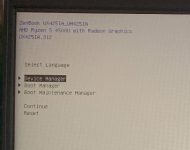
You will need to use Smokeless_UMAF to increase the DVMT Pre-Allocated VRAM above 512mb. 1GB is the absolute minimum you will need for graphics acceleration in macOS, see the post linked below for details and where to look to find the relevant bios options that need changing.

 
Hi Edhawk,

Thanks for getting back to me so quickly!

I actually tested both of those suggestions, but it puts me right back into a different roadblock:

1. Disabling NootedRed.kext: When I completely disable NootedRed to try and run the installer without it, the system successfully boots in the background but permanently freezes on the text screen at the line CoreAnalyticsHub start completed. The macOS Installer UI never appears. It just sits there completely blind.

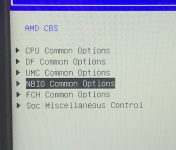
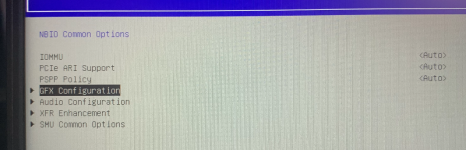
2. VRAM / Smokeless_UMAF: Fortunately, my ASUS BIOS actually leaves the Advanced AMD CBS menus unlocked by default, so I didn't even need to use Smokeless_UMAF. I went into NBIO Common Options -> GFX Configuration and explicitly forced the "UMA Framebuffer Size" to 2G (it is definitely not on Auto or 512MB).

Since disabling NootedRed leaves me completely stuck on the blind CoreAnalyticsHub text screen, is there a specific boot argument or trick to force the basic VESA display to wake up so I can actually see the macOS installer? Or does this specific ASUS eDP screen absolutely require NootedRed to even show the Apple logo?

Thanks again for your patience and help!
 
The error message you are seeing occurs right after macOS loads the kernel, usually signaling a failure in initializing graphics, PCI devices, or an error in your ACPI tables. So assuming that NootedRed is the only possible cause may not be wise.

No, the system wouldn’t need NootedRed for it to show the Apple Logo and progress bar. Booting macOS or the installer without a graphics kext is usually ok, assume everything else works. You just see some graphical glitches and artefacts during the boot process because the system has no graphics acceleration.

I assume you have tried using different versions of NootedRed and you are seeing the same verbose error each time. If that’s not the case please explain what isn’t correct with the assumption.

The developer for NotedRed borrowed some features from WhateverGreen, not sure which exactly, but it might be worth trying the boot argument to force all displays online with your setup, I.e. igfxonln=1 boot argument.
 
  AdBlock Detected
Sure, ad-blocking software does a great job at blocking ads, but it also blocks some useful and important features of our website. For the best possible site experience please take a moment to disable your AdBlocker.