ASUS VivoBook X513UA (Ryzen 7 5700U Lucienne) - Kernel Panic Before macOS Installer Starts

rahulgan11

New member
AMD OS X Member
Jul 2, 2026
1
0
1
CPU:
Ryzen 7
Hi everyone,


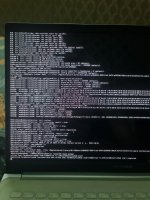
I am new to the Hackintosh community and this is my first AMD Hackintosh build. I have spent several days reading the Dortania guide and trying different EFI configurations, but I am unable to boot into the macOS installer.


I would really appreciate any help or guidance.


Laptop Information​


  • Model: ASUS VivoBook X513UA (KM513UA)
  • Platform: Laptop
  • BIOS: UEFI
  • BIOS Version: 311
  • Secure Boot: Disabled
  • CSM: Disabled / Not Available
  • SVM: Enabled
  • Firmware: UEFI


Hardware​


CPU​


  • AMD Ryzen 7 5700U (Lucienne)
  • 8 Cores / 16 Threads

GPU​


  • AMD Radeon Vega Integrated Graphics
  • Device ID: 1002:164C

Display​


  • Internal OLED Display
  • Resolution: 1920 × 1080

Audio​


  • Realtek ALC897
  • Device ID: 10EC:0897

Wi-Fi​


  • Intel Wi-Fi 6 AX200
  • Device ID: 8086:2723

Bluetooth​


  • Intel Wireless Bluetooth

Storage​


  • Intel 670p NVMe SSD
  • Model: INTEL SSDPEKNU512GZ

Touchpad​


  • ELAN1300 I2C HID Precision Touchpad

Keyboard​


  • ASUS PS/2 Keyboard

Fingerprint​


  • ELAN Fingerprint Sensor (I know this is unsupported.)
 

Attachments

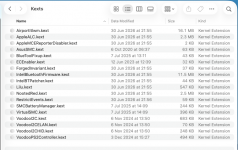
You kexts folder is lacking some Laptop keyboard/trackpad 'essentials'.
  • VoodooPS2Controller.kext
  • Voodooi2c.kext
  • VoodooI2CHID.kext
  • VoodooI2CELAN.kext
For your Intel Bluetooth module to work you need to add BlueToolFixup.kext. Also without the Internal USB port that the Bluetooth module uses being activated and set with the correct Usb port connector type, it is likely to be flakey if it works at all.

For your USB ports to work you need to add a custom UTBMap.kext, UTBDefault.kext is a waste of space and will do nothing helpful.

You may need to use a USB to Ethernet adapter, if you are using an 'Online' installer, i.e. one created in Windows. As your Intel WiFi may not work prior to the OS being installed.

You may need the following kexts for your battery to work in macOS.
  • ECEnabler.kext
  • SMCBatteryManager.kext
Mot sure if AsusSMC.kext will be of much help, but it is worth a try.


This is how I would build your /EFI/OC/Kexts folder.

Screenshot 2026-07-02 at 21.38.50.png

Looking through your config.plist I would comment as follows:
  1. You should not have any DeviceProperties in your config.plist when using NootedRed.kext. They are likely to cause unnecessary issues when booting the system.
    1. Replace The Audio layout-id with alcid=98.
  2. The order of the sub-headings within the Kernel section are wrong. The Add section should come first not the Quirks section.
  3. I always set Lilu.kext as the first and VirtualSMC.kext as the second entry in the Add section, the rest can fall as the Plist editor sorts them.
  4. You aren't using the latest version of the AMD Kernel patches, but as you are trying to install Sequoia this is not a fatal issue.
  5. Because you are not using a custom USB kext, I would suggest enabling the Kernel > Quirks > XhciPortLimit entry, so your USB ports have a chance of working in macOS.
Try this revised EFI see if it gets you any further along the installation path.
 

Attachments

  AdBlock Detected
Sure, ad-blocking software does a great job at blocking ads, but it also blocks some useful and important features of our website. For the best possible site experience please take a moment to disable your AdBlocker.