
Asus Tuf gaming X670e-wifi+AMD Ryzen 9 9950X3D efi help
- Thread starter my10ez
- Start date
-
Hello Guest. Before you post check the Troubleshooting guide here, Dortania Troubleshooting
You are using an out of date browser. It may not display this or other websites correctly.
You should upgrade or use an alternative browser.
You should upgrade or use an alternative browser.

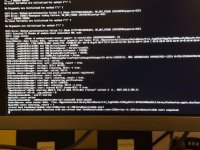

First thing you need to be aware of is that macOS Tahoe dropped support for the iMacPro1,1 system. So your config.plist would never work to install Tahoe. You would have more luck installing Sequoia with the current SMBIOS data. You need to use the MacPro7,1 SMBIOS for Tahoe.
Second is that Samsung drives are not a good choice when running macOS on a Hackintosh.

The OC EFI contents for my Asus Prime X670E-Pro system looks like this.
 Runs Sequoia and Tahoe, latest versions of both OS's.
I have attached a copy of my EFI folder for you to use as a base when setting up your own.
Things you need to be aware of with regards by EFI as it is set to work with the following:
Second is that Samsung drives are not a good choice when running macOS on a Hackintosh.
- Not sure you need the SSDT-Disable_Network_GPP7.aml table with this X670E board.
- You need to add apfs_aligned.efi to your /EFI/OC/Drivers folder and config.plist.
- You shouldn't require the GenericUSBXHCI.kext or XHCI-Unsupported.kext, if you generate a custom USB kext for your system.
- UTBDefault.kext does nothing helpful during macOS installation, as USBToolBox.kext hasn't been updated to work with Tahoe.
- You are lacking any ACPI patches, which seem to be mandatory for X670E systems.
- You are lacking the MmioWhitelist entries required for your motherboard.
- As you have an Nvidia dGPU I can see why you don't have a graphics related kext in your OC setup.
- For AppleALC.kext to work in Tahoe you need to add SimpleHDA.kext and a compatible layout ID for your Audio codec (ALC1220A)
- https://github.com/laobamac/SimpleHDA/blob/main/README.en.md
- There isn't a custom layout ID in AppleALC for the ALC1220A codec, so using alcid=1 would be reasonable during installation.
The OC EFI contents for my Asus Prime X670E-Pro system looks like this.
Runs Sequoia and Tahoe, latest versions of both OS's.I have attached a copy of my EFI folder for you to use as a base when setting up your own.
Things you need to be aware of with regards by EFI as it is set to work with the following:
- Asus Prime X670E-Pro motherboard
- Ryzen 7 9700X 8-core CPU
- AMD RX 5700 XT GPU (WhateverGreen.kext)
- Apple Broadcom Native WiFi/BT card (SimpleBCM.kext & AirportBrcmFixup.kext)
Attachments
Last edited:

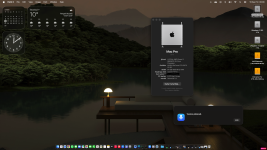
Do you have a Mediatek WiFi & Bluetooth card installed in your X870 system? If yes, have a look at this thread over at Tonymacx86, see if the process documented for bluetooth works with your card.
Specifically post #30.
Specifically post #30.
No,my friend helped me to remake a new efi for my x670 system,installed mediatek wifi-bluetooth kexts but only wifi is ok.So did the EFI provided in post #2 work for your system?
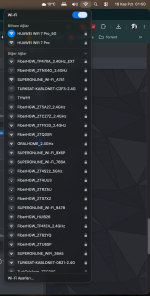
If you read through post #30 from the link above, you will see that the Tahoe kext has been limited to work with 3 x specific cards. So to get your Mediatek Bluetooth module working you need to do the following:
1. You need to edit the Tahoe kext and add your own idVendor/idProduct entries to the kext, using Hex Fiend.
2. You need to add a Bluetooth specific boot argument -bluetoothmediatek
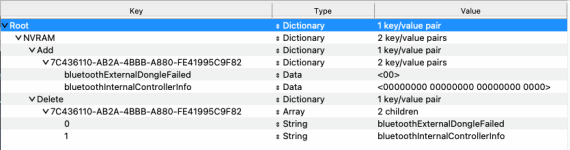
3. You need to add the Bluetooth NVRAM entries shown below (bluetoothInternalControllerInfo and bluetoothExternalDongleFailed) to your config.plist.
4. You need to ensure you have the USB port serving the Bluetooth module active and set as 'Internal' in your USBMap.kext or USBPorts.kext, whichever you are using.
Did you or your friend complete the above process for your Mediatek Bluetooth module?
1. You need to edit the Tahoe kext and add your own idVendor/idProduct entries to the kext, using Hex Fiend.
2. You need to add a Bluetooth specific boot argument -bluetoothmediatek
3. You need to add the Bluetooth NVRAM entries shown below (bluetoothInternalControllerInfo and bluetoothExternalDongleFailed) to your config.plist.
4. You need to ensure you have the USB port serving the Bluetooth module active and set as 'Internal' in your USBMap.kext or USBPorts.kext, whichever you are using.
Did you or your friend complete the above process for your Mediatek Bluetooth module?
He tried but didnt work maybe i can try after the work.If you read through post #30 from the link above, you will see that the Tahoe kext has been limited to work with 3 x specific cards. So to get your Mediatek Bluetooth module working you need to do the following:
1. You need to edit the Tahoe kext and add your own idVendor/idProduct entries to the kext, using Hex Fiend.
2. You need to add a Bluetooth specific boot argument -bluetoothmediatek
3. You need to add the Bluetooth NVRAM entries shown below (bluetoothInternalControllerInfo and bluetoothExternalDongleFailed) to your config.plist.
View attachment 19817
4. You need to ensure you have the USB port serving the Bluetooth module active and set as 'Internal' in your USBMap.kext or USBPorts.kext, whichever you are using.
Did you or your friend complete the above process for your Mediatek Bluetooth module?
I’m still new to creating EFI folders and working with kexts, so I’m not very familiar with the process. If I manage to get my EFI folder ready, I’ll share it with you&people.Also, could you please check the Bluetooth settings and make the necessary changes to the EFI folder I send you, then share the updated version with me?Care to post a copy of your Working EFI folder, with the Serial Number redacted/deleted from the config.plist. It would help others with the same board.
Thanks
Yes, I could provide the kext and update the EFI/config.plist to work with the Mediatek Bluetooth. But I would need the vendor ID and Product ID for the Bluetooth module to do that. Can you provide these pieces of information along with a copy of the working EFI folder?
Do you have a working USB configuration/kext for macOS Tahoe?
Do you have a working USB configuration/kext for macOS Tahoe?
Yes, I could provide the kext and update the EFI/config.plist to work with the Mediatek Bluetooth. But I would need the vendor ID and Product ID for the Bluetooth module to do that. Can you provide these pieces of information along with a copy of the working EFI folder?
Do you have a working USB configuration/kext for macOS Tahoe?
Yes,I’d be glad to do,I’ll share the Vendor ID and Product ID for the Bluetooth module when I get home from work,and I’ll add a copy of the working EFI folder as well.I also have a working USB configuration/kext for macOS Tahoe.
Does the USB kext include the USB port serving the M.2 WiFi /BT module?
Is it set with connector type 'Internal' (255)?
Is it set with connector type 'Internal' (255)?
These are my efi and device report.I hope they help for my bluetooth and other people who needs Asus Tuf Gaming x670e-wifi mobo.Honestly i have no idea about that.Need to check them at night.
Thank you
Attachments
This revised BueToolFixup_Mediatek_SRS_Tahoe.kext, now contains the Dev ID for your Mediatek Bluetooth device (0E8D). This was actually present in the Sequoia version of the kext but replaced when the kext was transitioned to Tahoe. I can only assume because the kext is limited to 3 x Devices and yours wasn't one that was in the list.
The revised Tahoe kext has been added to the attached /EFI/OC/Kexts folder, along with the necessary Bluetooth config.plist edits.
You or your friend still need to undertake some actions on your Hack. See post #35 linked below. Items 3 onwards require your attention, these are actions I can't undertake. Without these actions being completed correctly your Bluetooth device will not work.
See if this works for your system.
With regards to your USB configuration/kext your EFI lacks a custom kext, which will be needed to ensure the Bluetooth device is correctly configured in your Hack. Even if you had a custom UTBMap.kext in your setup it would be no use in macOS Tahoe, as USBToolBox.kext & the USB port discovery Tool haven't been updated to work with Tahoe.
UTBDefault.kext is of no use on an AMD AM5 system, which contains multiple USB controllers. The kext only looks to enable ports on a single USB controller (XHC1), so most if not all of your USB ports will be floating and activated as macOS sees fit. So don't be surprised if a number of the ports don't work and work at the incorrect speed when they do work.
Without a custom USBMap.kext or USBPorts.kext for your system, it is unlikely the Bluetooth device will work. If it does work you should expect disconnections, glitches and other issues.
The revised Tahoe kext has been added to the attached /EFI/OC/Kexts folder, along with the necessary Bluetooth config.plist edits.
You or your friend still need to undertake some actions on your Hack. See post #35 linked below. Items 3 onwards require your attention, these are actions I can't undertake. Without these actions being completed correctly your Bluetooth device will not work.
See if this works for your system.
With regards to your USB configuration/kext your EFI lacks a custom kext, which will be needed to ensure the Bluetooth device is correctly configured in your Hack. Even if you had a custom UTBMap.kext in your setup it would be no use in macOS Tahoe, as USBToolBox.kext & the USB port discovery Tool haven't been updated to work with Tahoe.
UTBDefault.kext is of no use on an AMD AM5 system, which contains multiple USB controllers. The kext only looks to enable ports on a single USB controller (XHC1), so most if not all of your USB ports will be floating and activated as macOS sees fit. So don't be surprised if a number of the ports don't work and work at the incorrect speed when they do work.
Without a custom USBMap.kext or USBPorts.kext for your system, it is unlikely the Bluetooth device will work. If it does work you should expect disconnections, glitches and other issues.
Attachments
I'll try it and will write the result later.Ty for your helpBu revize edilmiş BueToolFixup_Mediatek_SRS_Tahoe.kext dosyası artık Mediatek Bluetooth cihazınızın (0E8D) Geliştirici Kimliğini içeriyor. Bu bilgi aslında kext'in Sequoia sürümünde mevcuttu ancak kext Tahoe'ya geçiş yapıldığında değiştirildi. Bunun nedeni, kext'in 3 cihazla sınırlı olması ve sizin cihazınızın listede yer almaması olabilir diye tahmin ediyorum.
Yenilenmiş Tahoe kext dosyası, gerekli Bluetooth config.plist düzenlemeleriyle birlikte ekli /EFI/OC/Kexts klasörüne eklendi.
Siz veya arkadaşınızın Hack cihazınızda bazı işlemler yapması gerekiyor. Aşağıda bağlantısı verilen 35 numaralı gönderiye bakın. 3. maddeden itibarenki maddeler sizin dikkatinizi gerektiriyor, bunlar benim yapamayacağım işlemler. Bu işlemler doğru şekilde tamamlanmadığı takdirde Bluetooth cihazınız çalışmayacaktır.
Bakalım bu yöntem sisteminizde işe yarayacak mı.
USB yapılandırmanız/kext'inizle ilgili olarak, EFI'nizde Bluetooth cihazının Hack'inizde doğru şekilde yapılandırılmasını sağlamak için gerekli olan özel bir kext bulunmamaktadır. Kurulumunuzda özel bir UTBMap.kext olsa bile, macOS Tahoe'da işe yaramaz, çünkü USBToolBox.kext ve USB bağlantı noktası keşif aracı Tahoe ile çalışacak şekilde güncellenmemiştir.
UTBDefault.kext, birden fazla USB denetleyicisi içeren AMD AM5 sistemlerinde işe yaramaz. Kext yalnızca tek bir USB denetleyicisindeki (XHC1) portları etkinleştirmeye çalışır, bu nedenle USB portlarınızın çoğu, hatta tamamı, macOS'un uygun gördüğü şekilde etkinleştirilir. Bu nedenle, portların birçoğunun çalışmaması veya çalıştıklarında yanlış hızda çalışması sizi şaşırtmasın.
Sisteminiz için özel bir USBMap.kext veya USBPorts.kext dosyası olmadan Bluetooth cihazının çalışması olası değildir. Çalışsa bile bağlantı kopmaları, aksaklıklar ve diğer sorunlarla karşılaşmanız muhtemeldir.
I'll try it and will write the result later.Ty for your help
Tried and nothing.i'm gonna buy a bluetooth dongle.Thank you very much for your help.This revised BueToolFixup_Mediatek_SRS_Tahoe.kext, now contains the Dev ID for your Mediatek Bluetooth device (0E8D). This was actually present in the Sequoia version of the kext but replaced when the kext was transitioned to Tahoe. I can only assume because the kext is limited to 3 x Devices and yours wasn't one that was in the list.
The revised Tahoe kext has been added to the attached /EFI/OC/Kexts folder, along with the necessary Bluetooth config.plist edits.
You or your friend still need to undertake some actions on your Hack. See post #35 linked below. Items 3 onwards require your attention, these are actions I can't undertake. Without these actions being completed correctly your Bluetooth device will not work.
See if this works for your system.
With regards to your USB configuration/kext your EFI lacks a custom kext, which will be needed to ensure the Bluetooth device is correctly configured in your Hack. Even if you had a custom UTBMap.kext in your setup it would be no use in macOS Tahoe, as USBToolBox.kext & the USB port discovery Tool haven't been updated to work with Tahoe.
UTBDefault.kext is of no use on an AMD AM5 system, which contains multiple USB controllers. The kext only looks to enable ports on a single USB controller (XHC1), so most if not all of your USB ports will be floating and activated as macOS sees fit. So don't be surprised if a number of the ports don't work and work at the incorrect speed when they do work.
Without a custom USBMap.kext or USBPorts.kext for your system, it is unlikely the Bluetooth device will work. If it does work you should expect disconnections, glitches and other issues.