Asus Tuf gaming X670e-wifi+AMD Ryzen 9 9950X3D efi help

my10ez

New member
AMD OS X Member
Jul 15, 2024
8
1
3
CPU:
AMD Ryzen 9 9950X3D
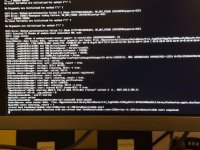
Hello,tried to install macos Tahoe but something is wrong.My efi is attached and this is my screenshot.Can you help about it pls.
 

Attachments

  • EFI.rar
    EFI.rar
    4.3 MB · Views: 2
  • IMG_0687.JPEG
    IMG_0687.JPEG
    1.9 MB · Views: 2
First thing you need to be aware of is that macOS Tahoe dropped support for the iMacPro1,1 system. So your config.plist would never work to install Tahoe. You would have more luck installing Sequoia with the current SMBIOS data. You need to use the MacPro7,1 SMBIOS for Tahoe.

Second is that Samsung drives are not a good choice when running macOS on a Hackintosh.
  1. Not sure you need the SSDT-Disable_Network_GPP7.aml table with this X670E board.
  2. You need to add apfs_aligned.efi to your /EFI/OC/Drivers folder and config.plist.
  3. You shouldn't require the GenericUSBXHCI.kext or XHCI-Unsupported.kext, if you generate a custom USB kext for your system.
    1. UTBDefault.kext does nothing helpful during macOS installation, as USBToolBox.kext hasn't been updated to work with Tahoe.
  4. You are lacking any ACPI patches, which seem to be mandatory for X670E systems.
    1. https://forum.amd-osx.com/threads/dsdt-patch.5391/post-44767
  5. You are lacking the MmioWhitelist entries required for your motherboard.
    1. https://dortania.github.io/OpenCore-Install-Guide/extras/kaslr-fix.html#using-devirtualisemmio
  6. As you have an Nvidia dGPU I can see why you don't have a graphics related kext in your OC setup.
  7. For AppleALC.kext to work in Tahoe you need to add SimpleHDA.kext and a compatible layout ID for your Audio codec (ALC1220A)
    1. https://github.com/laobamac/SimpleHDA/blob/main/README.en.md
    2. There isn't a custom layout ID in AppleALC for the ALC1220A codec, so using alcid=1 would be reasonable during installation.
Your current OC EFI folder contents looks like this.

Screenshot 2026-11-13 at 21.45.02.png

The OC EFI contents for my Asus Prime X670E-Pro system looks like this.

Runs Sequoia and Tahoe, latest versions of both OS's.

I have attached a copy of my EFI folder for you to use as a base when setting up your own.

Things you need to be aware of with regards by EFI as it is set to work with the following:
  • Asus Prime X670E-Pro motherboard
  • Ryzen 7 9700X 8-core CPU
  • AMD RX 5700 XT GPU (WhateverGreen.kext)
  • Apple Broadcom Native WiFi/BT card (SimpleBCM.kext & AirportBrcmFixup.kext)
You will need to adjust the EFI to suit your system. Starting with the elements listed above.
 

Attachments

✖
  AdBlock Detected
Sure, ad-blocking software does a great job at blocking ads, but it also blocks some useful and important features of our website. For the best possible site experience please take a moment to disable your AdBlocker.