ASUS TUF GAMING B550M-PLUS WORKING ON TAHOE 26.3

tucano2000

Active member
AMD OS X Member
May 21, 2021
173
138
43
CPU:
Ryzen 1600X
preview.png


🧰 Hardware


ComponentModel
CPURyzen 5800X3D or AMD 8 cores cpu
MotherboardASUS TUF GAMING B550M-PLUS
GPURX 6900 XT
AudioRealtek ALC1200
EthernetRealtek 2.5G
StorageNVMe / SATA SSD

EFI AND PROCEDURES FOR INSTALLATION IN MY GITHUB REPOSITORY

 
Nice to see you running a bare metal installation of macOS instead of as a VM.

Some things of note:

As you are using RestrictEvents.kext try swapping the cpuname entry for auto, under the NVRAM > Add > repatch entry. This will fix the PCI and any memory foibles that occur in macOS when using MacPro7,1 SMBIOS.

As you are using NootRX.kext you shouldn’t be using any DeviceProperties in your config.plist. Doing so often causes unnecessary issues. If the DeviceProperties are deemed essential then switch to using WhateverGreen. Kext in place of NootRX.kext. There is a version of WhateverGreen that is supported in Tahoe v 1.7.1.d or similar.

You don’t need a layout-ID for the audio codec when using VoodooHDA.kext, so at least one of the two DeviceProperties is not required. Also on my Asus TUF Gaming B550m Plus WiFi system I found that using alcid=15 worked with AppleALC.kext (layout ID created by @CaseySJ for AMD boards with the ALC1200 audio codec).

Your UTBMap.kext isn’t configured for Tahoe, it lacks the new port number and port connection type entries Apple set for any system running Tahoe. You would be best served using Corpnewt's USBMap script to generate a new USB map for your system. It is also lacking in the number of USB ports it activates, which probably limits which ports on your case and on the Rear I/O plate that are usable.

I hope you aren’t using the config.plist you posted in the EFI over on GitHub, as you left the Serial Number in the config.plist. I am fairly positive that some lazy git will use your config.plist as it is, without changing the SMBIOS data.

When I next sit at my desk I will post a copy of the OC 1.0.6 EFI I use on my similar setup that I use to run Ventura, Sonoma, Sequoia and Tahoe. It may contain a few edits you can use.

 
Nice to see you running a bare metal installation of macOS instead of as a VM.

Some things of note:

As you are using RestrictEvents.kext try swapping the cpuname entry for auto, under the NVRAM > Add > repatch entry. This will fix the PCI and any memory foibles that occur in macOS when using MacPro7,1 SMBIOS.

As you are using NootRX.kext you shouldn’t be using any DeviceProperties in your config.plist. Doing so often causes unnecessary issues. If the DeviceProperties are deemed essential then switch to using WhateverGreen. Kext in place of NootRX.kext. There is a version of WhateverGreen that is supported in Tahoe v 1.7.1.d or similar.

You don’t need a layout-ID for the audio codec when using VoodooHDA.kext, so at least one of the two DeviceProperties is not required. Also on my Asus TUF Gaming B550m Plus WiFi system I found that using alcid=15 worked with AppleALC.kext (layout ID created by @CaseySJ for AMD boards with the ALC1200 audio codec).

Your UTBMap.kext isn’t configured for Tahoe, it lacks the new port number and port connection type entries Apple set for any system running Tahoe. You would be best served using Corpnewt's USBMap script to generate a new USB map for your system. It is also lacking in the number of USB ports it activates, which probably limits which ports on your case and on the Rear I/O plate that are usable.

I hope you aren’t using the config.plist you posted in the EFI over on GitHub, as you left the Serial Number in the config.plist. I am fairly positive that some lazy git will use your config.plist as it is, without changing the SMBIOS data.

When I next sit at my desk I will post a copy of the OC 1.0.6 EFI I use on my similar setup that I use to run Ventura, Sonoma, Sequoia and Tahoe. It may contain a few edits you can use.

I'm glad to hear that you have the same motherboard with EFI already well built.
I posted on GitHub recently because I couldn't find an EFI for this motherboard model anywhere, and it took me over a day to fix the boot problems that were crashing at the end, which I believe were due to the USB port mapping.

I believe someone else might need it, and I know it's not easy to find an EFI that works for this motherboard model and that you know how to do it so simply. That's why I decided to share it.

I changed the MAC serial number before putting it on GitHub.

I will definitely want this EFI you mentioned make the improvements you mentioned, which showed good construction and experience.

Thank you in advance.
 
  • Like
Reactions: Edhawk
Attached is a copy of the EFI I am currently using on my Asus TUF Gaming B550m Plus WiFi II system. Serial number etc. has been removed.

The system contains the following, so it won't match yours.
  1. Case: Fractal Design Focus G mATX with single USB2 and single USB3 ports to case top.
  2. Motherboard: Asus TUF Gaming B550m Plus WiFi II.
  3. CPU: Ryzen 9 3900X 12-core/24-thread.
  4. Graphics: PowerColor Red Dragon RX 5700 XT 8GB discrete GPU, in top x16 PCIe slot.
  5. Memory: 32GB RAM (4 x 8GB DIMMS).
  6. NVMe Drives: 2 x Western Digital SN580 1TB drives in motherboard M.2 connectors.
  7. WiFi/BT: Broadcom BCM94360CD card on a PCIe adapter in top PCIe x1 slot.
    1. Builtin Intel AX200NGW WiFi/BT card is disabled in the Bios so it doesn't clash with my Broadcom card.
  8. LAN1: Fenvi Aquantia/Marvell AQC113CS 10G NIC in bottom PCIe x4 slot.
  9. LAN2: Builtin Realtek RTL8125B 2.5GB NIC, not used as my home network is built and set for 10G wired devices.
  10. PSU: EVGA 600W 80 Plus power supply.
  11. Card Reader: CSL USB3 card reader with twin USB3.0 ports to case front.
  12. Hot Swap cage: Icy Dock Express cage incorporates slim DVD drive and twin 2.5" SATA SSD/HD
I made a mistake saying this system ran Ventura and Sonoma, that is my Asus TUF Gaming B550 Plus WiFi II system!

This system runs Windows 11 (separate drive), Sequoia and Tahoe (same drive but separate Partitions/APFS Containers).

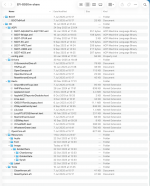
This is what my EFI folder looks like when expanded in Finder.

Screenshot 2026-02-22 at 18.17.51.png EFI 1.0.5 contents.

Custom SSDT's:
I have a number of custom SSDT's in my setup as can be seen in the ACPI folder.
  1. The majority of these were generated using Corpnewt's SSDTTime python script and the system ACPI tables (not just the DSDT.aml).
  2. The exception being the SSDT-AQUANTIA-AQC113.aml table, which is required to fi an issue with the Device ID for my Fenvi 10G NIC.
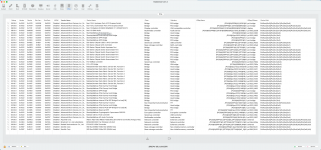
  3. One that you might need to look at is the SSDT-Bridge.aml table. This was created because the discrete GPU had a missing name in the IOReg Path for the device. This SSDT fixes this issue, by replacing the 'pic-bridge' entry in the IOReg Path with 'BRG0'. It does this for all associated components of the dGPU. The Hackintool > PCIe Devices tab below shows this name change
    1. Screenshot 2026-02-22 at 18.11.00.png Screenshot 2026-02-22 at 18.04.49.png
    2. The top 4 x entries in the Hackintool screenshot above are all related to the dGPU. 3 x entries have the BRG0 name fix applied.
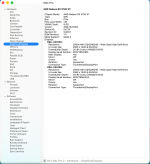
    3. The 2nd screenshot shows the RX 5700 XT in System Information > Graphics/Displays, just for clarification.
    4. Also I found that I don't need to enable WhateverGreen.kext in Tahoe, so it is set with a MaxKernel entry in the config.plist which stops it being used in any OS or update after Sequoia.
OCLP for Modern WiFi (Broadcom):
  1. I have a number of additional kexts and a single Block entry in my config.plist that are required for my Broadcom WiFi to work in Sequoia.
  2. I haven't got around to fixing this for Tahoe, as it requires a different configuration and it hasn't been a priority to date.
  3. I have set csr-active-config to <03080000> so the OCLP unsigned kexts can be used.
  4. I have set Misc > Security > SecureBootModel to 'Disabled' because of the OCLP and because this is an AMD system.
Kernel Patches:
  1. I have the normal AMD Kernel Patches in my config.plist, with the first 4 x patches set to work with my 12-core CPU.
  2. I have 9 x additional patches in the config, which are used to fix issues with the Aquantia kexts in macOS, so our third-party devices work with the native kexts.

Some general Screenshots follow:
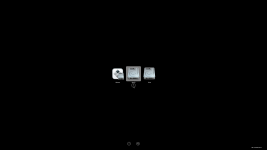
OC-Bootscreen1.png OpenCore boot screen icons OC 1.0.5.

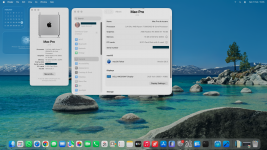
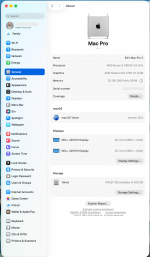
Screenshot 2026-02-22 at 18.01.42.png System Preferences > General > About pane.

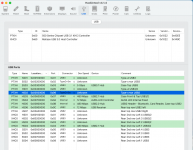
Screenshot 2026-02-22 at 17.59.04.png Hackintool > USB tab, with full complement of USB ports shown, with details of their location in the comment column.

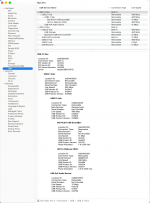
Screenshot 2026-02-22 at 18.06.48.png System Information > USB report

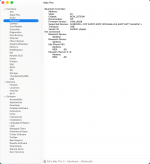
Screenshot 2026-02-22 at 18.04.17.png System Information > Bluetooth report

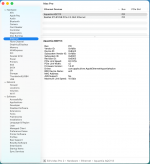
Screenshot 2026-02-22 at 18.04.37.png System Information > Ethernet report

I hope this helps. If I can be bothered to update OpenCore to release 1.0.6 I will attach a copy of the updated EFI. But as things stand it isn't needed for Tahoe 26.3 or earlier.
 

Attachments

  AdBlock Detected
Sure, ad-blocking software does a great job at blocking ads, but it also blocks some useful and important features of our website. For the best possible site experience please take a moment to disable your AdBlocker.