need some help EFI And OC

comsonic

New member
AMD OS X Member
Dec 4, 2025
5
0
1
Hi there am new here i need some help with EFI and OC I try for month on my own but everytime i get close to puting macos on my laptop and get no way because i hang on black screen If anyone can help it would be appreciate my spec are

lenovo legion 5 15ach6h

amd ryzen 7 5800h with integrate amd radeon graphics 4GB
32 DDR4
RTX 3060
1TB M.2
2TB M.2
 
Hi there am new here i need some help with EFI and OC I try for month on my own but everytime i get close to puting macos on my laptop and get no way because i hang on black screen If anyone can help it would be appreciate my spec are

lenovo legion 5 15ach6h

amd ryzen 7 5800h with integrate amd radeon graphics 4GB
32 DDR4
RTX 3060
1TB M.2
2TB M.2
Which version do you want to install?
 
Post a copy of the OpenCore EFI you are using, plus an image of the laptop’s display showing the verbose text that appears when the system kernel panics.

That will give us a better idea of what the problem might be with your Sequoia installation.
 
Any chance of seeing a verbose text image, so we know where the boot process kernel panics?

Whose EFI have you based yours upon?
 
Which WiFi/BT card does your laptop contain, make and model?
 
OK, those images show a few possible issues, but not a definitive reason for a kernel panic. But all good to know before we begin.
  1. Can you boot into Windows on your laptop?
  2. If yes, can you do so and download Corpnewt's SSDTTime python script.
  3. Run the SSDTTime.bat option and use Option 'P' to dump the ACPI tables from your system.
  4. They will come in handy when looking at what you already use in your EFI.
  5. The dumped tables will be saved in a folder named 'OEM' within the 'Results' folder in SSDTTime
    1. The 'Results' folder won't be created until you select an option in SSDTTime.
  6. Zip and upload a copy of the OEM folder with all the ACPI tables.
I will have a look at your EFI folder shortly.
 
Which SSD/HDD or M.2/NVMe drives are installed in your laptop?

Provide make and model of all drives and what is installed or proposed for each drive.
 
OK, those images show a few possible issues, but not a definitive reason for a kernel panic. But all good to know before we begin.
  1. Can you boot into Windows on your laptop?
  2. If yes, can you do so and download Corpnewt's SSDTTime python script.
  3. Run the SSDTTime.bat option and use Option 'P' to dump the ACPI tables from your system.
  4. They will come in handy when looking at what you already use in your EFI.
  5. The dumped tables will be saved in a folder named 'OEM' within the 'Results' folder in SSDTTime
    1. The 'Results' folder won't be created until you select an option in SSDTTime.
  6. Zip and upload a copy of the OEM folder with all the ACPI tables.
I will have a look at your EFI folder shortly
To your other Questions I will be installing macos to my 1TB M.2 And Hopefully Dual Boot Between Windows And macos
 

Attachments

Make and model of the M.2 drive?

I ask because some drives aren't macOS compatible and can cause issues with IONVMeController, as were seen in the text in image 'IMG_1697.jpg. The lines starting with 'AppleNVMe Assert failed:' and 'virtual IOReturn IONVMeController:' would be prime examples of the issues that can be raised is an incompatible drive is used.

It can also lead to issues when using NVMeFix.kext.
 
I'll replace the NVMeFix.kext But it still didn't work the both NVMe Drive is a WD Black 1TB and crucial P3 2TB That i want to use for macos I can't even get to the Boot to Install it to the Drive I clearly don't know how to do this i'll try watching a video for it and that didn't help and even found other EFI from this website so am i clueless what to do
 
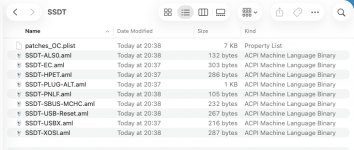
OK, based on the ACPI tables provided above and using Corpnewt's SSDTTime script I have generated a number of custom SSDT's for your laptop. These are attached below in the folder named SSDT.

Screenshot 2026-02-22 at 21.02.39.png Custom SSDT tables generated by SSDTTime specifically for your laptop.

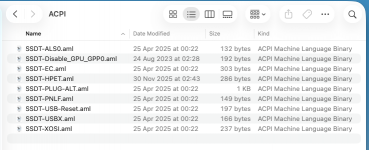
This is the contents of your current /EFI/OC/ACPI folder, note the date and time of the files.

Screenshot 2026-02-22 at 21.13.20.png

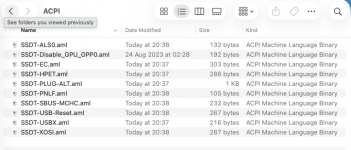
This is the contents of your revised /EFI/OC/ACPI folder, based on the newly created SSDTs, again note the date and time of the files.

Screenshot 2026-02-22 at 21.14.55.png

Alongside the custom SSDT's is a file named 'patches_OC.plist', which contains the ACPI patches generated with the SSDT's.
Specifically the SSDT-HPET.aml and SSDT-XOSI.aml tables. Without these ACPI patches being added to your main config.plist the two SSDT's won't work.

It is always recommended that you use the custom SSDT's generated from your own ACPI tables, as others with the same laptop might be using a different bios release, which can make a difference to if and how the tables generated work.

The SSDT's should be used to replace other like named SSDTs in your /EFI/OC/ACPI folder, including the names being added to the ACPI > Add section of your config.plist.

The ACPI patches in the 'patches_OC.plist' should be copied to the ACPI > Patches section of your config.plist.
 

Attachments

I have amended your EFI and attached the revised folder below for you to try in its place.

It incorporates the new SSDTs and patches. Plus a few other edits based on need and essential elements.

Rename the folder to EFI before using it.

Use the ResetNvram option from the OpenCore Boot screen, press the spacebar if the option is hidden.

Make sure you take a photo of the Verbose text if the system kernel panics.
 

Attachments

  AdBlock Detected
Sure, ad-blocking software does a great job at blocking ads, but it also blocks some useful and important features of our website. For the best possible site experience please take a moment to disable your AdBlocker.