

My latest build consists of the ASUS PRIME X670E-Pro WiFi AM5 motherboard. This has been a work in progress for some time as I had a few issues to resolve before I could install macOS Sequoia and Tahoe.
Before we get to the issue that prevented me running macOS on this system, here is a summary of the components used in this triple-boot build.
The main stumbling block was finding the correct AMD ACPI patches for this motherboard, so OpenCore would boot successfully to the macOS installation wizard. I eventually followed the instructions from @etorix in the post linked below.
I had tried the different sets of ACPI patches individually with no success. It wasn't until I worked through the process to interrogate the DSDT.aml that I was able to find the correct patches. Using Hex Fiend and a copy of the DSDT.aml I realised the ASUS PRIME X670E-Pro WiFi board requires the three patches from the standard AM5 set and patch 1A from the MSI set. Armed with this information the installation of macOS Sequoia sailed through without any issues.
 The set of 4 x ACPI patches required by the ASUS PRIME X670E-Pro WiFi motherboard, viewed in ProperTree.
Whereas every previous time the installation had stalled at or around the Verbose Text 'Registered CoreanalyeticsHub' error.
Obtaining the MmioWhitelist patches for this system was simple enough using OpenCore Debug version and following the Dortania guide for using the DevirtualiseMmio Quirk.
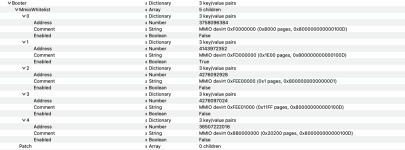 MmioWhitelist patches for my ASUS PRIME X670E-Pro WiFi board using BIOS 3265 x64
The rest of the OpenCore EFI configuration was fairly standard for an AM5 board, i.e. following the Ryzen guide, enabling the AM5 Kernel patch created by @CaseySJ and editing the first four AMD Kernel patches to correspond with my 8-core CPU.
Here is a Finder view of the EFI folder I used to boot this system in to Sequoia 15.8.1 and then Tahoe 26.8.1 (separate partitions for the two OS's) on a WD SN770X 1TB drive.
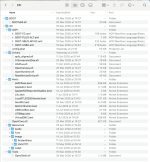 Initial minimised EFI folder.
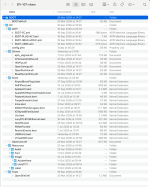
Screenshot above shows my current EFI folder contents, which I have attached below for anyone with the same motherboard.
The Shared EFI includes the OCLP kexts and config.plist settings required for the Broadcom WiFi to work in Sequoia. I haven't got it working in Tahoe, yet. These will need to be disabled in the config.plist, along with the other non-essential kexts when initially installing macOS Sequoia or Tahoe.
I have removed the MLB, ROM, Serial Number and SystemUUID entries from the config.plist, as you would expect. You will need to add your own MacPro7,1 SMBIOS data if you use this EFI.
Before we get to the issue that prevented me running macOS on this system, here is a summary of the components used in this triple-boot build.
- Fractal Design R5 White case with side window.
- ASUS PRIME X670E-Pro WiFi motherboard.
- Realtek ALC1220A audio codec (layout ID 99)
- Realtek 8125 2.5GB Ethernet
- Mediatek MT7992 WiFi/BT card disabled in BIOS.
- 5 x USB controllers
- AMD Ryzen 7 9700X 8-core/16-thread CPU.
- AMD Radeon IGPU disabled in the BIOS.
- Corsair 32 GB RAM (2 x 16GB 6000MHz modules)
- PowerColor RX 6750 XT 12GB GPU.
- Fenvi Aquantia 10G PCIe x2 NIC
- Broadcom BCM43602 WiFi/BT card on PCIe adapter.
- Logitech C920 Webcam
- Corsair TM 750 modular PSU.
- 2 x 25"Dell Ultrasharp U2515H 2560x1440 displays.
The main stumbling block was finding the correct AMD ACPI patches for this motherboard, so OpenCore would boot successfully to the macOS installation wizard. I eventually followed the instructions from @etorix in the post linked below.
In a further twist, AsRock B650E Steel Legend and X670E PG Lightning have been found to fit the patterns for MSI boards, while AsRock X870E Taichi Lite fits the "general" patterns … which are not so general, and just looking at the manufacturer may not be good enough.
Which leaves my "Universal Patches" in this unfortunate situation:
Which leaves my "Universal Patches" in this unfortunate situation:
The Problem
Modern DSDT tables (Intel and AMD) refer to configuration variables (G000 and so forth…) from "Operational Regions" in RAM, and then conditionally initialise devices accordingly. macOS operates according to an outdated version of...
I had tried the different sets of ACPI patches individually with no success. It wasn't until I worked through the process to interrogate the DSDT.aml that I was able to find the correct patches. Using Hex Fiend and a copy of the DSDT.aml I realised the ASUS PRIME X670E-Pro WiFi board requires the three patches from the standard AM5 set and patch 1A from the MSI set. Armed with this information the installation of macOS Sequoia sailed through without any issues.
The set of 4 x ACPI patches required by the ASUS PRIME X670E-Pro WiFi motherboard, viewed in ProperTree.Whereas every previous time the installation had stalled at or around the Verbose Text 'Registered CoreanalyeticsHub' error.
Obtaining the MmioWhitelist patches for this system was simple enough using OpenCore Debug version and following the Dortania guide for using the DevirtualiseMmio Quirk.
MmioWhitelist patches for my ASUS PRIME X670E-Pro WiFi board using BIOS 3265 x64The rest of the OpenCore EFI configuration was fairly standard for an AM5 board, i.e. following the Ryzen guide, enabling the AM5 Kernel patch created by @CaseySJ and editing the first four AMD Kernel patches to correspond with my 8-core CPU.
Here is a Finder view of the EFI folder I used to boot this system in to Sequoia 15.8.1 and then Tahoe 26.8.1 (separate partitions for the two OS's) on a WD SN770X 1TB drive.
Initial minimised EFI folder.- This minimised EFI folder lacked a number of common kexts, which were added once macOS was installed.
- NootRX.kext was disabled for the installation, only enabled once I had reached the macOS Desktop.
- UTBMap.kext & USBToolBox.kext were only used for the Sequoia installation, they were replaced with a custom USBPorts.kext once macOS was up and running.
- The config.plist included the Aquantia 10G NIC kernel patches (set 1) from @CaseySJ.
Screenshot above shows my current EFI folder contents, which I have attached below for anyone with the same motherboard.
The Shared EFI includes the OCLP kexts and config.plist settings required for the Broadcom WiFi to work in Sequoia. I haven't got it working in Tahoe, yet. These will need to be disabled in the config.plist, along with the other non-essential kexts when initially installing macOS Sequoia or Tahoe.
I have removed the MLB, ROM, Serial Number and SystemUUID entries from the config.plist, as you would expect. You will need to add your own MacPro7,1 SMBIOS data if you use this EFI.
