Stuck on [EB|#LOG:EXITBS:START].

FinnLess

New member
AMD OS X Member
Jun 26, 2025
1
0
1
CPU:
Ryzen 5 7530u
I'm pretty new to all of this, and I've been trying to install Sequoia on my thinkpad L14 gen 4 (r5 7530u), and I just can't get it to work.
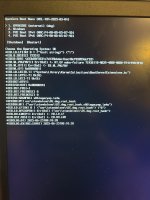
Using the efi I made (3 times) following both the nootedred guide, and dortania's, I get this error:
IMG_2102.jpg
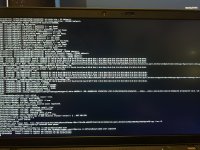
Ive tried using premade efis, and sometimes I would get this error:
IMG_2131.jpeg
Bellow I attached my current efi, along with a hardware report.
I've been asking around for help, but so far nothing has worked. Im pretty sure my hardware is compatable and I really want to get this working. Thanks for the help!
 

Attachments

Last edited:
The first screenshot doesn’t show any error, it just shows the transition from OC to the macOS loader.

The second screenshot shows an issue with the Brightness keys kext linking to the GPU, so probably best to remove that kext.

I will have a look at your EFI when I get to my desk later today.

Your laptop should be compatible with macOS, your desktop not so, as the dGPU in your Desktop is not supported by macOS.
 
I'm pretty new to all of this, and I've been trying to install Sequoia on my thinkpad L14 gen 4 (r5 7530u), and I just can't get it to work.
Using the efi I made (3 times) following both the nootedred guide, and dortania's, I get this error:
View attachment 17339
Ive tried using premade efis, and sometimes I would get this error:
View attachment 17340
Bellow I attached my current efi, along with a hardware report.
I've been asking around for help, but so far nothing has worked. Im pretty sure my hardware is compatable and I really want to get this working. Thanks for the help!
I have the exact same issue with my l14 gen 1 (r5 4650u). The farther I ever got was with a random premade efi where i ended up with a panic every time, but all other premade or made from scratch by myself efi end up with that error
 
1751276092783.png
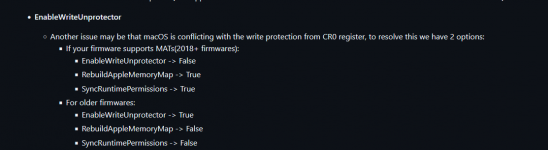
Try this, 2nd option worked for me for your 1st image with your own efi
 
The 2nd option is the list of Quirk settings shown under ‘For older firmwares’.
 
  AdBlock Detected
Sure, ad-blocking software does a great job at blocking ads, but it also blocks some useful and important features of our website. For the best possible site experience please take a moment to disable your AdBlocker.