Ryzen 9 9950X / ASUS X870E-E / RX 6600 / Tahoe hangs at CoreAnalyticsHub

idontknow

New member
AMD OS X Member
Sep 19, 2026
3
0
1
CPU:
AMD Ryzen 9 9950X
Hi,

I'm trying to boot macOS Tahoe on the following system:

  • CPU: AMD Ryzen 9 9950X
  • Motherboard: ASUS ROG Strix X870E-E Gaming WiFi
  • GPU: AMD Radeon RX 6600
  • SSD: Samsung 990 Pro 2TB, but i'm going to use 2.5" sata ssd.
  • Bootloader: OpenCore
  • Kernel patches: AMD Vanilla
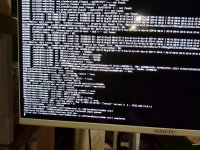
OpenCore loads correctly and macOS starts verbose boot, but the system eventually hangs at the point shown in the attached photo.

The last visible lines are around:

AppleKeyStore...
AppleLockdownMode...
Registered CoreAnalyticsHub functions with xnu.
CoreAnalyticsHub start completed
After that, there is no further output and the system stays stuck.

So far, I have already confirmed that:

  • OpenCore itself boots correctly
  • The macOS kernel starts
  • I can get well past the early boot stage
  • Secure Boot is disabled
  • I am using AMD Vanilla patches
  • This is not a USB boot / OpenCore picker issue
I'm not sure whether the last visible CoreAnalyticsHub line is actually related to the real cause of the hang.

What would be the best things to check at this stage?

I'm mainly wondering about:

  • 9950X core-count patch values
  • ProvideCurrentCpuInfo
  • ACPI
  • X870E / PCIe initialization
  • RX 6600 / WhateverGreen
  • USB mapping
  • BIOS settings
  • Any Tahoe-specific issue on Zen 5 / X870E
I can upload my config.plist, EFI folder, OpenCore debug log, and BIOS settings if needed.

Any help would be appreciated. Thanks.
 

Attachments

  • EFI-Tahoe.zip
    EFI-Tahoe.zip
    8 MB · Views: 1
  • image-1790593843798.jpg
    image-1790593843798.jpg
    292.2 KB · Views: 2
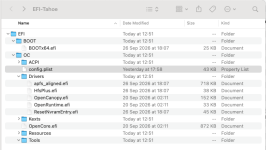
following a Quick Look through your EFI-Tahoe folder I would comment as follows:
  1. Some of the OpenCore essential files have different time stamps/Dates. This shouldn't ever be the case, the BOOTx64.efi, Drivers (except HfsPlus & apfs_aligned), Tools and OpenCore.efi should all have the same date/time stamp showing they came from the same release/debug version of OpenCore.
    1. Screenshot 2026-10-01 at 07.19.58.png Finder view of your EFI-Tahoe folder contents, with different date/time stamps
  2. You have UTBDummy.kext in your /EFI/OC/Kexts folder. This is a waste of space as it does nothing for your system. It should be removed.
  3. Your motherboard contains a USB audio device (Audio CODEC ALC4080), so you don't need AppleALC.kext. This device should work OOB with the Kexts/Dexts provided by Apple in Tahoe.
  4. USBToolBox.kext and UTBMap.kext aren't compatible with macOS Tahoe. The UTBMap.kext is missing some new name and port changes that Apple made when Tahoe was released. These kexts should be replaced with a USBPorts.kext or USBMap.kext generated for your system.
  5. You are missing the AM5 ACPI patches, which most if not all AM5 systems require in order to boot macOS. Check to see if there is a Hackintosh guide on GitHub for your Asus motherboard where these patches have already been created.
  6. You are missing the MmioWhitelist entries for your AM5 system, see this part of the OC Troubleshooting guide for details on how to obtain these entries.
    1. https://dortania.github.io/OpenCore-Install-Guide/extras/kaslr-fix.html#using-devirtualisemmio
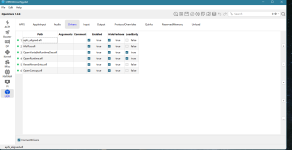
  7. The first 4 x AMD Patches are configured correctly for your 16-core CPU.
  8. You have failed to enable patch number 19, which is a prerequisite fix for all AM5 systems.
This guide by @fabiosun for a similar Asus motherboard and AMD CPU may offer some pointers for fixing the list of issues above.

 
You are missing the AM5 ACPI patches, which most if not all AM5 systems require in order to boot macOS. Check to see if there is a Hackintosh guide on GitHub for your Asus motherboard where these patches have already been created.
Failing that, you may try the semi-generic patches in this post. "am5_patches" is likely the suitable set and there's an explanation of how you can check against your DSDT.
 
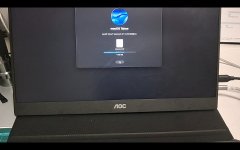
I successfully booted to macOS Recovery but it stops during installing macOS Tahoe.
 

Attachments

  • EFI.zip
    EFI.zip
    8 MB · Views: 0
  • Screenshot_20261002_074545_Gallery.jpg
    Screenshot_20261002_074545_Gallery.jpg
    302.4 KB · Views: 1
Could be an issue with the macOS Tahoe installation media you are using. Or an issue with the drive you are installing Tahoe on to. Unlikely to be an issue with the OpenCore EFI folder at that stage of the installation.

You need to run the Recovery process again, including downloading the installation files. Probably best if you erase and format the proposed macOS drive as part of the installation process, so the old corrupted files are removed before any new files are written to the drive.

Have you temporarily removed the Samsung NVMe drive while installing macOS on the SSD? If not might be worth doing so as to minimise the risk of it causing any issues during the macOS installation.
 
✖
  AdBlock Detected
Sure, ad-blocking software does a great job at blocking ads, but it also blocks some useful and important features of our website. For the best possible site experience please take a moment to disable your AdBlocker.