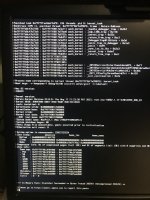
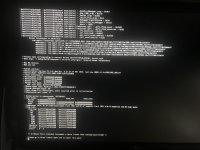
I have installed Ventura without issues on my computer.... but I try to install Sonoma for test, and get a memory panic...
I don´t know what is the problem. All the kext are updated. I try to clean install or update from ventura and it isn´t works.
I attach my EFI folder and the error screen.
Finally I get install Sonoma on my computer (on external ssd to test it) !!
I don´t use the actual Ventura´s EFI that works fine...I started again with the kext and config.plist of Dortania and Opencore 0.9.6, and Sonoma boots ok.
But now I have a problem with the BCM943602CS... as expected the wifi don´t works.
To fix this issue, I follow the guide:
Download the Opencore Legacy Patcher (last version)
Add the kext Amfipass.kext, IOSkywalk.kext, IO80211FamilyLegacy.kext y AirPortBrcmNIC.kext (plugin of IO80211FamilyLegacy.kext), set the min version to 23.0.0
Block the com.apple.iokit.IOSkywalkFamily.
SecureBootModel: "Disabled" (before "Default")
csr-active-config: "03080000" (before "00000000")
SIP disable: booting in recovery mode, write : "csrutil disable"
Reset NVRAM
but when I boot, i get a kernel panic.
If change the value of csr-active-config to 00000000, usually i can boot sonoma, but I get a error when i try to patch with OCLP: "SIP is enabled, required 0x803 or higher" and "Currently booted SIP: 0X26f"
And if i write terminal the state of SIP, i get the SIP is disable, but OCLP shows "enabled".
I don´t know what is the problem... Thanks in advance!
Removing ToggleSipEntry.efi driver won't fix this issue, as it has no bearing on the level of SIP your system uses, if you don't use it.
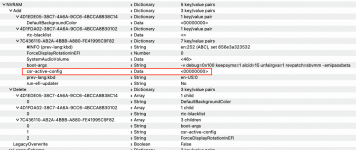
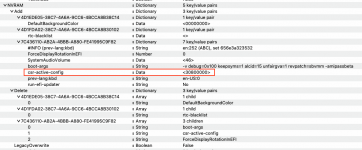
The way to fix this issue is to change the 'csr-active-config' entry in your config.plist from <00000000> to <30800000>, as shown in the two screenshots below.
Make this change in your config.plist and your system should be set with the correct SIP level for using the OCLP root patches.
Removing ToggleSipEntry.efi driver won't fix this issue, as it has no bearing on the level of SIP your system uses, if you don't use it.
The way to fix this issue is to change the 'csr-active-config' entry in your config.plist from <00000000> to <30800000>, as shown in the two screenshots below.
I just try with <03080000> and I always get a kernel panic.
The attached EFI folder is when I change this numbers to 00000000 for boot without this error.
Finally, I get to apply the patch when I delete the AMFI.kext and add in boot-args "amfi=0x80"
Now I can connect to my wifi...
One question, Can I set SIP enable again and set "csr-active-config" to <00000000> after apply the patch? or I will lost the wifi connection if I do it?
This site uses cookies to help personalise content, tailor your experience and to keep you logged in if you register.
By continuing to use this site, you are consenting to our use of cookies.
Sure, ad-blocking software does a great job at blocking ads, but it also blocks some useful and important features of our website. For the best possible site experience please take a moment to disable your AdBlocker.