

macOS under Win Hyper-V
- Thread starter Manni45-NRW
- Start date
You are using an out of date browser. It may not display this or other websites correctly.
You should upgrade or use an alternative browser.
You should upgrade or use an alternative browser.

Have you seen this AMD/Intel VMware guide? Have you read it? Have you tried following the guide?
What does your system contain, i.e. CPU, Motherboard, Memory, drives etc?

*** First of all, don't make any changes to the vmware .vmx file. It is recommended that you create a new virtual machine from scratch so that it recreates this file by default and without any changes.
*** Use VMWare Workstation Pro version at the link provided in the tutorial. (If you install it, you will have to make a new Patch as described)
*** Enable AMD-V or INTEL VT (Virtualization Technology) in BIOS. (you should research how to do this on your machine)
1) First you need to download VMWare Workstation Pro:
- VM Workstation Pro 17.6.3: (NOW...
*** Use VMWare Workstation Pro version at the link provided in the tutorial. (If you install it, you will have to make a new Patch as described)
*** Enable AMD-V or INTEL VT (Virtualization Technology) in BIOS. (you should research how to do this on your machine)
1) First you need to download VMWare Workstation Pro:
- VM Workstation Pro 17.6.3: (NOW...
- tucano2000
- Replies: 683
- Forum: Virtual Machines


What does your system contain, i.e. CPU, Motherboard, Memory, drives etc?
My Notebook is a Medion Erazer Gaming Notebook Beast X25Have you seen this AMD/Intel VMware guide? Have you read it? Have you tried following the guide?
*** First of all, don't make any changes to the vmware .vmx file. It is recommended that you create a new virtual machine from scratch so that it recreates this file by default and without any changes.
*** Use VMWare Workstation Pro version at the link provided in the tutorial. (If you install it, you will have to make a new Patch as described)
*** Enable AMD-V or INTEL VT (Virtualization Technology) in BIOS. (you should research how to do this on your machine)
1) First you need to download VMWare Workstation Pro:
- VM Workstation Pro 17.6.3: (NOW...
- tucano2000
- Replies: 683
- Forum: Virtual Machines
What does your system contain, i.e. CPU, Motherboard, Memory, drives etc?
Gerätename MM-Beast
Prozessor AMD Ryzen 9 5900HX with Radeon Graphics (3.30 GHz)
Installierter RAM 64,0 GB (63,4 GB verwendbar)
Geräte-ID 1BB7DD67-616F-423A-8392-21FFC9E00FCA
Produkt-ID 00331-20210-00000-AA305
Systemtyp 64-Bit-Betriebssystem, x64-basierter Prozessor
running following system:
Edition Windows 11 Pro Insider Preview
Version Dev
Installiert am 23.06.2025
Auswertung läuft ab am 11.08.2026 20:09
Betriebssystembuild 27881.1000
Funktionspaket Windows Feature Experience Pack 1000.26100.107.0
Last edited:
You would need to edit the VMware .vmx file to suit your needs, which obviously don’t follow the standard VMware setup in the guide.
Thanks you, Edhawk. Now I am a bit further:
SATA 0:0 is the Opencore.vmdk
SATA 0:1 is a disk with 80GB defined
SATA 0:2 is the CD with Sequoia.iso
After Power on a screen is shown with OpenCore an Install macOS.
Selecting OPENCORE nothing happens.
When I select Installation, a lot of messages are shown and thenthe question for the language. After language select a screen with topics is shown: macOS Sequoia install etc. But later the installion disk is only the OPENCORE.
Is there anthing to initialize the installation disk?
SATA 0:0 is the Opencore.vmdk
SATA 0:1 is a disk with 80GB defined
SATA 0:2 is the CD with Sequoia.iso
After Power on a screen is shown with OpenCore an Install macOS.
Selecting OPENCORE nothing happens.
When I select Installation, a lot of messages are shown and thenthe question for the language. After language select a screen with topics is shown: macOS Sequoia install etc. But later the installion disk is only the OPENCORE.
Is there anthing to initialize the installation disk?
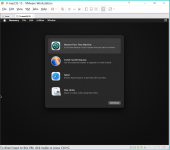

Have you created the disk in VMware, where you plan to install macOS?
As that is what you should be selecting from that second screen, the location for macOS. Not the OpenCore or the installation ISO disks.
Are you sure you have read and followed the stages in the VM guide.
As that is what you should be selecting from that second screen, the location for macOS. Not the OpenCore or the installation ISO disks.
Are you sure you have read and followed the stages in the VM guide.
Hi and good evenimg.
The installation process finished now after about 20 min. But then everything has been done backwards and the installation screen accurs once more.
The installation process finished now after about 20 min. But then everything has been done backwards and the installation screen accurs once more.
What do you mean everything is done backwards?
Which icon are you selecting from the boot screen?
Which icon are you selecting from the boot screen?