macOS Tahoe - Aorus B450 Elite Ryzen 52600

Maurisiwi

New member
AMD OS X Member
Feb 5, 2026
1
1
3
CPU:
AMD Ryzen 5 2600
Hi everyone!

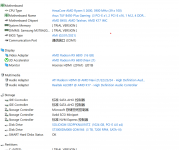
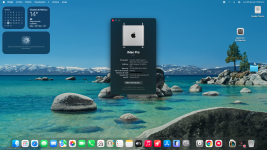
It's been a while since I've done this; the last version I installed was macOS Catalina about 5 years ago. But I've come back to try it with Tahoe, and I've had good results with this setup:

Motherboard: Aorus B450 Elite V1.x
CPU: AMD Ryzen 2600
RAM: 16GB 2666MHz
GPU: AMD RX 580 8GB
NVME: ADATA LEGEND 710 256GB
Wi-Fi: Intel Dual Band AC 7260
SMBIOS: MacPro7.1

I used OpenCore and Heliport to get the Wi-Fi working.Captura de pantalla 2026-03-23 a la(s) 9.37.46 p.m..png
 
  • Like
Reactions: Edhawk
You might want to look at adding RestrictEvents.kext and the revpatch=auto,sbvmm boot arguments.

The ‘auto’ entry will fix the Memory and PCIe slot messages that arise when using the MacPro7,1 SMBIOS on a Hack.

The ‘sbvmm’ entry helps with future over the air (OTA) updates for macOS Tahoe.

I use the kext and have both entries in my config.plist on all my AMD Hacks.
 
Could you share your EFI configuration file? I keep getting crashes after installing Tahoe because I'm not very good at configuring it. My configuration file is attached.
朋友能否分享下你的efi 配置文件,我自己装完Tahoe总是死机,我自己不太会配置这个东西,附件是我的配置
 

Attachments

  • 屏幕截图 2026-03-24 224829.png
    屏幕截图 2026-03-24 224829.png
    129.3 KB · Views: 5
I would need to see your whole EFI folder to see what needs fixing for your B450 system.

Zip a copy of your EFI folder and attach it to a post here. Then we can see about fixing any issues.

Your Hack is fairly standard for a B450 system, with nothing totally untoward in the components listed. The only component that might give you any issues is the ADATA NVMe drive as it uses the Realtek RTS5766DL controller, which from a quick read around seems to not a good choice for macOS.

AI Overview says the following about the controller.
  • Incompatible: The RTS5766DL controller is notorious for causing kernel panics during the macOS installer or failing to show up in Disk Utility.
You may have more success if you replace the ADATA drive with a Western Digital or SanDisk NVMe drive. Alternatively a macOS compatible SATA SSD might work.

The ADATA drive could then be used as a Windows or Linux boot disk.
 
  AdBlock Detected
Sure, ad-blocking software does a great job at blocking ads, but it also blocks some useful and important features of our website. For the best possible site experience please take a moment to disable your AdBlocker.