
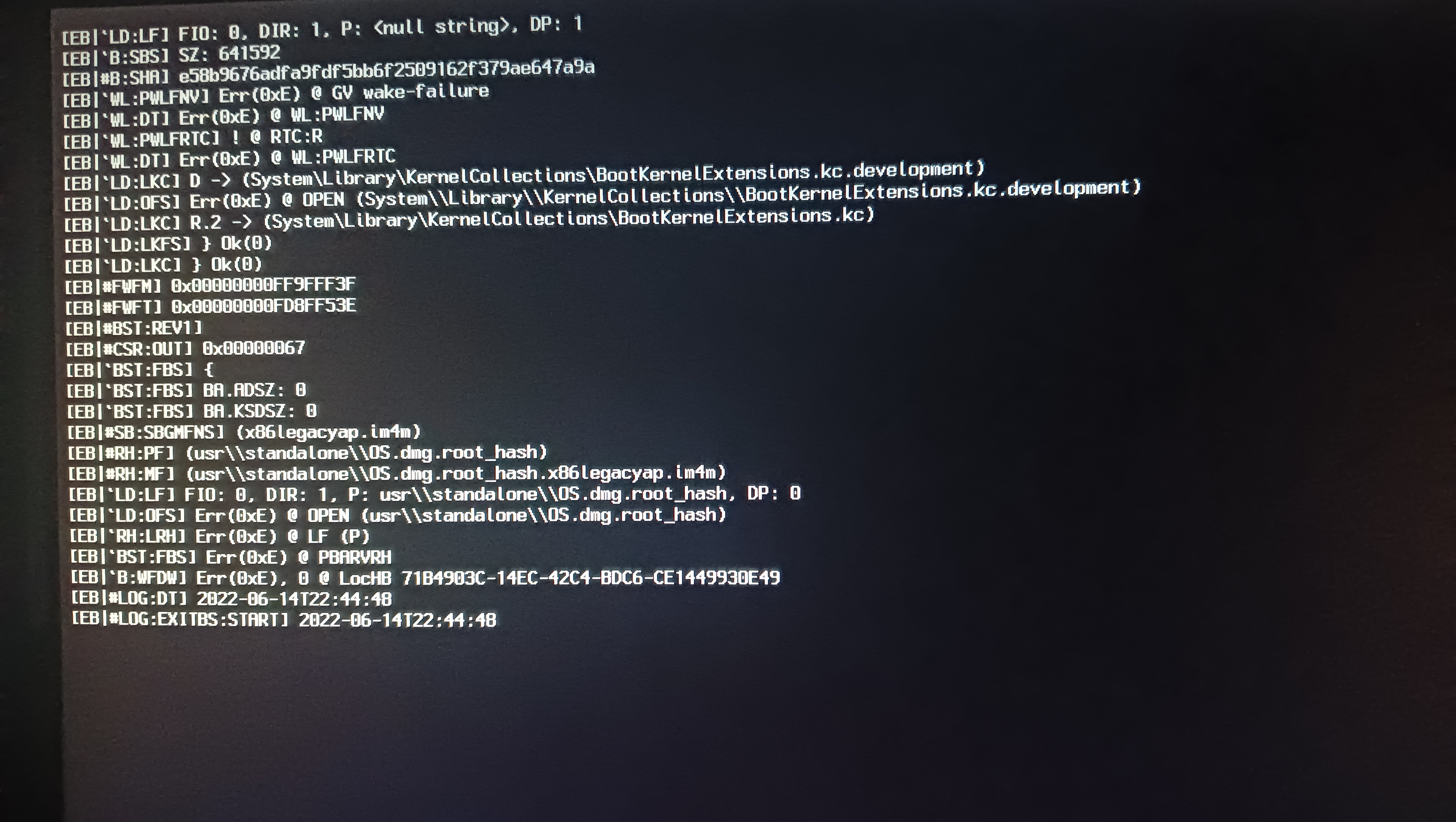
[Log:Exitibs:Start] 2022-06014t21:39:19

Haza

Member
AMD OS X Member
Jun 14, 2022
82
13
8
CPU:
Athlon 3000G
Hi!
I use an open core 0.6.1.
So when trying to install mac os, big sure stops at [Log:Exit is:Start] 2022-06014t21:39:19 and freezes, maybe someone has encountered such a problem?

I'll attach the photos
CPU: Athlon 3000g
RAM: Samsung 3x4 12 gb
Motherboard: Msi b450m pro vfh max
 
Last edited:
OpenCore 0.7.1 or newer is required. Also you won't be able to install with the integrated Vega GPU on that CPU. You'll need a dedicated GPU.
 
Hi!
I use an open core 0.6.1.
So when trying to install mac os, big sure stops at [Log:Exit is:Start] 2022-06014t21:39:19 and freezes, maybe someone has encountered such a problem?

I'll attach the photos
CPU: Athlon 3000g
RAM: Samsung 3x4 12 gb
Motherboard: Msi b450m pro vfh max

Hi Haza,

It should technically work (as we have sort of solved the AMD IGPU issue only very recently - check the 5800H threads here). I also have a build for my Atari VCS which uses a dual core AMD Ryzen APU which has successfully booted Big Sur and it has a Vega64 SSDT inside you could try. > https://www.tonymacx86.com/threads/guide-atari-vcs-2020-console.309903/
 
Hi Haza,

It should technically work (as we have sort of solved the AMD IGPU issue only very recently - check the 5800H threads here). I also have a build for my Atari VCS which uses a dual core AMD Ryzen APU which has successfully booted Big Sur and it has a Vega64 SSDT inside you could try. > https://www.tonymacx86.com/threads/guide-atari-vcs-2020-console.309903/
Thanks for the link to the article, I tried using the EFI from the article, but it still hangs on this line
 
  • Like
Reactions: Middleman
OpenCore 0.7.1 or newer is required. Also you won't be able to install with the integrated Vega GPU on that CPU. You'll need a dedicated GPU.
I put opencore 0.7.1 and also put the R7 240 card, but it still hangs on this line
 
  • Like
Reactions: Middleman
I put opencore 0.7.1 and also put the R7 240 card, but it still hangs on this line
Using my EFI you need to manually enable the SSDT-Vega64 in ACPI and change the AMD GPU device properties to your R7 240. May also need the radpg=15 in the boot-arg.
 
You can also leave the Kernel patch alone, as my Ryzen 1606G is a dual core (but using 4 core kernel setting as there is no dual core setting for AMD Vanilla patch).
 
Using my EFI you need to manually enable the SSDT-Vega64 in ACPI and change the AMD GPU device properties to your R7 240. May also need the radpg=15 in the boot-arg.
And can you throw off these files for correction, I just don't have that much knowledge of opencore)
 
  • Like
Reactions: Middleman
Using my EFI you need to manually enable the SSDT-Vega64 in ACPI and change the AMD GPU device properties to your R7 240. May also need the radpg=15 in the boot-arg.
And if you run the installation on Vega 3 ? Will I need to make changes ?
 
And can you throw off these files for correction, I just don't have that much knowledge of opencore)
I could help with this (if you aren't that experienced with OC). What is your device-id for the R7? You can find it typically under Windows Device Manager or Linux under Settings/Display/Property > Hardware IDs.
 
And if you run the installation on Vega 3 ? Will I need to make changes ?
Not possible. It's a different set of ids. On AMD setups you must account for the correct installed card.
 
I could help with this (if you aren't that experienced with OC). What is your device-id for the R7? You can find it typically under Windows Device Manager or Linux under Settings/Display/Property > Hardware IDs.
Thanks here is the id PCI \VEN_1002&DEV_6610&SUBSYS_04621043&REV_00
 
Thanks here is the id PCI \VEN_1002&DEV_6610&SUBSYS_04621043&REV_00

Alright @Haza

I have created an EFI for your chipset - hopefully it should work for Big Sur.
We don't need to enable the Vega64 SSDT as I am using a new alternative setting
and the card is set to your Vega 64 so it should work.
 

Attachments

Alright @Haza

I have created an EFI for your chipset - hopefully it should work for Big Sur.
We don't need to enable the Vega64 SSDT as I am using a new alternative setting
and the card is set to your Vega 64 so it should work.
Thanks he stopped hanging on this line, but he now stops at memory panic.
Here's a picture
What could be the problem ?

 
Last edited:
Alright @Haza

I have created an EFI for your chipset - hopefully it should work for Big Sur.
We don't need to enable the Vega64 SSDT as I am using a new alternative setting
and the card is set to your Vega 64 so it should work.

What could be the problem with memory panic ?
 
Alright @Haza, I've checked the file made some more changes.
See if this works. >
 

Attachments

  AdBlock Detected
Sure, ad-blocking software does a great job at blocking ads, but it also blocks some useful and important features of our website. For the best possible site experience please take a moment to disable your AdBlocker.